CodePeople2

Forum Replies Created
-
Forum: Plugins
In reply to: [Calculated Fields Form] Serp URL FormHello @pexel
What is the version number of your plugin copy?
The extra URL parameters were removed from the form URLs months ago.
Best regards.
Forum: Plugins
In reply to: [Calculated Fields Form] Remove padding around formHello @saralanda
Thank you very much for providing the link. The margin is applied by the style definition:
.form-item, form {
    margin-bottom: 2rem;
}
Located in the https://tulumcharters.com/wp-content/themes/mesmerize-pro/style.min.css file belonging to the theme active on your website.
If you want the styles in the theme not to affect the forms created with our plugin, instead of editing each form separately, you can enter the style definition below through the “Appearance > Customize > Additional CSS” WordPress menu option:
form.cff-form{margin:0;}Best regards.
Hello @jazura
The plugin supports the
col-sm-4class name too, but they are applied to wider screens than mobiles.Best regards.
Hello @jazura
I’m sorry, it is difficult to answer your question without checking the structure of your form. If you want to preserve the columns’ structure, even on mobiles, you can configure your form as follows:
To create a layout with columns, even on mobiles, follow these steps:
- Insert the Parent DIV Field:
Begin by adding aDIVfield that will act as the container for the columns. - Insert Three Nested DIV Fields:
Inside the parentDIV, insert three additionalDIVfields, one for each column. - Assign the CSS Class:
For each of the three nestedDIVfields (corresponding to the columns), add thecol-xs-4class to the “Add CSS Layout Keywords” attribute. This ensures that each column occupies an equal portion of the layout. - Include the Definitive Fields:
Finally, place the desired content or fields inside the correspondingDIVfor each column.
Best regards.
Forum: Plugins
In reply to: [Calculated Fields Form] Remove padding around formHello @saralanda
Have you been able to pinpoint the specific style definition responsible for applying the padding to the form? If so, could you kindly share the link to the page where the form is located? This will allow me to review the loaded styles and investigate further.
Best regards.
Forum: Plugins
In reply to: [Calculated Fields Form] highlight highest/lowest values with color(s)Hello @jesus-1
Yes, of course. But I will need more details about your specific case.
I’ll try to describe the process with a hypothetical example.
Assuming you have a field that makes a calculation, the calculation you prefer. Continuing with a similar example fieldname1+fieldname2+fieldname3 and you want to decide the colors with the following rules, if the three fields’ values are less than 10, assign the red color, if at least one field is over 10, assign the color orange, if two of three have values over 10, assign the yellow color, and finally, if the three fields values are over 10, assign the green color. It is a hypothetical example, but you can apply this logic to any other equation.
In this case, the equation would be similar to:
(function(){
let result = fieldname1+fieldname2+fieldname3,
color = 'red',
n = 0;

if(10<fieldname1) n = n+1;
if(10<fieldname2) n = n+1;
if(10<fieldname3) n = n+1;

if(n == 1) color = 'orange';
else if(n == 2) color = 'yellow';
else if(n == 3) color = 'green';

getField(fieldname3|n).jQueryRef().find('input').css('color', color);

return result;
})()
Now the same code, but optimized:
(function(){
let colors = ['red', 'orange', 'yellow', 'green'],
values = [fieldname1,fieldname2,fieldname3],
n = values.filter(element => element > 10).length;

getField(fieldname3|n).jQueryRef().find('input').css('color', colors[n]);

return SUM(values);
})()
Best regards.
Forum: Plugins
In reply to: [Calculated Fields Form] highlight highest/lowest values with color(s)Hello @jesus-1
Yes, you can include conditional statements in the equation and apply different colors based on the result:
(function(){
var result = fieldname1+fieldname2,
    color;

if ( result < 5) color = 'red';
else if ( result < 10 ) color = 'orange';
else if ( result < 20 ) color = 'yellow';
else if ( result < 30 ) color = 'blue';
else color = 'green';

getField(fieldname3|n).jQueryRef().find('input').css('color', color);

return result;
})()
Best regards.
Forum: Plugins
In reply to: [Calculated Fields Form] calculation based on dateHello @kjou06
You are describing a different situation. The code I recommended previously is based on your initial question, where is feasible to compare them alphabetically. But if you change the date format, you cannot compare them as texts and must convert them into date objects. In this case, the equation would be:
(function(){
let d = DATEOBJ(fieldname123, 'dd/mm/yyyy');
if (d<=DATEOBJ('30/04/2025', 'dd/mm/yyyy')) return 200;
if (d<=DATEOBJ('30/06/2025', 'dd/mm/yyyy')) return 140;
return 110;
})()
Best regards.
Forum: Plugins
In reply to: [Calculated Fields Form] Remove padding around formHello @saralanda
Please provide the link to the page that contains the form. The form does not include padding itself, so, I assume these styles are inherited from the theme active on your website.
Best regards.
Forum: Plugins
In reply to: [Calculated Fields Form] calculation based on dateHello @kjou06
I’m sorry, but what you say is incorrect. The use of return instruction stops the evaluation of the equation returning a result, the other lines in the equation are not evaluated.
If the following condition is satisfied
if (d<='2025/04/30') return 200;The equation returns 200 and the second condition is never reached.
Have you tested the equation?
Best regards.
Forum: Plugins
In reply to: [Calculated Fields Form] calculation based on dateHello @kjou06
Thank you very much for using our plugin. Assuming the date field is the fieldname123, you can insert a calculated field in the form and enter the equation:
(function(){
let d = CDATE(fieldname123, 'yyyy/mm/dd');
if (d<='2025/04/30') return 200;
if (d<='2025/06/30') return 140;
return 110;
})()
You need only to replace fieldname123 in the previous equation with the name of the date field in your form.
Best regards.
Forum: Plugins
In reply to: [Calculated Fields Form] how to configure costumer email when submitHello @rforcadell
Thank you very much for providing the version number of your plugin copy.
You have installed the free plugin distribution. It allows you to configure the notification email to receive the information collected by the form via email to the email address you enter in the “Destination” attribute:
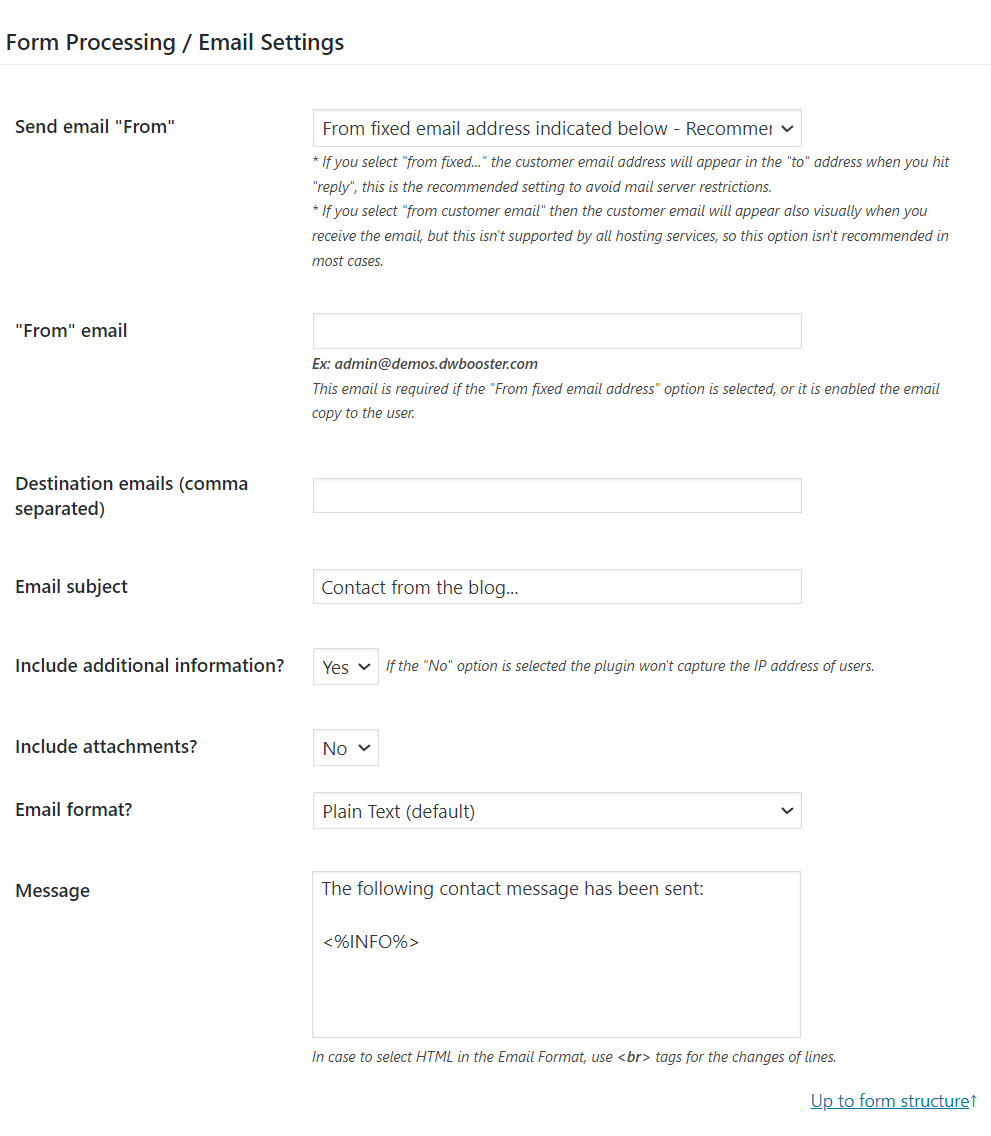
However, the free plugin distribution does not include the “Copy email to user” section. It allows you to configure the confirmation emails the plugin sends to the users after submitting the form, to the email address entered by the users:
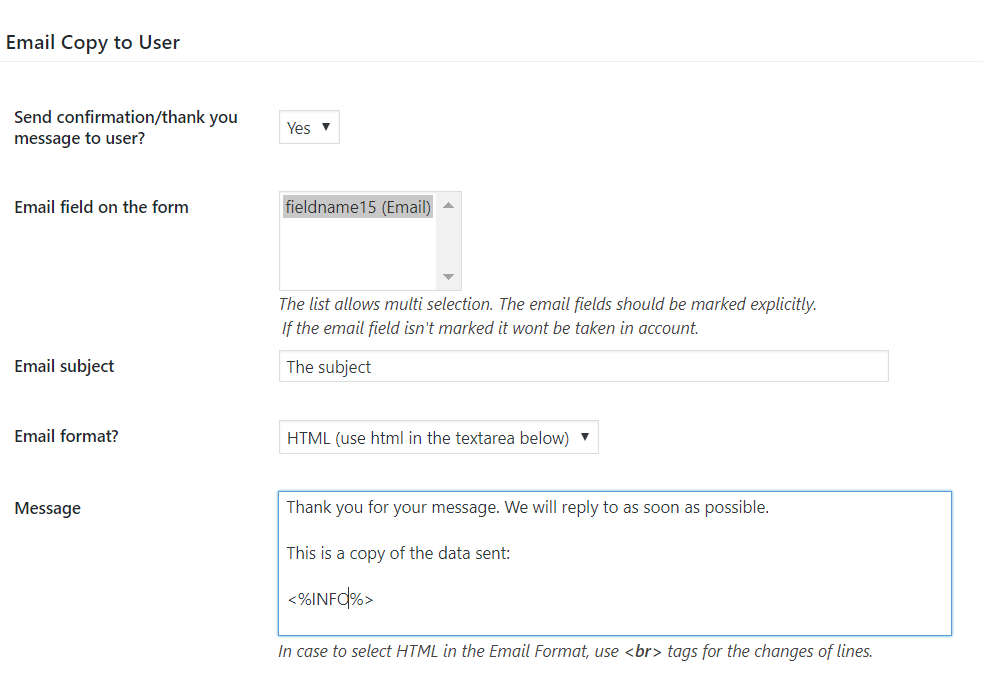
To send the confirmation email to the users you will need to upgrade your plugin copy to the Professional version.
Best regards.
Forum: Plugins
In reply to: [Calculated Fields Form] how to configure costumer email when submitHello @rforcadell
Thank you so much for using our plugin. If you want to send the information collected by the form to the email address entered by the user through the form, you need the Professional plugin distribution. The free one allows you to receive the information submitted by the form in your own email address but not send it to the user.
Could you please indicate the version number of your plugin copy?
Best regards.
Forum: Plugins
In reply to: [Calculated Fields Form] Form Size on public websiteHello @breakingnewground123
Are you referring to the form in the “Original Creepers – Round Toe” accordion option?
The form will take the area of its container. If you inert the form shortcode into a div with 400px width, the form width will be 400px too (this applies for other container sizes).
However, if you want to apply a max-width to the form directly. You can enter it the “Form Settings > Advanced Settings” tab:
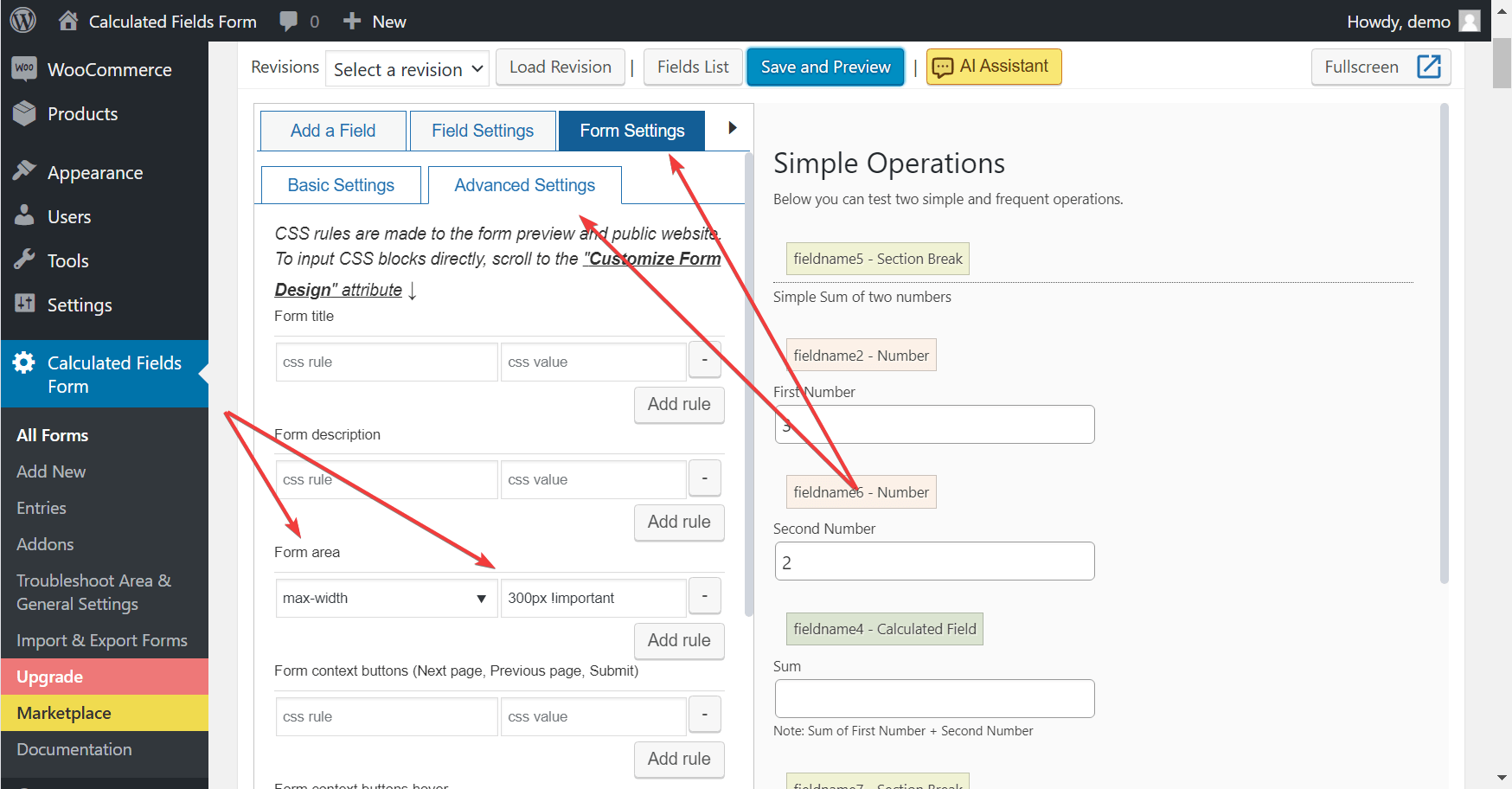
Best regards.
Hello @saralanda
Thank you so much for using our plugin. I’ll try to describe the process with a hypothetical example. If the URL parameters are param1 and param2, and the fields to pre-fill in the form are fieldname1 and fieldname2, respectively.
Insert an “HTML Content” field in the form, tick the “Accept advanced code in content as JavaScript code” checkbox in its settings, and enter the following piece of code as its content:
<script>
fbuilderjQuery(document).on('formReady', function(){
getField('fieldname1').setVal(getURLParameter('param1', ''));
getField('fieldname2').setVal(getURLParameter('param2', ''));
});
</script>
Best regards.
- Insert the Parent DIV Field: