CodePeople2

Forum Replies Created
-
Forum: Plugins
In reply to: [Calculated Fields Form] Hide Input FieldHello @breakingnewground123
I need to check the form in action to ensure you have assigned the hide-strong class name to the correct field and attribute. So, I need only the link to the public form and that you indicate the field’s name (fieldname#)
Best regards.
Forum: Plugins
In reply to: [Calculated Fields Form] Hide Input FieldHello @breakingnewground123
Could you please indicate the exact URL that contains the form?
Best regards.
Forum: Plugins
In reply to: [Calculated Fields Form] Hide Input FieldHello @breakingnewground123
Thank you so much for using our plugin.
If you have a field with a static value, but this field must always be hidden, you can use a “Hidden” control directly (It is a control in the sidebar). If it is a calculated field, but you can make it always invisible, you can tick the “Hide field from public page” checkbox in calculated field settings. If are referring to any other control and you want to hide it from the public form, there are two alternatives, you can enter the
hide-strongpredefined class name through its “Add CSS Layout Keywords” attribute, or enter a pair display none CSS rule through its “Advanced Settings” tab.However, if the field is not a “Hidden” control or “Calculated Field” control with the checkbox attribute ticked (in both cases the plugin uses input tags with
type="hidden") and you want to show/hide it dynamically from a calculated field’s equation you can use the SHOWFIELD and HIDEFIELD operations.For example, assuming you have the equation fieldname1+fieldname2, and you want to show the fieldname3 if the sum is greater than 10 and hide it otherwise. You can edit the equation as follows:
(function(){
let result = fieldname1+fieldname2;
if(10 < result) SHOWFIELD(fieldname3|n);
else HIDEFIELD(fieldname3|n);
return result;
})()
Note I included the |n modifier to the fieldname3 field. The plugin replaces the fields’ names with their corresponding values before evaluating the equations. The |n modifier tells the plugin you are referring directly to the field’s name instead of its value.
Finally, an important note. I used the SHOWFIELD and HIDEFIELD operations in the equation. They only show and hide the field but do not modify the field’s value or its inclusion in the form submissions. There is another pair of operations ACTIVATEFIELD and IGNOREFIELD that show and hide the fields, respectively, but additionally, they enable or disable the field. A disabled field is excluded from the form submissions, and their values are managed as zero by the equations.
Learn more about these operations in the “Managing Fields Operations” module by visiting the following link to the plugin documentation:
https://cff.dwbooster.com/documentation#managing-fields-module
Best regards.
Forum: Plugins
In reply to: [Calculated Fields Form] Ip LocationHello @mrpetreli
The IP location is determined on the server side. If you want to populate a field in the form with the visitor IP, you have two alternatives: you can implement a server-side equation that returns the public user IP address (https://cff.dwbooster.com/blog/2018/10/01/server-side-equations) or call a third-party service (https://cff.dwbooster.com/blog/2019/05/17/third-party-connection-module).
What version of the plugin are you using?
Best regards.
Forum: Plugins
In reply to: [Calculated Fields Form] WP rocket compatabilityHello @rosco12345
Thank you so much for using our plugin.
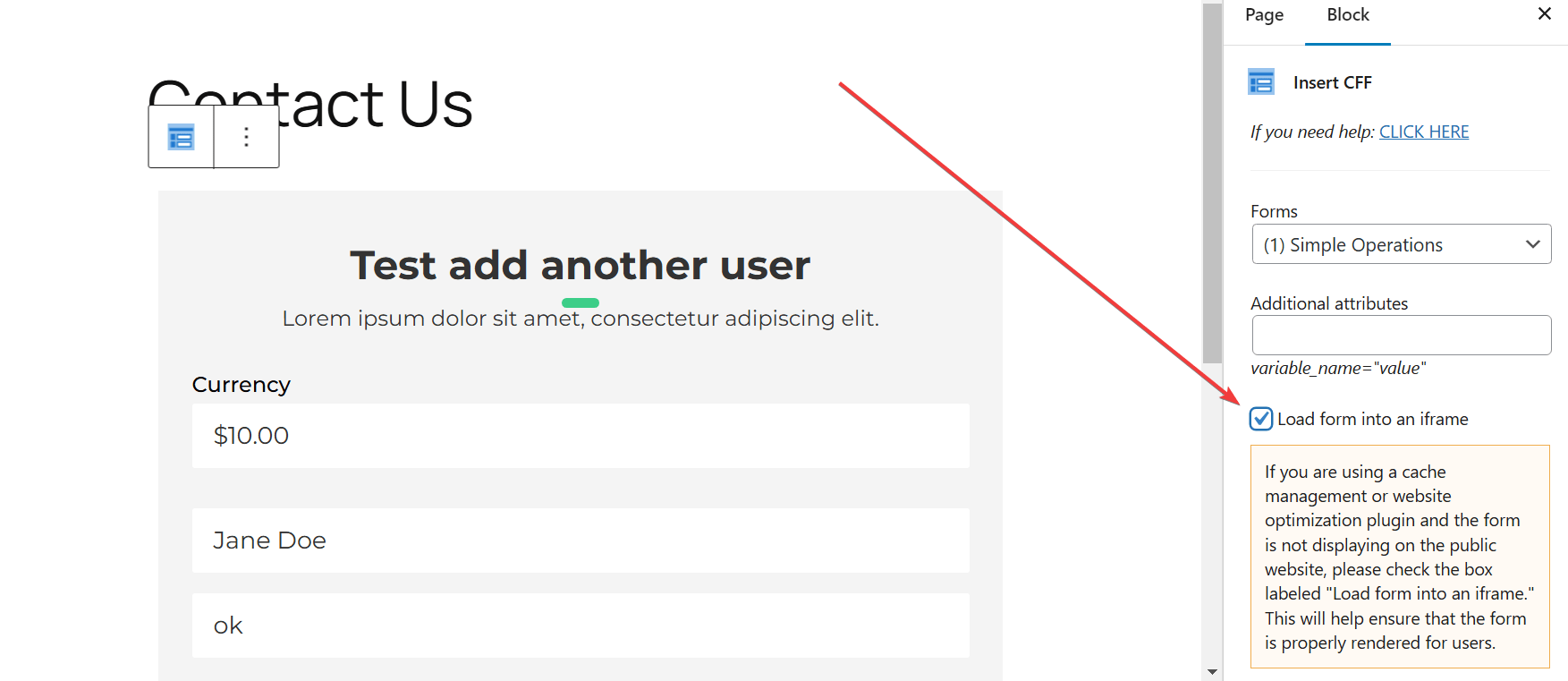
The simplest solution does not require editing the WP Rocket settings. Insert the form shortcode with the iframe attribute set at 1.
Please edit the form shortcode as follows:
[CP_CALCULATED_FIELDS id="13" iframe="1"]If you have inserted the shortcode with the WordPress editor module, you activate the iframe by ticking a checkbox in its settings:
Best regards.
Forum: Plugins
In reply to: [Loading Page with Loading Screen] Target specific custom post typesHello @lauren1234567
Thank you so much for using our plugin. If your website domain is for example
https://www.yourwebsite.comyou should enter the URL with wildcards through the “Display the loading screen only on pages with the URLs (If this field is left empty, the loading screen will be displayed on all pages.)” attribute in the plugin settings page.E.g.
https://www.yourwebsite.com/category/*Best regards.
Forum: Plugins
In reply to: [Calculated Fields Form] Token expirationHello @gwathiell
Thank you very much for using our plugin. The issue described is not exactly related to the “Calculated Fields Form” plugin but the commercial complementary plugin “Spreadsheet for Calculated Fields Form”.
However, the possible reasons stated into the Google documentation ( https://developers.google.com/identity/protocols/oauth2#expiration ) are:
1) The user has revoked your app’s access.
2) The refresh token has not been used for six months.
3) The user changed passwords and the refresh token contains Gmail scopes.
4) The user account has exceeded a maximum number of granted (live) refresh tokens.
5) The user belongs to a Google Cloud Platform organization that has session control policies in effect.
… and it has the following note: A Google Cloud Platform project with an OAuth consent screen configured for an external user type and a publishing status of “Testing” is issued a refresh token expiring in 7 days.
From the above points:
You can discard the #1 (explicit revocation by the user) and the #3 (user changed password) since the user account is yours.
We can discard the #2 (six months expiration) since it expires in less time.
We can discard the #4, unless you have a lot of applications connected to that account.
The #5, about the “Google Cloud Platform project” and the note about the expiration every 7 days seems to be the cause.
Please confirm if the #5 is the case and then consider requesting the approval of the application to remove its testing status (it may be a slow approval process by Google) or consider other account to setup the application.
You can read more about the Google application “publishing status” at the following page:
https://support.google.com/cloud/answer/10311615#publishing-status
Thanks.
Forum: Plugins
In reply to: [Calculated Fields Form] Convert text in uppercaseHello @topsurfer
You are describing a different use case. It is not a “Single Line Text”, you are describing an equation, and in this case, if you want to return the result as an uppercase text, you can simply make it uppercase:
String(IF(fieldname3 != '',IF(fieldname2 != '', tobase(fieldname4,10,16), '! Wert BUS-ID fehlt !'), '! Wert Basis-ID fehlt !')).toUpperCase();Or, if you want to make uppercase only the hexadecimal result:
IF(fieldname3 != '',IF(fieldname2 != '', String(tobase(fieldname4,10,16)).toUpperCase(), '! Wert BUS-ID fehlt !'), '! Wert Basis-ID fehlt !');Best regards.
Forum: Plugins
In reply to: [Calculated Fields Form] Convert text in uppercaseHello @topsurfer
Thank you so much for using our plugin. If you want to do it only visible, you can enter the following style definition pair through the “Input Tag” section in the “Advanced Settings” tab of the field’s settings:
text-transformuppercaseIf you want to make the value uppercase, not only display it as uppercase, you can follow the steps below:
Assuming the Single Line Text field is the fieldname123 (replace it with the name of the field in your form).
Insert an “HTML Content” field in the form.
Tick the “Accept advanced code in content as JavaScript code” checkbox in its settings.
Enter the following piece of code as its content:
<script>
fbuilderjQuery(document).on('change', '[id*="fieldname123_"]', function(){
this.value = String(this.value).toUpperCase();
});
</script>
Best regards.
Forum: Plugins
In reply to: [Calculated Fields Form] Calculated Dates – Leap YearHello @philbarr2001
The issue should be related to the time-zone. Please use the specific date/time operations in the DATE/TIME Operations module:
https://cff.dwbooster.com/documentation#datetime-module
E.g.
GETDATETIMESTRING(DATETIMESUM(fieldname3, 'mm/dd/yyyy', -60, 'd'), 'mm/dd/yyyy')Best regards.
Forum: Plugins
In reply to: [Calculated Fields Form] Calculated Dates – Leap YearHello @philbarr2001
Thank you so much for using our plugin. I’ve just tested the form and it returns January 14. Please watch the video by visiting the following link:
https://resources.developers4web.com/cff/tmp/2025/01/11/video-date.mp4
Best regards.
Hello @joa888a
Thank you very much for using our plugin. Yes, that’s possible. You need only to include a conditional statement in the equation to evaluate the main code only if the conditions are satisfied. For example, assuming you have the equation: fieldname1+fieldname2+fieldname3, and you want to evaluate the equation only if the user populated the three fields. In this case, you can modify the equation as follows:
(function(){
if(AND(fieldname1,fieldname2,fieldname3)) return fieldname1+fieldname2+fieldname3;

return '';
})()
If the values of the fieldname1, fieldname2, and fieldname3 fields can be the number zero, you can compare the fields’ raw values with the empty string as follows:
(function(){
if(AND(fieldname1|r != '',fieldname2|r != '',fieldname3|r != '')) return fieldname1+fieldname2+fieldname3;

return '';
})()
The plugin preprocesses the fields’ values to use them in mathematical operations, the |r modifier allows you to access the fields’ raw values.
Best regards.
Forum: Plugins
In reply to: [Calculated Fields Form] clear checkboxesHello @ohtusabes
I see you are managing the form submission yourself using the
cff-form-submittedevent. I recommend calling theRESETFORM();operation as part of its code.Best regards.
Forum: Plugins
In reply to: [Calculated Fields Form] Siteler arası kısa kod geçişiHello @metesey
No, I’m sorry, that’s not possible. The alternatives are:
1) Insert an iframe in the second website to load the form from the main website:
<iframe id="cff-iframe-1" src="https://www.yourmainwebsite.com/?cff-form=8" style="border: none; width: 100%; overflow-y: hidden; height: 782px; min-height: auto;" scrolling="no"></iframe>2) Or you can install the plugin on both websites, export the form from the main website and import it in the second one ( https://cff.dwbooster.com/documentation#import-export-form ), and finally, use the form in the second website as usual.
Best regards.
Forum: Plugins
In reply to: [Calculated Fields Form] Hangi ücretli sürüme geçmeliyim? nasıl?Hi! We’d like to help but we can’t reply about that in this forum. We are not allowed to support any customers in these forums.
For pro or commercial product support please contact us directly on our site. This includes any pre-sales topics as well.
Commercial products are not supported in these forums. We will happily answer this and any other questions you can have on our own site.
Thank you.