CodePeople2

Forum Replies Created
-
Forum: Plugins
In reply to: [Calculated Fields Form] Changing value in field settings is no effectHello @hyzwar
Thank you so much for using our plugin. Could you please provide the link to the page containing the form so we can check the behavior described?
Based on your comments, it seems you have configured browser persistence in the “Form Settings” tab. If that is the case, the plugin will use the information stored in the browser by default.
Best regards.
Forum: Reviews
In reply to: [Calculated Fields Form] Works greatHello @norrisengineering
Thank you very much for your review. We are continuously working on new tools to make form creation simpler and more intuitive.
Best regards.
Hello @joesurf
Thank you very much for using our plugin. I visited your website and tested the purchase process, and it is working fine. Please watch the following video:
https://wordpress.dwbooster.com/videos/music-store/tmp/2026/02/18/video.mp4
Best regards.
Forum: Plugins
In reply to: [Music Player for WooCommerce] Play buttons not working on first clickHello @ollyw
I see your website is returning incorrect headers during redirection. Could you please try ticking the checkbox ‘Load demo files with PHP code instead of redirecting browsers to them’ in the plugin settings page?

Best regards.
Forum: Plugins
In reply to: [Music Player for WooCommerce] Play buttons not working on first clickHello @ollyw
Could you please confirm how you have configured the Preload option in your players?
If your store includes many products with players and your server has limited resources, this configuration may cause performance issues. When preload is enabled, the plugin attempts to generate all demo files at once, which can overload server-side resources and lead to errors.
In this case, we recommend setting the Preload option to none to prevent these issues.
Please let us know if you need any assistance updating this setting.
Best regards.
Forum: Plugins
In reply to: [Music Player for WooCommerce] Play buttons not working on first clickHello @ollyw
I have responded to your question from the plugin website.
When the plugin is deactivated/activated, it automatically removes any generated demo files to prevent unnecessary or unused files from remaining on your website. The next time the user clicks the “Play” button, the plugin generates new demo files.
However, since you are using the LiteSpeed Cache plugin, the response is served from the cache instead of requesting the demo file from our plugin. As a result, the player receives a URL that points to a file that no longer exists.
Thanks.
Forum: Plugins
In reply to: [Calculated Fields Form] ‘remember’ values entered into formHello @irvingbos
Thank you so much for using our plugin. Yes, that’s possible. You have multiple alternatives. For example, you can tick the “Enable browser persistence” box in the form settings tab to persist the form data directly in the browser:
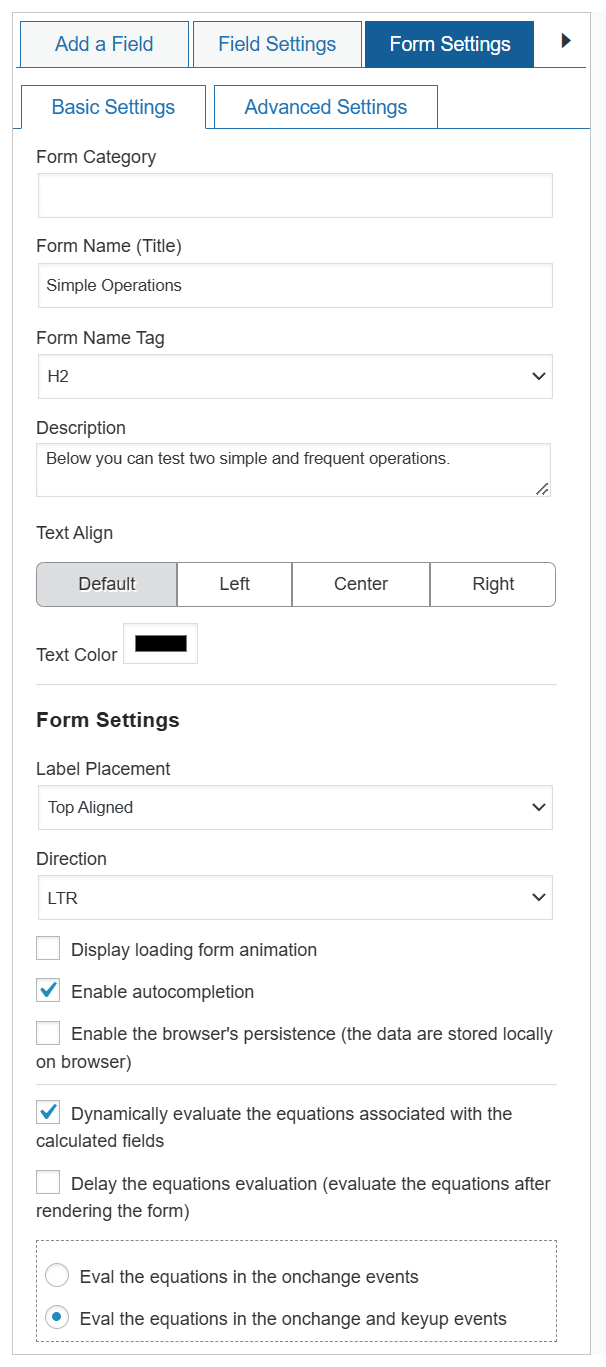
However, once the form is submitted, the plugin destroys the persisted data. Also, you cannot access the data entered by the user because it is persisted in the client-side (the user’s browser).
Another option is to install the complementary “Draft for Calculated Fields Form” plugin (https://cff-bundles.dwbooster.com/product/draft). This plugin stores form data on the server side and can be configured to retain that data even after the form is submitted. In addition, it allows you to access saved drafts at any time, including the ability to review and edit the stored information.
Best regards.
Forum: Plugins
In reply to: [Music Player for WooCommerce] Divi 5 CompatibilityHello @bjarkej
For inquiries regarding the commercial plugin distribution, please reach out to us via the plugin website:
https://wcmp.dwbooster.com/contact-us
Best regards.
Forum: Plugins
In reply to: [Music Player for WooCommerce] Divi 5 CompatibilityHello @bjarkej
Thank you so much for using our plugin! We’re excited to announce a new plugin update that adds a Divi 5 module, making it easier than ever to insert playlists into your pages with a cleaner, enhanced interface.
Best regards.
Forum: Plugins
In reply to: [Calculated Fields Form] Debounce Server Side FunctionsHello @mulmer
If you require controlling when a specific equation is evaluated, you have multiple alternatives.
I’ll try to describe the process with a hypothetical example:
Assuming you have two slider fields in the form: fieldname1 and fieldname2, and you implemented the server side equation “sum_fields”. Also, you inserted the calculated fieldname3 whose equation is:
SERVER_SIDE('sum_fields', fieldname1, fieldname2);However, you don’t want to call the server side equation immediately. You want to call it one second after the user stops sliding the slider field.
First option:
You can use the “cffProxy” operation in the equation by editing it as follows:
(function(){
    function delayEquation(f1, f2, callback) {
        if ( 'flag' in window ) clearTimeout(flag);
        flag = setTimeout(function(){
            let result = SERVER_SIDE('sum_fields', f1, f2);
            callback(result);},
            1000
        );

    };
    return cffProxy(delayEquation, fieldname1, fieldname1);
})()
Learn more about the cffProxy operation by reading the following blog post:
https://cff.dwbooster.com/blog/2019/05/17/third-party-connection-moduleThe second option is to stop the dynamic evaluation of the equation, and evaluate it manually from an “HTML Content” field:
- Select the calculated field “fieldname3” and tick the box attribute “Do not evaluate dynamically” in its settings. Now, this specific equation won’t be evaluated dynamically.
- Insert an “HTML Content” field in the form, tick the box in its settings to support scripts, and finally enter the following script code in its content.
<script>
fbuilderjQuery(document).on('formReady', function(){
  let field1 = getField('fieldname1');
  let field2 = getField('fieldname2');
  fbuilderjQuery(document).on('change', '[name="'+field1.name+'"],[name="'+field2.name+'"]', function(){
    if('flag' in window) clearTimeout(flag);
    flag = setTimeout(function(){EVALEQUATION('fieldname3')}, 1000);
  });
});
</script>
Best regards.
Forum: Reviews
In reply to: [Calculated Fields Form] Great toolForum: Plugins
In reply to: [Music Player for WooCommerce] Divi 5 CompatibilityHello @bjarkej
Thank you so much for using our plugin.
We are implementing a specific module for Divi5 because the architecture has changed a lot from Divi4 to Divi5. However, our plugin uses the Divi module only to insert the playlist shortcode. But the integration of the players and products do not depend on modules.
Note that you can use the “Code Module” distributed with Divi5 to insert shortcodes directly. For example, if you want to insert the playlist with all product players, you can simply to insert the Divi5 Code Module, and enter the shortcode:
[wcmp-playlist products_ids="*"]All shortcode parameters are described in the following section of the plugin documentation:
https://wcmp.dwbooster.com/documentation#playlist-shortcode
Best regards.
Hello @marcobartholomew
Thank you very much for your review. We sincerely appreciate it.
Best regards.
Forum: Reviews
In reply to: [Calculated Fields Form] PERFECTForum: Reviews
In reply to: [Calculated Fields Form] Best support, awesome Tool!Hello @brandtmax
Yes, of course, you can access directly to the labels and values, by using the appropriate tags:
<%fieldname5_label%>
<%fieldname5_shortlabel%>
<%fieldname5_value%>
<%fieldname5 separator={{: }}%>
The fields and informative tags are described in the following section of the plugin documentation:
https://cff.dwbooster.com/documentation#special-tags
Best regards.