CodePeople2

Forum Replies Created
-
Forum: Reviews
In reply to: [Calculated Fields Form] Best support, awesome Tool!Hello @brandtmax
Yes, of course, you can access directly to the labels and values, by using the appropriate tags:
<%fieldname5_label%>
<%fieldname5_shortlabel%>
<%fieldname5_value%>
<%fieldname5 separator={{: }}%>
The fields and informative tags are described in the following section of the plugin documentation:
https://cff.dwbooster.com/documentation#special-tags
Best regards.
Forum: Reviews
In reply to: [Calculated Fields Form] Best support, awesome Tool!Hello @brandtmax
The Print button simply instructs the browser to print the form as a PDF. It does not generate a PDF file on the server or send it anywhere—it’s only a print action.
If you want to generate an actual PDF file and attach it to notification emails, you will need to use the PDF Generator add-on. This add-on creates the PDF on the server using the data submitted through the form.
Since you have full control over the PDF structure, you will need to enter the HTML, form fields, and any informative tags yourself.
If you require a custom coding service to create the PDF structure, please don’t hesitate to contact us through the plugin website: Contact Us.
Best regards.
Forum: Reviews
In reply to: [Calculated Fields Form] Best support, awesome Tool!Hello @brandtmax
Yes, that’s possible. Please watch the following video tutorial:
https://youtu.be/TXLMB3_w-Xg?list=PLY-AOoHciOKgZQsqWfkQlHJ21sm3qPF9X
You can generate the PDF by using basic HTML tags and the fields and informative tags supported by the notification emails.
Best regards.
Forum: Reviews
In reply to: [Calculated Fields Form] Best support, awesome Tool!Forum: Plugins
In reply to: [Calculated Fields Form] Calendar widthHello @brandtmax,
Thanks a lot! The plugin review is more than enough.
Appreciate it.Forum: Plugins
In reply to: [Calculated Fields Form] Calendar widthHello @brandtmax
Yes, with CSS you can do everything:
#fbuilder .ui-datepicker-inline{background: rgba(255, 255, 255, .2);}Best regards.
Forum: Plugins
In reply to: [Calculated Fields Form] Calendar widthHello @brandtmax
To center them, you simply should enter:
#fbuilder .timeslots-component {text-align:center;}Best regards.
Forum: Plugins
In reply to: [Calculated Fields Form] Calendar widthHello @brandtmax
A mode to increase the table width and height (based on the context, like screen width) is to enter the style definition below through the “Customize Form Design” attribute in the “Form Settings > Advanced Settings” tab:
#fbuilder .datepicker-container,
#fbuilder .ui-datepicker-inline,
#fbuilder .ui-datepicker-inline .ui-datepicker-header,
#fbuilder .ui-datepicker-inline .ui-datepicker-calendar {width:100%; max-width:100%;}
#fbuilder .ui-datepicker-inline td *{text-align:center;}

@media (min-width:710px){
#fbuilder .ui-datepicker-inline td a,
#fbuilder .ui-datepicker-inline td span {padding:1em;display:block;}
#fbuilder .ui-datepicker-inline {font-size: 1.5em;}
}
By the way, if you don’t want to display the text page X from Y, I recommend hiding the legend as well. You can even hide the page’s border. Please watch the video:
https://resources.developers4web.com/cff/tmp/2026/01/16/video_o.mp4
Best regards.
Forum: Plugins
In reply to: [Calculated Fields Form] Calendar widthHello @brandtmax
If you have been satisfied with both the plugin and our support, we would be immensely grateful if you could leave us a review on the plugin ( https://ww.wp.xz.cn/support/plugin/calculated-fields-form/reviews/ ). Your feedback will help us reach more users.
Best regards.
Forum: Plugins
In reply to: [Calculated Fields Form] Calendar widthHello @brandtmax
Yes, of course, that’s possible. All pages have assigned the “pbreak” class name. Also, each page has assigned a unique class name: “pb0”, “pb1”, “pb2”, and so on.
So, if you want to assign a background image to the page fieldset, you can use:
#fbuilder .pbreak>fieldset{
background:url(https://www.yourwebsite.com/your-image-path/image.png);
background-size:cover;
}
Or, if you want to assign a different image to each page:
#fbuilder .pb0>fieldset{
background:url(https://www.yourwebsite.com/your-image-path/image1.png);
background-size:cover;
}

#fbuilder .pb1>fieldset{
background:url(https://www.yourwebsite.com/your-image-path/image2.png);
background-size:cover;
}

#fbuilder .pb3>fieldset{
background:url(https://www.yourwebsite.com/your-image-path/image3.png);
background-size:cover;
}
Please watch the following video:
https://resources.developers4web.com/cff/tmp/2026/01/15/video-background_o.mp4
Best regards.
Forum: Plugins
In reply to: [Calculated Fields Form] Calendar widthHello @brandtmax
I’m sorry, but I don’t fully understand what you mean by “step into the next fieldset when I click on the first fieldset.”
If you want to control navigation to the next page using your own buttons, you can simply insert a Button field and use the GOTOPAGE operation.
Please watch the following video for guidance:https://resources.developers4web.com/cff/tmp/2026/01/15/video-next-page-button_o.mp4
In the video I inserted a button and entered the GOTOPAGE(1) operation as its onclick event. In the video, I inserted a button and added the GOTOPAGE(1) operation to its onclick event.
Note that I used 1 as the GOTOPAGE parameter because page indexes start at zero, so the second page has an index of 1.
Finally, I aligned the button to the right using its Advanced Settings.Finally, to hide the default next page buttons, I entered the style definition below through the “Customize Form Design” attribute in the “Form Settings > Advanced Settings” tab:
#fbuilder .pbNext{display:none !important;}Best regards.
Forum: Plugins
In reply to: [Calculated Fields Form] Calendar widthHello @brandtmax
Thank you very much for using our plugin. I’ve visited your website and noticed that the calendar appears quite large, as shown in the screenshot below. How do you want to adjust its size?
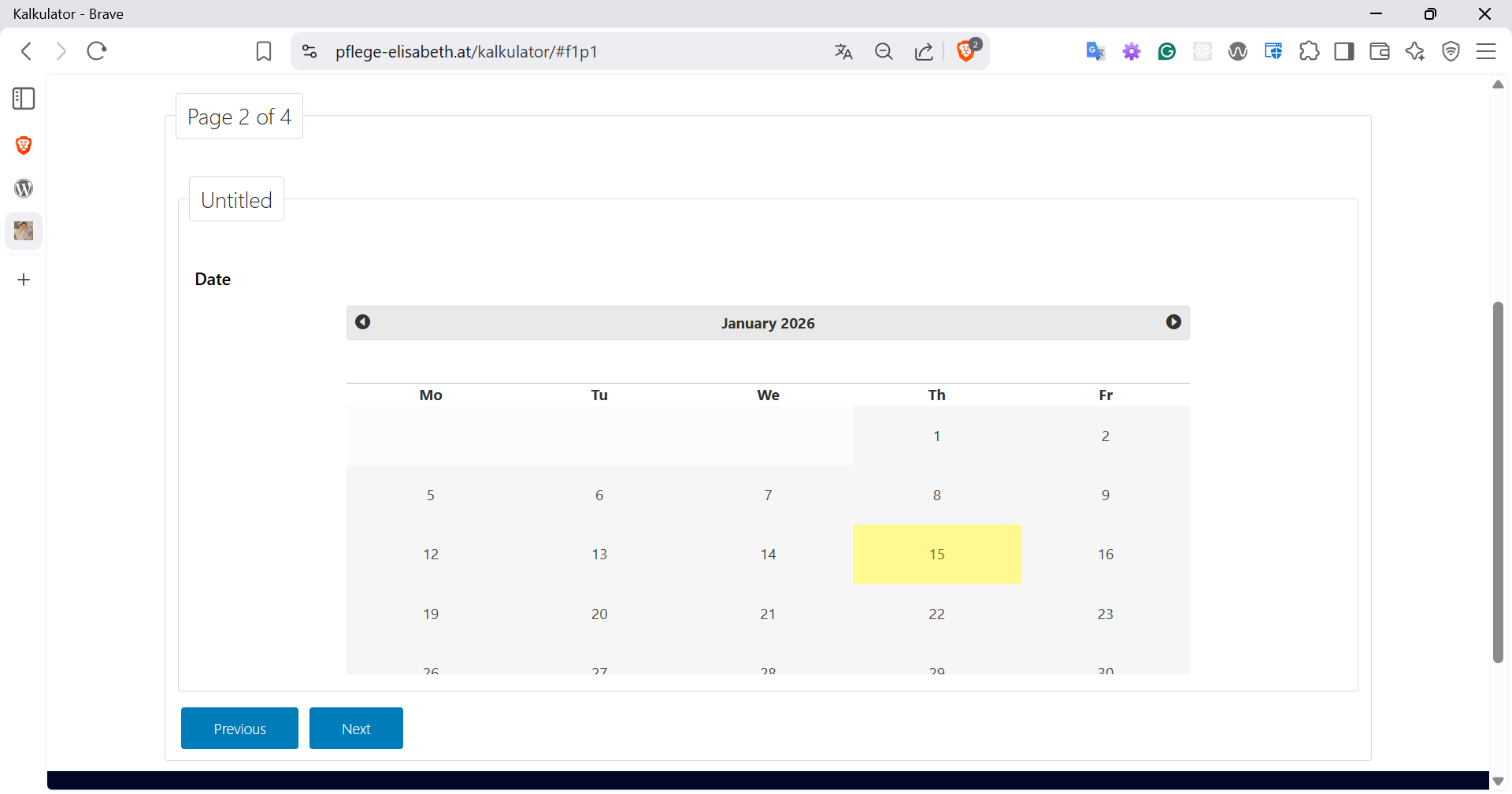
Best regards.
Forum: Plugins
In reply to: [Calculated Fields Form] Llimit to the total number of fields in a FormHello @svenomaier
Thank you very much for using our plugin.
Some users have created forms with more than one thousand fields. There is no specific limit on the number of fields. However, when working with such complex forms, it is important to design them with performance in mind.
For example, if your form requires equations to be evaluated dynamically, the plugin must identify which equations are affected by the values entered by the user and recalculate them accordingly. These calculations can, in turn, trigger other equations, creating a chain of evaluations.
For this reason, each time you add a calculated field to your form, we recommend carefully considering whether that calculation is truly necessary for your specific use case. Reducing unnecessary calculations can significantly improve performance and user experience.
Best regards.
Forum: Reviews
In reply to: [Music Player for Easy Digital Downloads] Great PluginHi @1driver5x5,
Thanks a lot for your review! We truly appreciate you taking the time to share your experience.
Best regards.
Forum: Reviews
In reply to: [Search in Place] Excellent Page Search Plugin