CodePeople2

Forum Replies Created
-
Forum: Reviews
In reply to: [Calculated Fields Form] Excellent support. I would buy again!Forum: Plugins
In reply to: [Calculated Fields Form] Email to prospect completing the form?Hello @weeered
Thank you so much for using our plugin. If you want to include field values, without their labels, in the notification emails, you don’t need to include additional fields in the form; only use the labels for the fields’ values in the email bodies:
E.g.
<%fieldname19_value%>To include the field’s label only:
<%fieldname19_label%>Or if you want to include the pair label-value, with a specific symbol between like colons:
<%fieldname19 separator={{: }}%>

or
<%fieldname19_label%>: <%fieldname19_value%>
The list of fields and informative tags supported by the notification emails is described in the following section of the plugin documentation:
https://cff.dwbooster.com/documentation#special-tags
If you want to send email copies to the users, please install the Professional plugin distribution and configure the email copy to the user section in the form settings:
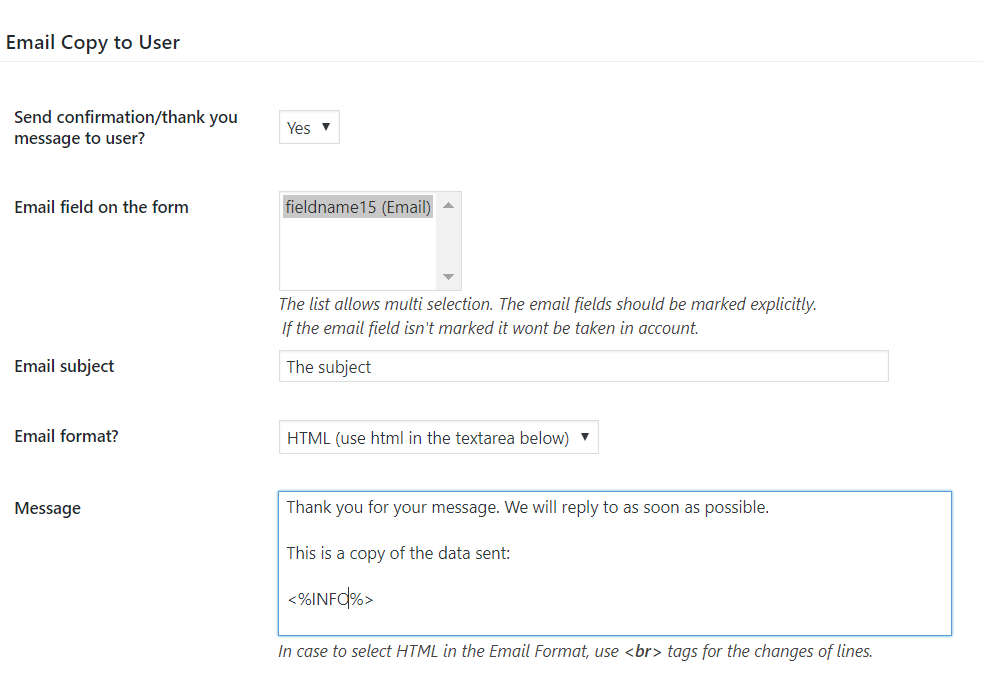
Best regards.
Forum: Plugins
In reply to: [Calculated Fields Form] Search box for checkboxesHello @ohtusabes
If you are allowing selection of only one choice, why do you use a checkbox field instead of a radio button or a dropdown field?
The checkbox field does not include a search box component like dropdowns. However, you can emulate it by using a calculated field as an auxiliary. If you require a custom coding service to filter the checkbox choices based on a calculated field, please do not hesitate to contact us directly via the plugin website. Contact Us.
Please watch the following video. I emulate the process directly in the browser:
https://resources.developers4web.com/cff/tmp/2025/12/02/video-checkbox_o.mp4Best regards.
- This reply was modified 6 months, 1 week ago by CodePeople2.
Forum: Plugins
In reply to: [Calculated Fields Form] Adding Text Below the Submit ButtonHello @ohtusabes
The process is simple:
- Select the “No” option in the “Display submit button?” attribute in the form settings. Now, the plugin no longer displays the default submit button.
- Now insert a button field in the form, and select the “submit” option as its type.
- Finally, insert an “HTML Content” field below the submit button with the preferred information.
Best regards.
Hello @jakubkubajz
Thank you so much for using our plugin.
You can show/hide the “HTML Content” field by selecting a specific choice in the DropDown field by configuring dependencies as described in the following video tutorial:
However, it does not applies to the submit button.
So, in this case, it is better to use a calculated field as an auxiliary field.
I’ll try to describe the process with an hypothetical example.
Assuming the dropdown field is the fieldname1 and the HTML Content field is the fieldname2, you also want to show the fieldname2 field and hide the submit button if the fieldname1 value is “value A”, and do the opposite for any other fieldname1 value.
Insert a calculated field in the form to be used as an auxiliary (you can hide it from the form and exclude it from the form submission by ticking a pair of checkboxes in its settings), and enter the equation:
(function(){
if(fieldname1 == 'value A') {
   SHOWFIELD(fieldname2|n);
   fbuilderjQuery('.pbSubmit').addClass('hide-strong');
} else {
   HIDEFIELD(fieldname2|n);
   fbuilderjQuery('.pbSubmit').removeClass('hide-strong');
}
})()
Best regards.
Forum: Reviews
In reply to: [Calculated Fields Form] Highly recommendForum: Plugins
In reply to: [Calculated Fields Form] One field not always calculatedHello @tooni
You are referring to the dependencies that control the behavior of the fields. In addition to showing or hiding fields, these dependencies also activate and deactivate them. When fields are deactivated, they are excluded from the equations and are not included in form submissions. The rules for activating and deactivating fields are triggered by the onchange events of the controlling field, which, in this case, is the dropdown menu.
It’s important to note that the code within your HTML Content field evaluates the equations during the input events. This means that your code is executed before the activation and deactivation rules have taken effect. As a result, when the equations are evaluated, the fields remain deactivated because the necessary activation and deactivation rules have not yet been applied.
Best regards.
Forum: Plugins
In reply to: [Calculated Fields Form] One field not always calculatedHello @tooni
When you include the recommended modification your form is slow because you have an endless loop in the form design.
An endless loop occurs when there are dependencies between equations, either directly or indirectly. For example, if the equation for field A uses field B and the equation for field B uses field A, this creates a dependency between the two fields. It can be even more complex: field A uses field B, field B uses field C and field C uses field A, generating a circular dependency between the values of the fields. In an endless loop can participate the dependency rules.
I recommend to analyze the implementation of the equations, however, as a first instance solution, please edit the code in the “HTML Content” field as follows:
<script>
fbuilderjQuery(document).on('input', '#fbuilder :input', function(){
let f = this.form;
setTimeout( function(){if(VALIDFORM(f, true)) EVALEQUATIONS(f);}, 500);
});
</script>
Best regards.
Forum: Plugins
In reply to: [Calculated Fields Form] One field not always calculatedHello @tooni
The problem is simple, and it is caused by your form settings. You disabled the dynamic evaluation of the equations by unticking the “Dynamically evaluate the equations associated with the calculated fields” checkbox in the “Form Settings” tab. Then you emulated the process by entering the following piece of code in an “HTML Content” field:
<script>
fbuilderjQuery(document).on('input', '#fbuilder :input', function(){
if(VALIDFORM(this.form, true)) EVALEQUATIONS(this.form);
});
</script>
This implementation is causing a timing problem. The previous code evaluates the equations before the dependent field is activated.
If you don’t want to enable the dynamic evaluation of the equations, you should edit your code to hear both input and change events:<script>
fbuilderjQuery(document).on('input change', '#fbuilder :input', function(){
if(VALIDFORM(this.form, true)) EVALEQUATIONS(this.form);
});
</script>Best regards.
Forum: Plugins
In reply to: [Calculated Fields Form] One field not always calculatedHello @tooni
Thank you very much for using our plugin. Please provide the link to the page the contains the form and indicate the names of the fields I should check.
Best regards.
Forum: Plugins
In reply to: [Calculated Fields Form] RecordSet DS not workingHi @sajtfokus!
We’d like to help, but we can’t reply to that in this forum. We are not allowed to support any customers in these forums.For pro or commercial product support please contact us directly on our site. This includes any pre-sales topics as well.
Commercial products are not supported in these forums. We will happily answer this and any other questions you can have on our own site.
Thank you.
Forum: Plugins
In reply to: [Calculated Fields Form] Placeholder in Text AreaHello @ohtusabes
I apologize for the confusion. You can use plain text, and the other options you mention in your entry. Please watch the following video:
https://resources.developers4web.com/cff/tmp/2025/11/15/video_o.mp4
Best regards.
Forum: Plugins
In reply to: [Calculated Fields Form] WordPress user detailsHello @ohtusabes
Yes, that’s possible, but it requires the DS fields distributed with the Developer and Platinum plugin distributions.
You can insert a DS field in the form, select the logged-in user information as its data source, and retrieve the preferred user details (ID, email, first name, last name, login, etc.)
You can even send a copy of the data to the logged-in user email.
Best regards.
Forum: Plugins
In reply to: [Calculated Fields Form] Calculators not workingHello @lowercas3
If you have been satisfied with both the plugin and our support, we would be immensely grateful if you could leave us a review on the plugin ( https://ww.wp.xz.cn/support/plugin/calculated-fields-form/reviews/ ). Your feedback will help us reach more users.
Best regards.