CodePeople2

Forum Replies Created
-
Forum: Reviews
In reply to: [Music Player for Easy Digital Downloads] Great PluginHi @1driver5x5,
Thanks a lot for your review! We truly appreciate you taking the time to share your experience.
Best regards.
Forum: Reviews
In reply to: [Search in Place] Excellent Page Search PluginForum: Reviews
In reply to: [Calculated Fields Form] Descomplicado e proativoHello @momentum3m
Thank you for using our plugin and for taking the time to leave a review, we truly appreciate it.
Best regards.
Forum: Reviews
In reply to: [Calculated Fields Form] Super pluginHello @katari0s
Thank you so much for using our plugin and for sharing your review. We truly appreciate your support.
Best regards.
Forum: Reviews
In reply to: [Music Store - WordPress eCommerce] Good PluginHello @officialtqron
Thank you for using our plugin and for leaving a review – we really appreciate it.
Best regards.
Hello @svenomaier
Thank you very much for the feedback.
If you have been satisfied with both the plugin and our support, we would be immensely grateful if you could leave us a review on the plugin ( https://ww.wp.xz.cn/support/plugin/calculated-fields-form/reviews/ ). Your feedback will help us reach more users.Best regards.
Hello @svenomaier
Thank you so much for using our plugin. The process is simple:
First, assign a custom class name to all radio button fields you want to treat as a group, for example
radio-group(The class names are assigned to the fields through their attributes “Add CSS Layout Keywords”).Second, insert an “HTML Content” field in the form, tick the checkbox in its settings to support scripts, and enter the following piece of code as its content:
<script>
   fbuilderjQuery(document).on('input', '.radio-group input', function(){
      let e = this;
      fbuilderjQuery('.radio-group input').prop('checked', false).trigger('change');
      e.checked=true;
  });
</script>
Best regards.
Hello @matthiaspabst
Could you please check your website with the browser in incognito mode? I guess you have a cache problem. I tested your form, and the only messages are the warnings generated by jQuery. Please watch the following video:
https://resources.developers4web.com/cff/tmp/2025/12/23/video-console_o.mp4
Best regards.
Hello @matthiaspabst
If you are referring to the CSP, it is not being caused by our plugin, it is happening in the WP Rocket generated code:
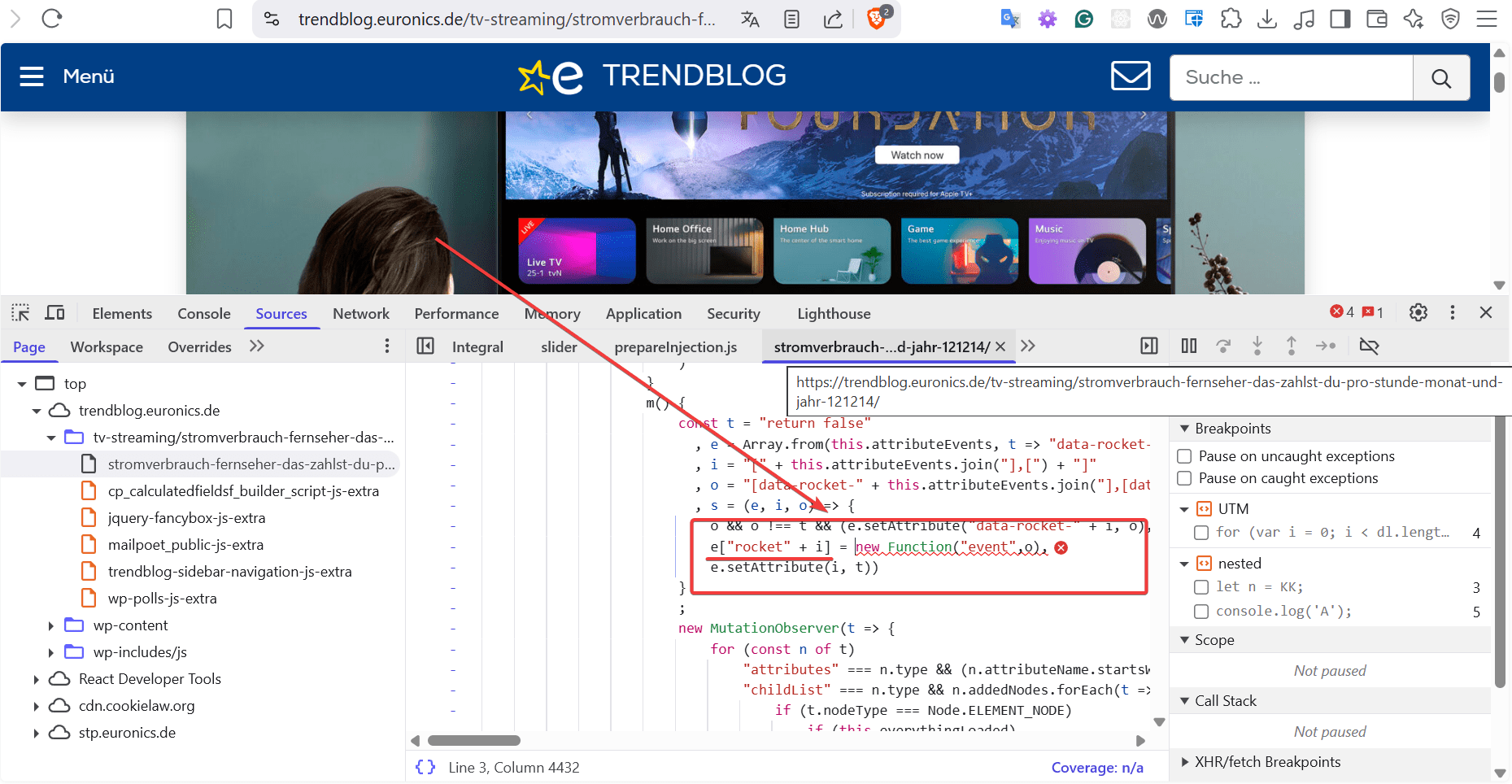
The console message you see when moving the slider is not an SCP message but a browser warning: “Added non-passive event listener to a scroll…”. This warning isn’t generated by our plugin; it comes from the jQuery slider control included with WordPress (our plugin simply uses it) and how jQuery handles slider events. You can confirm this by visiting the jQuery Slider Control page directly.
Best regards.
Hi @jlwp123
The answer depends on how your form is implemented. Once the form structure is generated, most calculations run client-side in the browser using JavaScript, so they don’t rely on the server.
If you use the “Server-Side Equations” add-on, however, calculations run on the server (PHP). In that case, the form sends field values to the server to compute results, useful when you need server resources or want to hide business logic from users.
Please read the following blog posts to see some use cases:
https://cff.dwbooster.com/blog/2018/10/01/server-side-equations
https://cff.dwbooster.com/blog/2019/08/04/partial
https://cff.dwbooster.com/blog/2019/11/05/case-of-use-filtering-products
https://cff.dwbooster.com/blog/2022/12/10/case-of-use-getting-distance-with-bingmaps/
There are virtually endless possibilities.
If you use DS fields, they pull values from third-party sources, databases, CSV files, JSON feeds, ACF, other form submissions, and more. Please watch the following video:
https://youtu.be/Z2h_yFiXp9A?list=PLY-AOoHciOKgZQsqWfkQlHJ21sm3qPF9X
Server-side dependency is determined by how you implement the form. Most forms run calculations client-side in the browser, but if you rely on server-side features (e.g., the “Server-Side Equations” add-on or DS fields fetching remote data) the form will send values to the server for processing.
Best regards.
Forum: Plugins
In reply to: [Calculated Fields Form] Currency symbol is not showing in Currency fieldHi @jlwp123
It’s been a pleasure to help you. If you have been satisfied with both the plugin and our support, we would be immensely grateful if you could leave us a review on the plugin ( https://ww.wp.xz.cn/support/plugin/calculated-fields-form/reviews/ ). Your feedback will help us reach more users.
Best regards.
Forum: Plugins
In reply to: [Calculated Fields Form] Currency symbol is not showing in Currency fieldHello @jlwp123
Thank you so much for using our plugin. Please ensure that you have ticked the “Format Dynamically” checkbox in the currency field settings.
Best regards.
Forum: Reviews
In reply to: [Calculated Fields Form] My most powerful free pluginForum: Plugins
In reply to: [Calculated Fields Form] Count submissionsHello @mpbaweb
The most natural implementation would utilize DS fields. You can insert a RecordSet DS field to access your preferred forms and submissions, along with a calculated field or another DS field to display the information of your choice.
However, you can emulate the process directly using the [CP_CALCULATED_FIELDS_RESULT_LIST] shortcode by including simple scripts.
But please note we are not allowed to support any customers in these forums, and both the shortcode for results and DS fields are commercial features.
For pro or commercial product support, please contact us directly on our site. This includes any pre-sales topics as well.
Commercial products are not supported in these forums. We will happily answer this and any other questions you can have on our own site.
Thank you.
Forum: Plugins
In reply to: [Calculated Fields Form] Calculation not workingHello @leverpu11ers
Thank you for using our plugin. I understand that you copied the equation for the AI generator; however, please note that it is not infallible.
Your current equation is:
PREC(fieldname3fieldname4fieldname5,2)NumberBut it is incorrect, “Number” is not a variable, and you have not included an operator between the field names.
The correct equation would be:
PREC(fieldname3*fieldname4*fieldname5,2)Best regards.