colourinvasion

Forum Replies Created
-
Forum: Plugins
In reply to: [WooCommerce] Tax rates not showingHi
After the test we activated all plugins again.
So when viewing the products we caught some, including the one we add to the cart, that don’t have the settings mentions. We imported all products using the plugin All In One Import so why some have the correct settings and others don’t?
Is it enought to quick edit all of them and change the settings?
Forum: Plugins
In reply to: [WooCommerce] Tax rates not showingHi
Already disable all plugins except WooCommerce and still the same, VAT 0. So it’s not a plugin conflict.
Forum: Plugins
In reply to: [WooCommerce] Tax rates not showingHi
This is a brand-new setup where taxes have never shown.
You can see the System report on the txt bellow,
https://www.zollas.art/wp-content/uploads/2025/09/woo_system_report.txt
Forum: Plugins
In reply to: [WooCommerce] Tax rates not showingHi
Thanks for the quick reply. Made the changes but still doesn’t show any tax on checkout.
Thanks for the help Adam, it´s resolved.
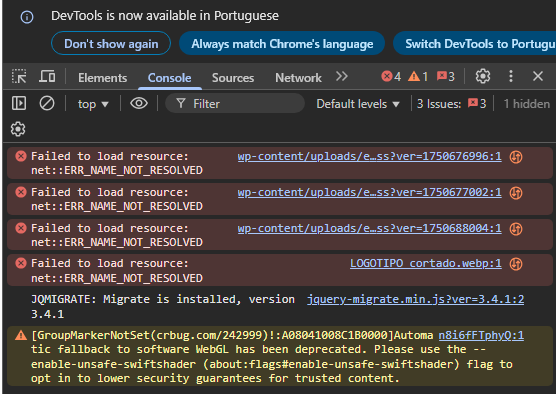
https://cuidaeapoia.pt/igemsapa/2025/08/Captura-de-ecra-2025-08-20-105312.png
This is the link to access the console errors. I didn’t make a video because the video is currently showing up.
Thank you for your quick response. I have just filled out the form with the questions asked. At this moment, the plugin is inactive so that the video works correctly, as requested by our client.
Forum: Plugins
In reply to: [Payment Plugins for PayPal WooCommerce] No response from PaypalHi
It’s solved. Our client tested with their Paypal account and it’s working. Thanks for the help.
Forum: Plugins
In reply to: [Payment Plugins for PayPal WooCommerce] No response from PaypalHi
The Paypal setting are using our client info and to test we use our own Paypal account to log in.
And we make the login with any problem, but when it loads the page for us to confirm the payment we get the error we sent.
Forum: Plugins
In reply to: [Payment Plugins for PayPal WooCommerce] No response from PaypalHi
It says “An error occurred. Please try again.”.
Forum: Plugins
In reply to: [Payment Plugins for PayPal WooCommerce] No response from PaypalHi
It was Admin Site Enhancement plugin blocking. But now we can access the Paypal login page and make the login but after that we get “Ocorreu um erro. Tente novamente.”
Forum: Plugins
In reply to: [ManageWP Worker] Update of the pluginHi
It’s not that’s it’s not working, although many times the connection to the project is lost, but for precaution we didn’t want to update since it said it was not compatible. You should think of updating the info on the directory. Thanks for the quick response.
Bom dia Marco
Sim temos. Segue abaixo,
2024-11-20T10:19:16+00:00 Erro – Error contacting the IfthenPay servers – Order 3545 – Incorrect response code: 403
2024-11-20T10:19:37+00:00 Erro – Error contacting the IfthenPay servers – Order 3545 – Incorrect response code: 403
2024-11-20T10:20:10+00:00 Erro – Error contacting the IfthenPay servers – Order 3545 – Incorrect response code: 403
2024-11-20T10:20:47+00:00 Erro – Error contacting the IfthenPay servers – Order 3545 – Incorrect response code: 403
2024-11-20T10:21:46+00:00 Erro – Error contacting the IfthenPay servers – Order 3545 – Incorrect response code: 403
2024-11-20T10:22:23+00:00 Erro – Error contacting the IfthenPay servers – Order 3545 – Incorrect response code: 403
2024-11-20T10:28:28+00:00 Erro – Error contacting the IfthenPay servers – Order 3546 – Incorrect response code: 403
2024-11-20T10:28:50+00:00 Erro – Error contacting the IfthenPay servers – Order 3547 – Incorrect response code: 403
2024-11-20T10:38:46+00:00 Erro – Error contacting the IfthenPay servers – Order 3548 – Incorrect response code: 403Hi
The video is now loading correctly.
Thanks for your help.Hi James,
I’ve installed the tag, we’ve tested it and it’s working. Now what’s the next step?