cpt.randall

Forum Replies Created
-
Forum: Plugins
In reply to: [WooCommerce] ‘Failed to update settings’Thank you for all the help!
Forum: Plugins
In reply to: [WooCommerce] ‘Failed to update settings’Sheila, yes my customer had purchased a firewall from godaddy. What I did was call, and complain to godaddy support that their firewall settings are to tight. Try that. Then if it doesn’t work, get off godaddy. Randy
Forum: Plugins
In reply to: [WooCommerce] ‘Failed to update settings’I spoke with the hosting company (GoDaddy), and the customer had purchased a firewall add on to their hosting package. I created a ticket, and explained what is happening. I am sorry I took up so much of your time. I did not know about the firewall, and GoDaddy just seems to make everything complicated 🙁
I’ll let you know what happens, but I want to thank you again Mahfuzur.Randy
Forum: Plugins
In reply to: [WooCommerce] ‘Failed to update settings’There are no security plugins installed.
What is the proper way to make sure that Woocommerce REST API is enabled?
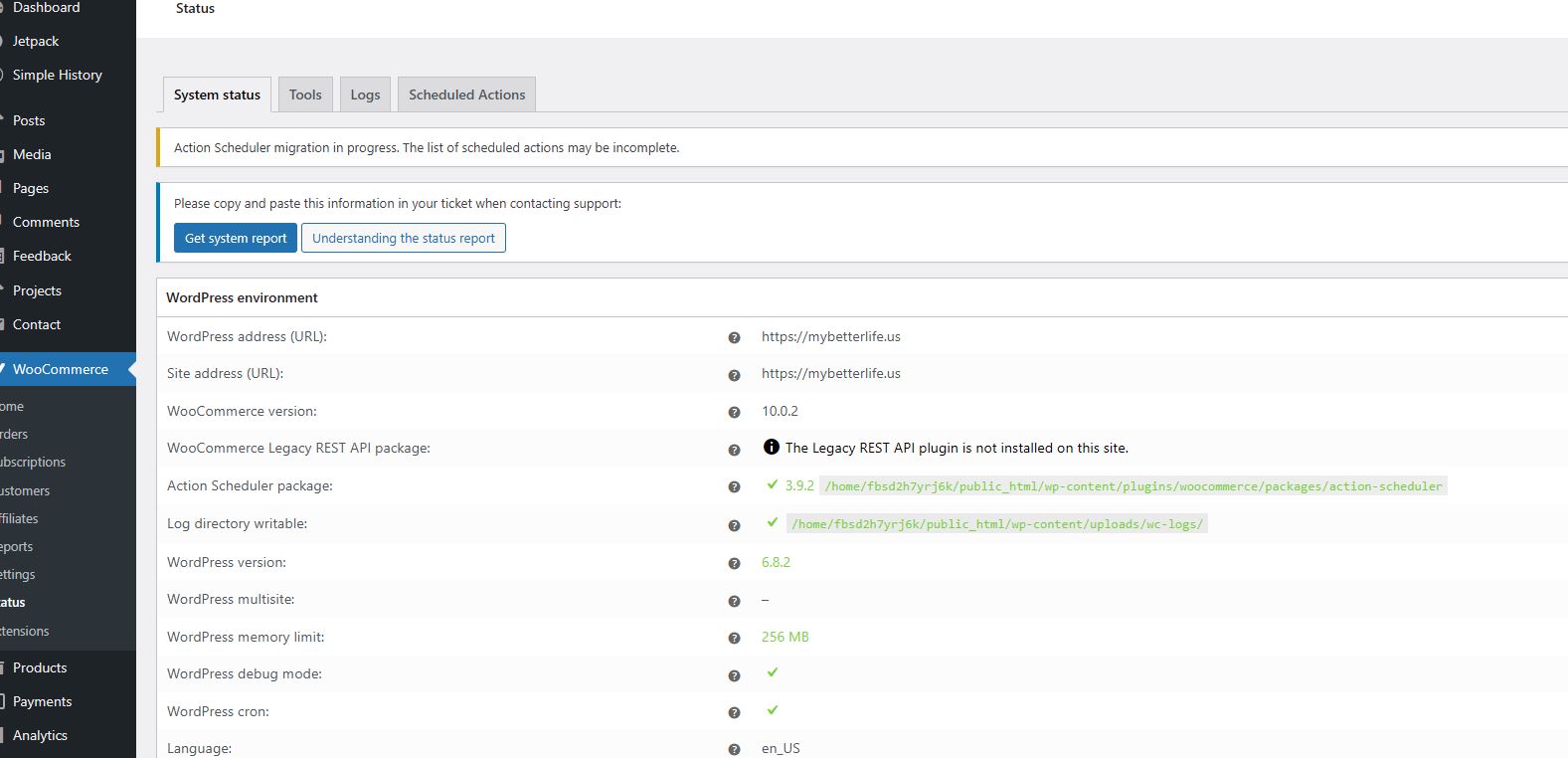
also, when I run a WooCommerce Status Report is shows: “The Legacy REST API plugin is not installed on this site.”
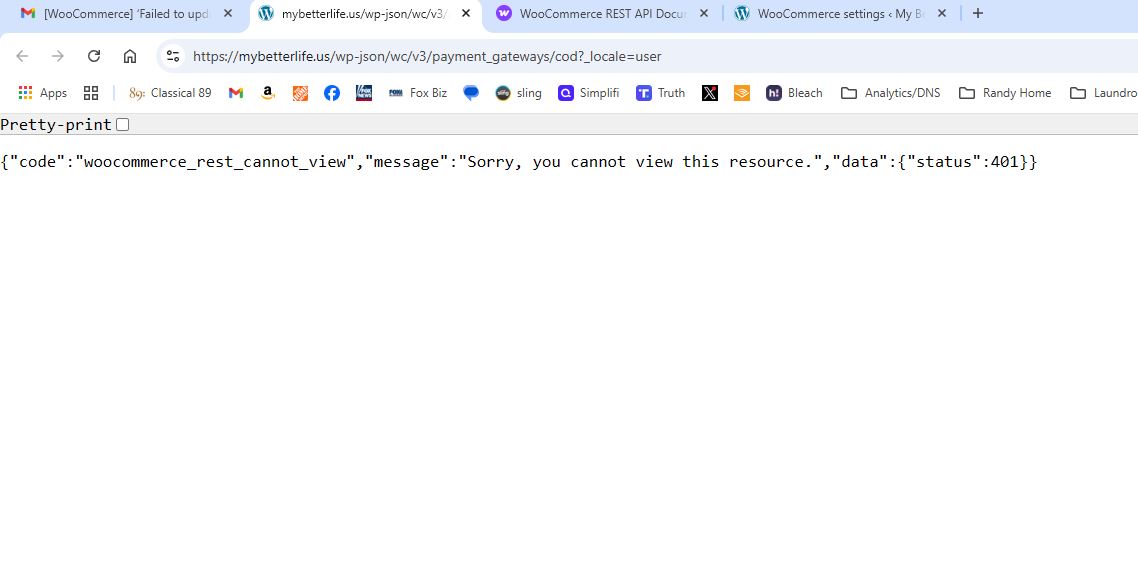
screenshot of report: https://mybetterlife.us/wp-content/uploads/restipa-report-screenshot.jpgScreen shot of URL for previous request:
https://mybetterlife.us/wp-content/uploads/restipa-screenshot.jpgForum: Plugins
In reply to: [WooCommerce] ‘Failed to update settings’I forgot to enable the Console tab! Yes there is an error:
Video: https://drive.google.com/file/d/1e6i8ehBgowRjXAydYPBxsQ1ucYaCI7Ls/view?usp=drive_link
Error: https://mybetterlife.us/wp-json/wc/v3/payment_gateways/cod?_locale=user 403 (Forbidden)
- This reply was modified 10 months, 2 weeks ago by cpt.randall.
Forum: Plugins
In reply to: [WooCommerce] ‘Failed to update settings’Thank you. I recorded a video on woocommerce and the error log:
https://drive.google.com/drive/folders/1iCWNKsicFdbYAsj_OB9JC_ghwo8wDbgi?usp=sharing
Thanks, RandyForum: Plugins
In reply to: [WooCommerce] ‘Failed to update settings’Hi, I did what you suggested. HEre is the error log file: https://pastebin.com/WvnK8gLb
I am still getting the errors. Is there any chance that DNS entries could effect this? Last week we changed the domain email to office 365, and had to make some changes with GoDaddy / DNS to get the emails working from the website.
Thank you for helping 🙂Forum: Plugins
In reply to: [WooCommerce] ‘Failed to update settings’Thank You Mahfuzur Rahman ! 🙂
I do NOT see any errors at all in the logs.
However in the Chrome Console I see :
Unchecked runtime.lastError: The message port closed before a response was received. Content unavailable. Resource was not cached
Thank you again!Forum: Plugins
In reply to: [Flamingo] New Messages marked as spamSame situation as above, customers receive errors on submission, CF7 flags as spam, and mail never gets delivered.
Why doesn’t dev respond?
Its a great plugin and I would pay$
We are hosting on AWS.
Is it time to drop CF7 ?
My customer is flaming mad at the email situation 🙁Going to use a different solution on this site.
- This reply was modified 6 years, 10 months ago by cpt.randall.
Forum: Plugins
In reply to: [Conditional Fields for Contact Form 7] Simple 1 conditional logic formAnyone have any idea on this?
Forum: Plugins
In reply to: [WooCommerce] Show in which warehouse the product is locatedAnother place to find WC help is at slack!
https://woocommercecommunity.slack.comGood luck,
RandyForum: Fixing WordPress
In reply to: Media upload button is not working.As of today, it still is not working in chrome. But only on certain sites!
Forum: Plugins
In reply to: Measurement Price Calulator showing metric not Imperial :(Thanks Jricketts4, but I did that.
Here is what I see on the Shipping tab: https://goo.gl/photos/UkxwiSKursXFdMRZ6
Again I set all the setting correctly but am getting this. I even compared it to our sister site, and it is NOT showing with sq cm but rather sq ft !
Weird.
Thanks,
RandyForum: Themes and Templates
In reply to: [Storefront] HomeStore Support?Thanks Stuart