VB

Forum Replies Created
-
Hey thanks, Ahmed, tested with amp validator and tried with an incognito window in the browser. It showed only one canonical this time.
Also checked from the google search console, looks okay now!Did you do any update from your side?
You can mark the issue as resolved. Thanks a lot!
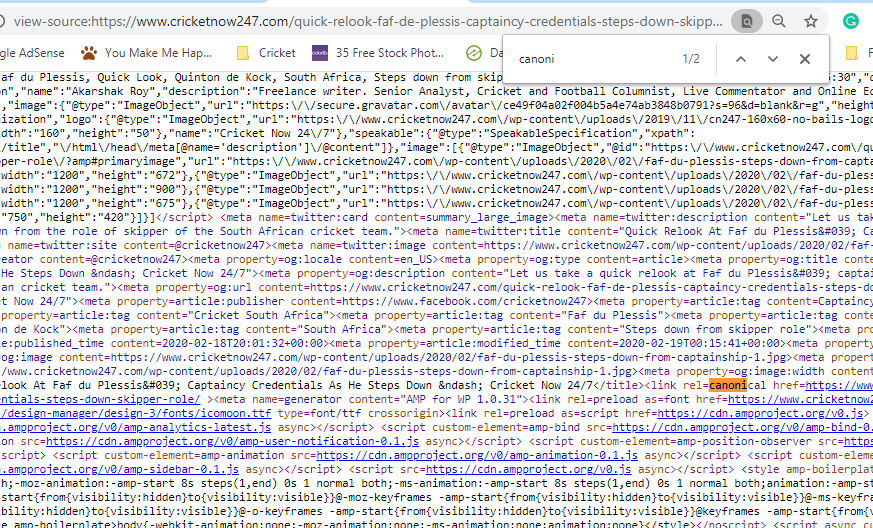
Rechecked again. Purged all the caches. Still showing two canonicals when done ‘view page source’
We have re-enabled the AMP option on the site. Let us know once the steps are done.
Hi Ahmed,
The Ezoic team was not able to reproduce the issu. Have given their reply below. Also, for now, we have deactivated the AMP plugin as being a small publisher our goals with Google News are not materializing due to their recent news algorithm changes.
For future reference/solutions, sharing the observations so far.Here is the Ezoic Team reply :
February 26th Tech Update:
Our technical team were unable to recreate the issue on the flagged pages as they are all passing validation tests in Google Search Console and no longer have the canonical link issue. Since we’re unable to replicate the issue, here’s a cached version of your site with the duplicated canonical link issue: https://webcache.googleusercontent.com/search?q=cache:eTZ9n5r6OlIJ:https://www.cricketnow247.com/quick-relook-faf-de-plessis-captaincy-credentials-steps-down-skipper-role/%3Famp+&cd=1&hl=en&ct=clnk&gl=usOther WordPress users have experienced these same issues before: https://ww.wp.xz.cn/support/topic/the-tag-link-relcanonical-appears-more-than-once-in-the-document/ and it’s caused by two conflicting WordPress plugins – usually “Yoast SEO” – which you currently have installed. In total, there are 40 plugins installed on your site with some throwing errors upon installation/activation.
Ezoic should not affect the functionality of AMP pages, therefore we believe this issue was a misconfiguration on yourend. Your AMP pages are set to be re-validated within the search console.
Out technical team created a test site of your site using the same theme and plugins to try and identify the issue. It appears that on your end, you were previously using the default AMP endpoint setting (page_url/amp/) and switched to using the ?amp query tag instead (page_url?amp) around February 16-18th. This caused a few issues in the search console, but will be resolved once Google re-indexes all the AMP pages again.
February 27th Tech Update:
After the index re-validation ran, Google processed some pages but had errors on some. 30 passed but 14 have failed so far.The issue of duplicated canonical links can only be found on your original site, not the site we serve. Therefore, this is an issue on the publisher’s end.
Our technical team have said that this is outside of our scope, but if you did something custom such as adding a filter to your WordPress PHP, you should remove it. If you’re using an SEO manager like Yoast, there are usually settings related to canonical links at the bottom of the post/page builder.
On another note, have you added any other plugins recently?I recommend that you also look into whether the Genesis framework and Yoast SEO are working together properly. Here’s a good article that goes over a couple different things to try: https://seowindycity.com/how-wordpress-created-duplicate-canonical-tag-problem/
So, For now, you can close this issue. Or if there is a solution from your end, we would be happy to test it on our site and confirm if it is resolved.
Okay, I have informed the Ezoic technical team about this. They are looking into it.
Will update here once I get a reply from them.Here I share a link with the screenshot of all the active plugins and also the current settings of the AMP for WP plugin.
Let me know if any more information needed.
http://cubeupload.com/codes/cd94c0
Some more ‘single section under design’ settings screenshots, forgot to add to above link.
http://cubeupload.com/codes/a3bed9- This reply was modified 6 years, 3 months ago by VB. Reason: forgot to add few screenshots
Hi Ahmed,
I see you have created a tutorial for Viglink on below link:
https://ampforwp.com/tutorials/article/how-to-add-viglink-in-amp/
Problem is the code includes my individual API Key. Please remove my API Key from the same. With this key, all sales will be attributed to me. So that would not be good. I hope you understand.
{
“apiKey”: “4ee69a0a7b887691c80d19877fe2eb27”
}Even Viglink asked me to do the same.
And regarding the main issue of Viglink not working on my AMP site, Viglink team is working on it, I will update this topic based on their responses.
Regards,
VipulI had done exactly that, but it’s not working. Because the link-writer code is coming after a few other default amp codes.
You can check this link (using right click and view page-source):
/ampYou will see the link-writer code is coming after other amp codes. That is why the affiliate javascript not working. You can compare to the non-amp version where the affiliate script is working.
Is there any way, I can make sure that the 1st code is entered at the top of the head section, before any other amp code?
<head>
1st code here
.
.
.
Other amp codes…..or Maybe you if the 1st link-writer code is common for all affiliates, then we can provide a toggle feature in the settings to enable or disable this code at the top of the head section.
…..
Regards,
Vipul- This reply was modified 7 years ago by Jan Dembowski.
The affiliate ad network is Viglink.
Here is the 1st code:
<script async custom-element=”amp-link-rewriter” src=”https://cdn.ampproject.org/v0/amp-link-rewriter-0.1.js”></script>
Here is the second code:
<amp-link-rewriter layout=”nodisplay”>
<script type=”application/json”>
{
“output”: “https://redirect.viglink.com?key=${apiKey}&u=${href}&type=ap&loc=SOURCE_URL&ref=DOCUMENT_REFERRER”,
“vars”: {
“apiKey”: “4ee69a0a7b887691c80d19877fe2eb27”
}
}
</script>
</amp-link-rewriter>Regards,
VipulOkay thank you! Will wait for the update.
Forum: Plugins
In reply to: [HD Quiz] Quiz not showing on AMPforWP websiteOh okay. Got it. Thanks for the quick reply! I will re-direct visitors to a non-amp version of the quiz page for now.