Cyclone Themes

Forum Replies Created
-
Forum: Themes and Templates
In reply to: [My Travel Blogs] Making post titles biggerForum: Themes and Templates
In reply to: [My Travel Blogs] Making post titles biggerHi,
You can have a logo or text, not both.
You can add text to the logo if you want.
Thank You
Forum: Themes and Templates
In reply to: [My Travel Blogs] Making post titles biggerHi,
There are not many options for the search in the customizer. What would you like to have?
Currently, when you click on the search icon. The search field will appear.
Thank You
Forum: Themes and Templates
In reply to: [My Travel Blogs] Making post titles biggerYou can use this CSS to increase the font size of the title on the blog detail page.
.bizberg_cocntent_wrapper h3.blog-title {
    font-size: 58px !important;
}
Goto Appearance > Customize > Additional CSS and paste the above CSS there.
Thank You
Forum: Themes and Templates
In reply to: [My Travel Blogs] Making post titles biggerHi,
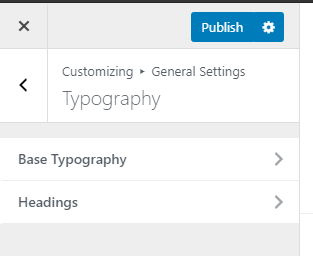
You can control the fonts from Appearance > Customize > General Settings > Typography.
https://i.gyazo.com/1d4d1071f2cdf564ee2b095936086271.png
Thank You
Forum: Themes and Templates
In reply to: [Eye Catching Blog] Remove hero title & subtitleHi,
We have updated the parent theme. Now you should be able to remove the banner title and subtitle. Please update the parent theme ( Bizberg ).
Thank You
Forum: Themes and Templates
In reply to: [Eye Catching Blog] Remove hero title & subtitleHi,
Can you tell me which Hero Section are you using? Banner or slider?
Thank You
Hi,
You can control the fonts from Appearance > Customize > General Settings > Typography
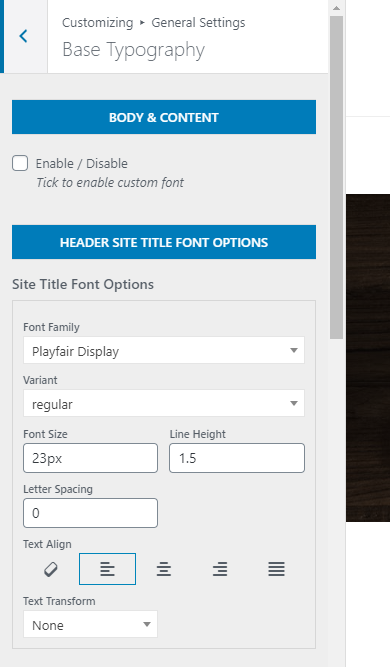
For site title font, goto Appearance > Customize > General Settings > Typography > Base Typography > Site Title Font Options
https://i.gyazo.com/216acc90ff54896723e323e9818da7b9.png
Thank You
- This reply was modified 5 years, 5 months ago by Cyclone Themes.
Forum: Themes and Templates
In reply to: [Eye Catching Blog] Remove hero title & subtitleHi,
Sorry, we were on holiday. Can you share your live URL of the site? We will take a look and give you an additional CSS code to hide the text.
Thank You
Forum: Themes and Templates
In reply to: [Education Business] Remove the scroll to top iconUse this code.
#back-to-top{
    display: none !important;
}
Thanks
Forum: Themes and Templates
In reply to: [Bizberg] Theme customization broken after upgrade to WP 5.5Hi,
Please upgrade to the latest version. It should work.
Thanks
Forum: Plugins
In reply to: [Primary Addon for Elementor] Blog Widget Options cannot be changedHi,
We thought the problem was only on our site so we test it on the WordPress staging site. The information we gave you doesn’t hurt anyone because it is a testing site and the theme and plugins are all from the wp.org site.
It was easy to create a staging site, that’s why we gave the credentials here.
If you don’t want to test it on the staging site, we will create a site on our server and will give you credentials on your contact form.
Thank You
Yes, it is working.
Thanks
Forum: Plugins
In reply to: [Primary Addon for Elementor] Blog Widget Options cannot be changedHi,
✔ Date Color and Background
✔ Read More ColorExcerpt Length still not working. If the post has excerpt it is working but for content, it is not limiting the words.
You can check here https://drive.google.com/file/d/1cn3C3M1EpRmGPZhzDtskb6zgFQMj8lMu/view?usp=sharing
Thank You
ok will check.
Thanks