David Borrink

Forum Replies Created
-
Yes, we do have 4.2.1 running.
I just did some tests and tried some different category term ids, and we get them by hovering over the name of the category in the posts category listings, and seeing the tag number in the URL at the bottom of the screen.
What’s odd is that I’ve had a few different times to add a pair of additional categories in a few tests, trying different categories from the blog listings. Sometimes the two additional numbers stay in the widget window, other pairs disappear, and I even tried to add a couple and one stayed and one disappeared. I just don’t understand why these numbers would disappear.I’ve done a screen video of it happening. Watch this: https://media.sallieborrink.com/wp-content/uploads/2026/02/t10video.mov
HI Ajay, sorry I haven’t gotten back to you sooner.
I did see a new version got released and we updated this morning to see if it fixed but the issue still persists.
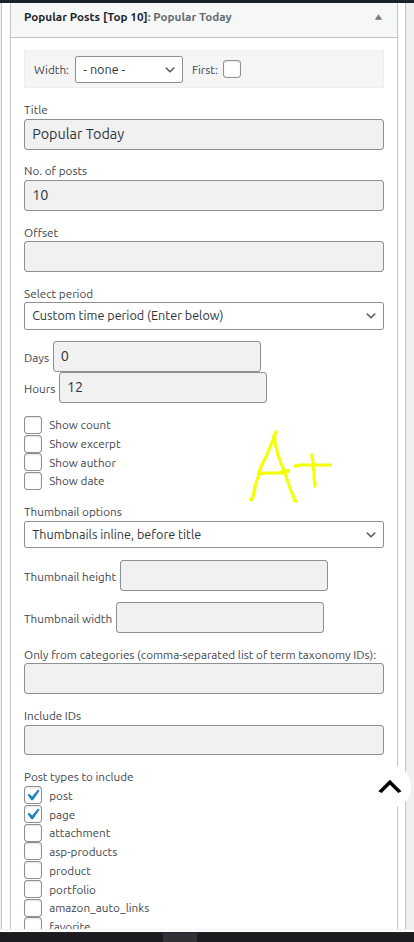
My wife’s site is where this is happening. https://sallieborrink.com. You can see in the sidebar on the front page there are a few instances of the widget in use. The two at the bottom are ones having issues and I’m providing a few screen shots of the panels to show what’s going on.
https://davidborrink.com/wp-content/uploads/2026/02/t10-1.png
This is the first one in the sidebar and it’s running fine.
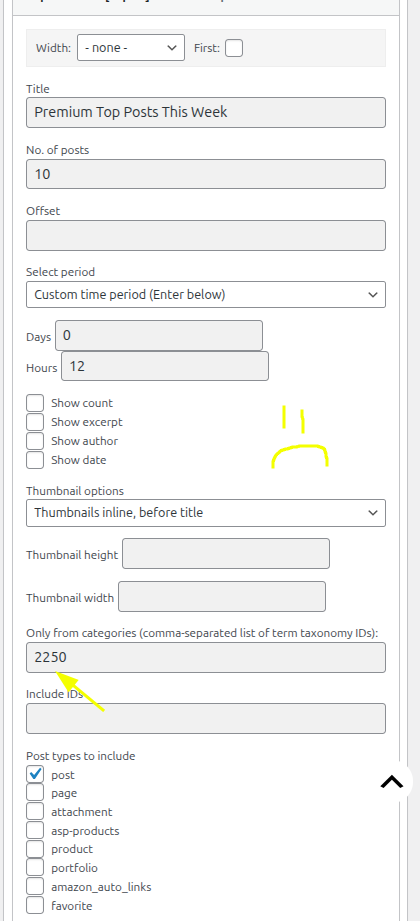
The next two links are to the bottom two in the sidebar.
https://davidborrink.com/wp-content/uploads/2026/02/t10-2.png
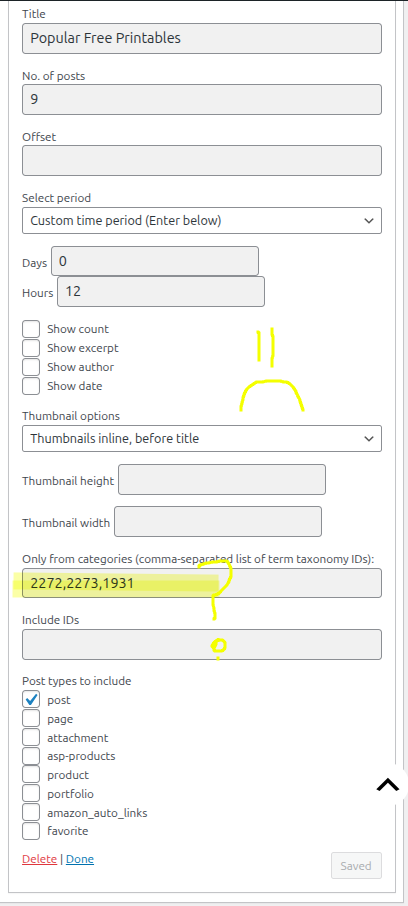
https://davidborrink.com/wp-content/uploads/2026/02/t10-3.png
You can see in the first one there is a post category ID number. In the second one, my wife highlighted that she put five category IDs in there, but after she saved, two of them disappeared. I watched her do it.
So that gives you some examples, and perhaps you might see something by being able to see her site.Correct. It’s in a sidebar widget, not a block. And we updated today to 4.2 to see if this persisted, and it did.
Thanks, threadi for taking the time to respond, and for the GitHub link to report this. My wife says, “If you want to insert code for anything (like affiliate links) then you need to be able to access the code”. For those who are more comfortable with the classic editing mode, it would make more sense to leave the “Edit in HTML” feature in. It’s still available in blocks, but just got taken out of the classic block.
- This reply was modified 6 months, 1 week ago by David Borrink.
Hello, Pial. Thank you for your response. Since you have a newer product to use, I went ahead and installed BetterLinks, thinking it would probably fix the problem, plus my wife likes the idea of working with a drag-and-drop interface, and also the idea of having click counts was attractive. I ran the installer and the setup wizard. After completing the migration, I had the list of URLs in Simple 301 Redirects and tried one out. The external redirects work now. That fixed the problem!
I was on my own account. I did get a reply from someone using the pre-sales choice and have a conversation going with someone now.
Great. Thank you. I just submitted my question to that area. Thanks for helping me be able to get something posted over there.
Shameem, thank you for your response. I went to the link you shared and when trying to choose Technical Support for WooCommerce Memberships, that plug-in is not listed in the choices of programs to request help for from the drop-down menu. I cannot make any choices for help. I need more assistance in order to start getting help.
Forum: Fixing WordPress
In reply to: Navigation Block – new menu item not showing on mobileTurns out it was my theme. They have a separate content area for mobile menus, and I forgot that was a thing with this theme. So many great setups from different developers, but that can cause forgetfulness sometimes. Thanks for pointing me to the theme as the issue.
- This reply was modified 2 years, 11 months ago by David Borrink.
Hi jrubimf, thank you for sharing that. Maybe I’ll use that if I have the problem again. I’m not having the problem anymore because the second day started with a new set of names and I traced the IP address on the first instance to another location different than the previous day. My guess is that the person doing this was using a proxy IP address and maybe realized I had figured out how to stop them at server level and gave up. I’ve had no problem since then.
Thanks, Peter. I set that setting in WF and they were still getting through. I tracked the traffic in the Tools panel and kept seeing the various attempts, and the email notes just kept coming with new users, but I deleted them within minutes. The locations and IPs in the Tools window were lining up with times that the new users were showing up and I did take their IPs and put them in my server’s firewall rules for WordPress. But still they kept coming.
I took another tactic. I went to my server access logs and matched the times that WordPress notes were saying the user was added, and then I was able to find them on the access logs, right down to the second. I could see that the same IP address was doing the actual registration moments, and it was NOT on WordFence’s traffic list. All fifteen incidents were located on my log file that way and the IPs all matched, to someone in Kiev. Ukraine was nowhere to be seen on the WordFence traffic list.
So, I put his IP address, and the entire block from the last set of numbers on a server ban.
The rest of the day has been quiet. Hopefully this will be the end of him
I used another theme and the stars show up. So it’s theme-related. I’ll check with the developer.
Forum: Fixing WordPress
In reply to: Warning: Attempt to read property “post_status” on null inThank you, loco leader. I also had this problem show up and found three invalid menu items in red. My customizer was listing a bunch of repeated warnings about “post_status” and thankfully you supplied a solution that solved my situation. I really appreciate that you shared it!
Forum: Plugins
In reply to: [WooCommerce] Categories not showing up, but subcategories do have productsHi tchris352, I just happened to get an email notice of your note. I’m wondering if you are aware that when you use the Customizer and choose the WooCommerce area, there are settings for the “Product Catalog” as to how to display items in your Shop. There are choices for “Shop Page Display” where you can choose to show categories and then on the “Category Display” choice where you can choose to show “Subcategories”.
Or, if your products are set to be categorized as both a main category and a sub category, maybe you only need to pick one. Without knowing what your setup is, I’m guessing at this point.
If you’re asking about menus, then those are where you’d be manually placing items in the menu setups.
Forum: Fixing WordPress
In reply to: Classic Block – difficulty in selecting multiple paragraphs, bulletsThanks, I’ll push the site into a staging environment and give that a go.