deuce25

Forum Replies Created
-
Forum: Plugins
In reply to: [Backend Payments for WooCommerce] Stripe integration surface errorEither Stripe changed the API key or someone changed it in the Backend Payments plugin settings. I have no idea but it’s working now!
Forum: Plugins
In reply to: [Backend Payments for WooCommerce] Stripe integration surface errorClient’s site that I built and run. What would be the difference?
Forum: Plugins
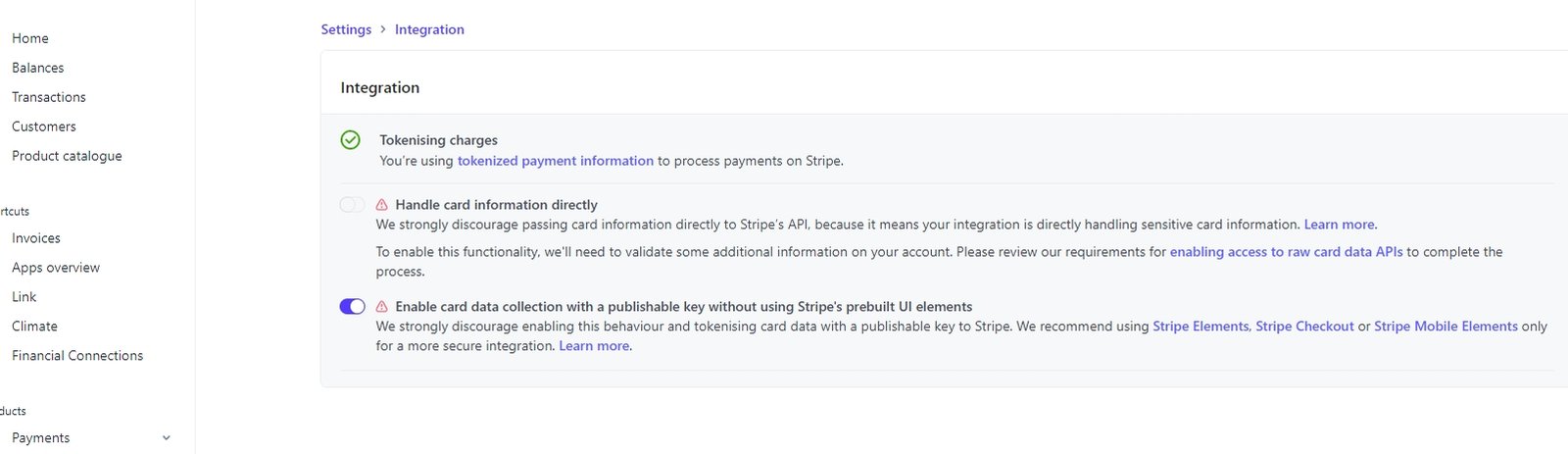
In reply to: [Backend Payments for WooCommerce] Stripe integration surface errorI confirmed “Enable card data collection…” is enabled.
Forum: Plugins
In reply to: [Backend Payments for WooCommerce] Stripe integration surface errorWe only have one Stripe account. We didn’t have this issue with Backend Payments until a few months ago. It used to work fine.
- This reply was modified 3 weeks, 5 days ago by deuce25.
Forum: Plugins
In reply to: [Backend Payments for WooCommerce] Stripe integration surface errorI’ve already tried that and it made no difference. Both Stripe and WC support have checked our website admin and say it’s something with the Backend Payments plugin.
If you’d like WP admin access let me know.
- This reply was modified 3 weeks, 5 days ago by deuce25.
It ended up being the host’s Modsecurity settings.
Hi Rica. Thanks for your reply.
- I do have a bunch of console errors which I’ll paste below.
- I tried this but no change.
- This made no difference.
- I had already checked this.
Console errors ————————————–
load-scripts.php?c=0&load%5Bchunk_0%5D=jquery-core,jquery-migrate,jquery-ui-core,jquery-ui-mouse,underscore,backbone,wp-api-request,wp-hooks&ver=6.9.4:5 JQMIGRATE: Migrate is installed, version 3.4.1
query.min.js:1 Failed to load resource: the server responded with a status of 403 ()
checklist.min.js?ver=3.35.7:2 Uncaught TypeError: Cannot read properties of undefined (reading 'QueryClient')
at 21947 (checklist.min.js?ver=3.35.7:2:16535)
at webpack_require (checklist.min.js?ver=3.35.7:2:49623)
at 33318 (checklist.min.js?ver=3.35.7:2:22201)
at webpack_require (checklist.min.js?ver=3.35.7:2:49623)
at 83725 (checklist.min.js?ver=3.35.7:2:45388)
at webpack_require (checklist.min.js?ver=3.35.7:2:49623)
at checklist.min.js?ver=3.35.7:2:49785
at checklist.min.js?ver=3.35.7:2:50876
at checklist.min.js?ver=3.35.7:2:50880
env.min.js?ver=3.35.7:1 @elementor/editor-site-navigation - Settings object not found
c @ env.min.js?ver=3.35.7:1
editor-notifications.min.js?ver=3.35.7:1 Uncaught TypeError: Cannot read properties of undefined (reading 'QueryClient')
at 74324 (editor-notifications.min.js?ver=3.35.7:1:15090)
at webpack_require (editor-notifications.min.js?ver=3.35.7:1:18142)
at 38205 (editor-notifications.min.js?ver=3.35.7:1:6229)
at webpack_require (editor-notifications.min.js?ver=3.35.7:1:18142)
at 86034 (editor-notifications.min.js?ver=3.35.7:1:17044)
at webpack_require (editor-notifications.min.js?ver=3.35.7:1:18142)
at 55549 (editor-notifications.min.js?ver=3.35.7:1:8702)
at webpack_require (editor-notifications.min.js?ver=3.35.7:1:18142)
at editor-notifications.min.js?ver=3.35.7:1:18213
at editor-notifications.min.js?ver=3.35.7:1:18396
editor.min.js?ver=3.35.7:1 Uncaught TypeError: Cannot read properties of undefined (reading 'createQueryClient')
at Module.V (editor.min.js?ver=3.35.7:1:1291)
at editor-loader-v2.min.js?ver=3.35.7:1:335
at editor-loader-v2.min.js?ver=3.35.7:1:398
jquery-migrate.min.js?ver=3.4.1:2 JQMIGRATE: Migrate is installed, version 3.4.1
Forum: Themes and Templates
In reply to: [Extendable] Create sub-menuPerfect. Thanks for the quick reply!
Forum: Plugins
In reply to: [Appointment Booking Calendar] PayPal required in Basic?Yeah I tried that plugin but I need the Restricted Dates and Special Dates functionality of ABC. So if I purchase the Pro version the PayPal thing can be turned off so it functions like a regular appointment calendar?
Forum: Plugins
In reply to: [Appointment Booking Calendar] Special Dates not workingNevermind, it’s working now. The “Minimum available date” was affecting it working properly on the front end even though it was fine in calendar config/admin.
I have things working now. There was an issue with some WC settings.
I have 2 variations for my products – North America and International prices. I set North America to only available for Canada/US/Mexico and set International to NOT available for Canada/US/Mexico. It sees me as Canada (which is where I am) and it doesn’t let me choose International so that’s working. I then tried through a VPN (Argentina) but it still only lets me choose NA and not International and I can’t figure out why. It should only let me choose International.
I’m also having an issue with the restriction message not appearing, as noted in my previous message.
@alexandreepicerie I’m having the same problem. Can you let me know the shortcode solution please?
Forum: Plugins
In reply to: [WooCommerce] Styling issue when using shortcodesThank you so much, crslz!!
Forum: Plugins
In reply to: [WooCommerce] Styling issue when using shortcodesThanks! Works great but the product titles are not centered. I tried adding text-align: center; to products h2 but it didn’t work. What did I miss?