dev5

Forum Replies Created
-
Forum: Plugins
In reply to: [AIO Forms - Craft Complex Forms Easily] Button selection visual confirmationThat did it – perfect! Thank you for the great support. I thought I had tried adding that, but ???
It’s a very nice form builder. I haven’t used all the features yet, but things like conditional are very nice and I hope to keep going deeper.Forum: Plugins
In reply to: [AIO Forms - Craft Complex Forms Easily] Button selection visual confirmationhttps://artisticbamboo.com/contact-us/
It still needs the hover and selected styles which didn’t work for me.Forum: Plugins
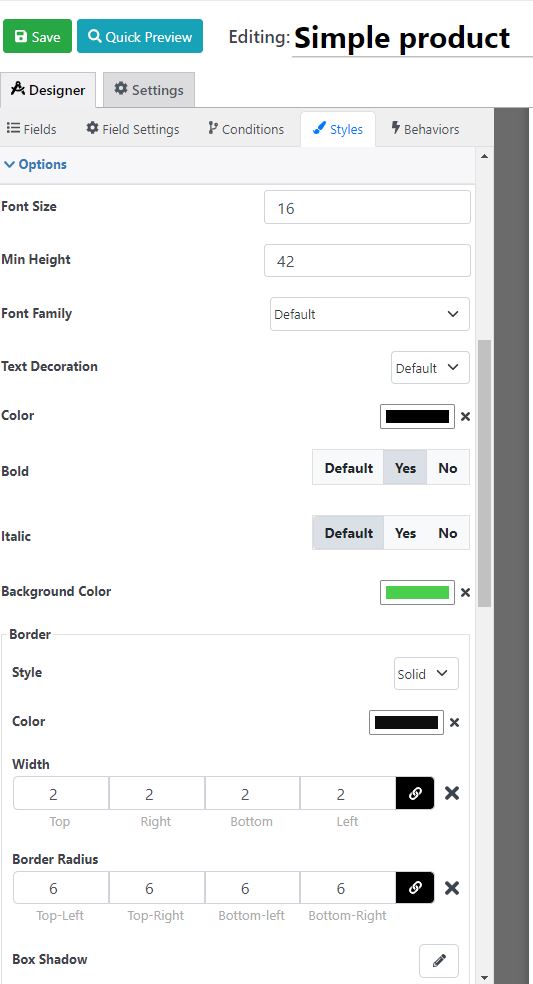
In reply to: [AIO Forms - Craft Complex Forms Easily] Button selection visual confirmationThank you. I tried using that CSS but can’t make it work. My CSS is below. Can you give me some pointers?
.rnField_10 is the buttons
.rnField_10 .option_item label{font-size:16px !important;line-height:16px !important;color:#000000 !important;font-weight:bold !important;}
.rnField_10 .option_item{background-color:#4acf4d !important;border-style:solid !important;border-top-width:2px !important;border-right-width:2px !important;border-bottom-width:2px !important;border-left-width:2px !important;border-color:#0e0e0e !important;border-top-left-radius:6px !important;border-top-right-radius:6px !important;border-bottom-left-radius:6px !important;border-bottom-right-radius:6px !important;}
.rnField_10.rnField{margin-top:1px !important;margin-right:1px !important;margin-bottom:12px !important;margin-left:1px !important;}
.rnField_10  .buttonselectoritem{min-height:42px !important;}
.rnField_2  button,.rnField_2  .RNIconOrImage{color:#000000 !important;}
.rnField_2  button{background-color:#4acf4d !important;border-color:#000000 !important;border-top-width:2px !important;border-right-width:2px !important;border-bottom-width:2px !important;border-left-width:2px !important;font-size:16px !important;line-height:16px !important;padding-left:60px !important;padding-right:60px !important;padding-bottom:10px !important;padding-top:10px !important;border-top-left-radius:6px !important;border-top-right-radius:6px !important;border-bottom-left-radius:6px !important;border-bottom-right-radius:6px !important;}
.rnField_2  rn-spinner-button{text-align:center !important;}
.rntext .rednaoLabel label{font-size:15px !important;line-height:15px !important;}
.rnemail .rednaoLabel label{font-size:15px !important;line-height:15px !important;}
.rnbuttonselection .rednaoLabel label{font-size:15px !important;line-height:15px !important;}
.rncheckbox .rednaoLabel label{font-size:15px !important;line-height:15px !important;}
.rnnumeric .rednaoLabel label{font-size:15px !important;line-height:15px !important;}
.rnbuttonselection .option_item label{font-size:16px !important;line-height:16px !important;}
.rnsubmit_button  button{font-size:16px !important; font-weight: bold !important; line-height:16px !important;}
.rnField_21 .rednaoLabel label{font-size:15px !important;line-height:15px !important;}
.rnField_18 .rednaoLabel label{color:#cf2323 !important;}
.rnField_20 input{}
.rnField_20 .rednaoLabel label{color:#cf2323 !important;}
.rnField_12 .rednaoLabel label{color:#cf2323 !important;}
Forum: Plugins
In reply to: [AIO Forms - Craft Complex Forms Easily] Button selection visual confirmationWhere is there a mouseover or selected condition to set in the editor?
- This reply was modified 1 year, 3 months ago by dev5.
Forum: Plugins
In reply to: [AIO Forms - Craft Complex Forms Easily] Button selection visual confirmationNo – I didn’t use CSS to style it, just the editor.
Forum: Fixing WordPress
In reply to: Permalink suffix making me crazy!!!!@sterndata
Wow – Steven thank you – that seems to be it! The primary image for the page had the same name. I would have never considered that. To me .php and .jpg are two different species but apparently not to the WP naming convention. Lesson learned.Forum: Plugins
In reply to: [Contact Form 7] mail-tag [your-email] not making senseThat’s not it.
First, I wasn’t writing literal syntax, I was being illustrative.
When a message is received from the form, I need the message to either say the user name for the person filling out the form w/their e-mail address i.e.
From: Jane Doe <[email protected]>
or
From: Contact Inquiry <[email protected]>
The best I can get so far is WordPress <[email protected] >. No one wants to see WordPress, especially when the site name is available in the default settings for WP.
There must be a way, I’ve done this for 20 years w/other forms.