djbaxter

Forum Replies Created
-
That makes sense. Thank you. 🙂
I am running the latest versions of both Lite and Pro.
I import all my feeds as draft so I can edit them and comment before posting.
Here’s a couple of sample feeds:
https://globalnews.ca/health/feed/
https://davidsuzuki.org/story-category/science-matters/feed/
I spoke too soon. 🙁
It seemed to be working this morning but now it’s back to importing 2, 3, or even 4 copies of previouly trashed drafts.
I can confirm that this method eliminates the duplicate and triplicate imports. 🙂
I think I’ve found the solution.
-
Install the Pluginception plugin.
Follow directions at How to Create a Site Specific Plugin
Add the following to your site-specific plugin:/* eliminate duplicate feed items */ function tifd_feedzy_remove_duplicates( $items, $feedURL ) { $uniques = array(); foreach ( $items as $item ) { if ( isset( $uniques[ strval( md5( $item->get_permalink() ) ) ] ) ) { continue; } $uniques[ md5( $item->get_permalink() ) ] = $item; } return array_values( $uniques ); } add_filter( 'feedzy_feed_items', 'tifd_feedzy_remove_duplicates', 10, 2 );I have installed and set up the Pluginception plugin so if there’s additional code that would accomplish this I could add it there.
I have the same error after upgrading today (March 31,2020) to the latest version, Version 13.4.
Nothing else was updated, I am not using an AMP plugin, and the site appears fine.
But I received this email fro WordPress:
“Since WordPress 5.2 there is a built-in feature that detects when a plugin or theme causes a fatal error on your site, and notifies you with this automated email.
In this case, WordPress caught an error with one of your plugins, wordpress-seo.
WordPress version 5.3.2
Current plugin: 13.4
PHP version 7.3.16Error Details
=============
An error of type E_ERROR was caused in line 321 of the file /public_html/wp-content/plugins/wordpress-seo/wp-seo-main.php. Error message: Uncaught Error: Class ‘WPSEO_Link_Watcher_Loader’ not found in /public_html/wp-content/plugins/wordpress-seo/wp-seo-main.php:321
Stack trace:
#0 /public_html/wp-includes/class-wp-hook.php(288): wpseo_init(”)
#1 /public_html/wp-includes/class-wp-hook.php(312): WP_Hook->apply_filters(NULL, Array)
#2 /public_html/wp-includes/plugin.php(478): WP_Hook->do_action(Array)
#3 /public_html/wp-settings.php(392): do_action(‘plugins_loaded’)
#4 /public_html/wp-config.php(79): require_once(‘…’)
#5 /public_html/wp-load.php(37): require_once(‘…’)
#6 /public_html/wp-login.php(12): require(‘…’)
#7 {main}You don’t need to back up files like .htaccess and config.php daily – only when something changes, which is generally infrequently.
It only takes a minute or two to back up those files to your own hard drive, something you should do as a matter of course anyway – something I do for all of the sites I manage or create, whether they are on the WordPress platform or some other platform.
Just common sense.
- This reply was modified 6 years, 4 months ago by djbaxter.
Yep. Adding this line to the head section resolves the problem:
<script src="https://www.google.com/recaptcha/api.js" async defer></script>Thank you. 🙂
- This reply was modified 6 years, 6 months ago by djbaxter.
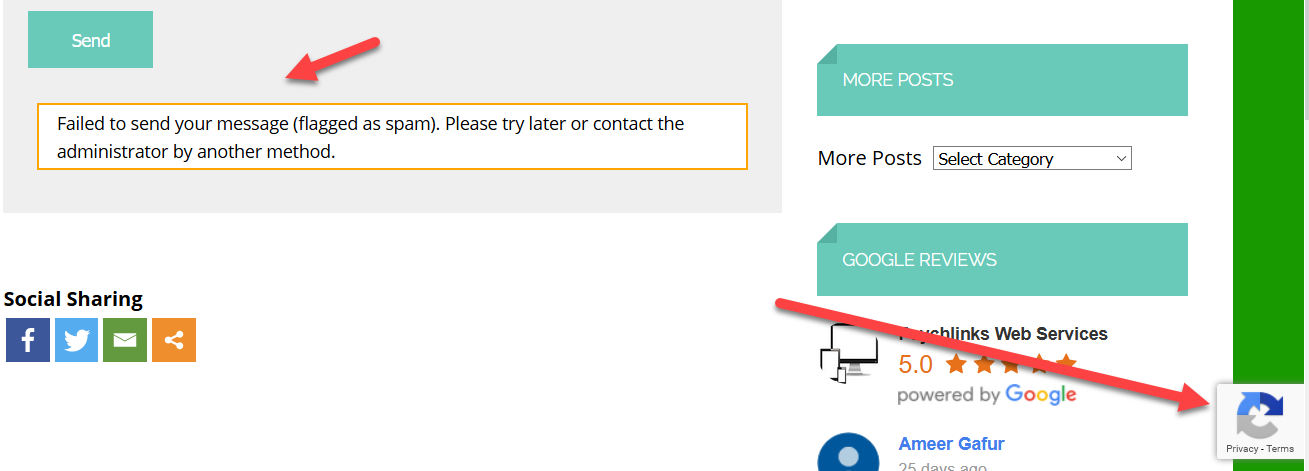
Okay. reCaptcha 3 reactivated. Contact form not working again – flagging simple message as spam.
Can’t upload screen shot here.
See screenshot at https://psychlinks.ca/flagged-as-spam.png
- This reply was modified 6 years, 6 months ago by djbaxter.
???
What does that mean? How would reactivating reCaptcha tell you anything?
Yes I registered quite a long time ago and yes I see the reCaptcha badge.
And everything was working without issue until approximately 5 days ago. Nothing else has changed. Same server. No new plugins. Just the regular updates.
I do know that Contact Form 7 with reCaptcha disabled still works.
So the possibilities are still to be determined:
- The latest WordPress update this week broke something;
- The latest Contact Form 7 update broke something; and/or
- Google has done something that broke reCaptcha 3.
All I’ve had time to do so far is
- isolate the problem to everything being blocked as spam by Contact Form 7 with reCaptcha
- confirm that as a temporary workaround I could get the contact forms working again by disabling reCaptcha on Contact Form 7
- update all the WordPress sites I manage to apply that workaround
I must say I’m getting a little annoyed by Contact Form 7. Not too long ago, they created a major headache by not clearly informing users that reCaptcha 2 would no longer work and that they had to update to reCaptcha 3. They could easily have done that with a notice in the Dashboard. That’s one reason I suspect we are going to find out that it is a CF7 problem and not one with either WordPress or reCaptcha.
- This reply was modified 6 years, 6 months ago by djbaxter.
Obviously disabling reCaptcha is not a long term option – just a temporary workaround.