donbowman

Forum Replies Created
-
I’ve re-confirmed in playground, w/ the default install, restricting tickets to just Event, it is adding meta data on a new pattern i create, even though that patter is a) not cpt Event, b) doesn’t contain an events calendar/rsvp/ticket block.
I have that set already. In Ticket Settings, Post types that can have tickets, i have ‘Event’ as the only checked box.
Here is a way to reproduce:
https://playground.wordpress.net/?plugin=the-events-calendar&plugin=event-tickets
- Open network in browser debug console
- setup the events calendar, use all defaults
- Go to dashboard
- Go to Appearance/Editor
- Go to Patterns
- Clear the network log in the console
- Select “Add Pattern’. Give it a name, select ‘Synced’
In the network log, you will observe, even though this synced pattern has nothing to do with tribe tickets, it has the ‘meta’ fields set for stock/price/tickets/etc.
This is a significant performance slowdown in wordpress, since unrelated pages it is doing all of the events calendar work (which is quite slow compared to other plugins).
Now, in the example above, for some reason it doens’t fail, but, it does the same thing. The POST/PUT it does below shows.
Since this synced pattern does not yet contain a tribe* block, and, is not of custom post type tribe*, I believe it should not have the code loaded/running.
{id: 8, date: "2025-07-31T00:38:22", date_gmt: "2025-07-31T00:38:22",…}
content
:
{raw: "", protected: false, block_version: 0}
date
:
"2025-07-31T00:38:22"
date_gmt
:
"2025-07-31T00:38:22"
excerpt
:
{raw: "", rendered: "", protected: false}
guid
:
{rendered: "https://playground.wordpress.net/scope:happy-sunny-forest/2025/07/31/test/",…}
id
:
8
link
:
"https://playground.wordpress.net/scope:happy-sunny-forest/2025/07/31/test/"
meta
:
{_price: "", _stock: "", _tribe_ticket_header: "", _tribe_default_ticket_provider: "",…}
modified
:
"2025-07-31T00:38:22"
modified_gmt
:
"2025-07-31T00:38:22"
password
:
""
slug
:
"test"
status
:
"publish"
template
:
""
title
:
{raw: "test"}
type
:
"wp_block"
wp_pattern_category
:
[]
wp_pattern_sync_status
:
""
_links
:
{,…}If i go to the site editor, create a new synced pattern, on open it immediately gives the same error, without having done the first save.
So the question is:
Why if the post type is not tribe_*, and, there is no tribe* block, is it running any code in the editor? This seems to be an enqueuing issue.
The system does a PUT to https://MYDOMAIN/wp-json/wp/v2/blocks/7561892?_locale=user
with the body as below when I do a save (this is from the network tools).
{id: 7561892, rank_math_seo_score: 8,…}
content
:
"<!-- wp:buttons {\"metadata\":{\"name\":\"save-to-pdf\"},\"className\":\"ticss-3803a7bf\",\"hasCustomCSS\":true,\"customCSS\":\".ticss-3803a7bf {\\n  position: absolute;\\n  top: 2%;\\n  right: 2%;\\n}\\n@media print {\\n  .ticss-3803a7bf {\\n    display: none !important;\\n  }\\n}\"} -->\n<div class=\"wp-block-buttons ticss-3803a7bf\"><!-- wp:button {\"className\":\"generate-pdf ticss-37330599 is-style-outline\",\"style\":{\"spacing\":{\"padding\":{\"left\":\"0\",\"right\":\"0\",\"top\":\"0\",\"bottom\":\"0\"}}},\"hasCustomCSS\":true,\"customCSS\":\".ticss-37330599 {\\n  /*\\n  width: 64px;\\n  height: 64px;\\n  */\\n}\\n.ticss-37330599 img {\\n  width: 24px;\\n  height: 24px;\\n  opacity: 0.8;\\n  border: 0px;\\n}\\n\\n.ticss-37330599 img:hover {\\n  width: 24px;\\n  height: 24px;\\n  opacity: 1.0;\\n}\"} -->\n<div class=\"wp-block-button generate-pdf ticss-37330599 is-style-outline\"><a class=\"wp-block-button__link wp-element-button\" style=\"padding-top:0;padding-right:0;padding-bottom:0;padding-left:0\"><img class=\"wp-image-7741796\" src=\"/www/eedbac7d-pdf_icon.svg\" alt=\"PDF_icon\"></a></div>\n<!-- /wp:button --></div>\n<!-- /wp:buttons -->"
id
:
7561892
meta
:
{_price: "", _stock: "", _tribe_ticket_header: "", _tribe_default_ticket_provider: "",…}
rank_math_seo_score
:
8
Looking at this in json format, the PUT is:
_locale
user
{"id":7561892,"rank_math_seo_score":8,"meta":{"_price":"","_stock":"","_tribe_ticket_header":"","_tribe_default_ticket_provider":"","_tribe_ticket_capacity":"0","_ticket_start_date":"","_ticket_end_date":"","_tribe_ticket_show_description":"","_tribe_ticket_show_not_going":false,"_tribe_ticket_use_global_stock":"","_tribe_ticket_global_stock_level":"","_global_stock_mode":"","_global_stock_cap":"","_tribe_rsvp_for_event":"","_tribe_ticket_going_count":"","_tribe_ticket_not_going_count":"","_tribe_tickets_list":"[]","_tribe_ticket_has_attendee_info_fields":false,"_EventAllDay":false,"_EventTimezone":"","_EventStartDate":"","_EventEndDate":"","_EventStartDateUTC":"","_EventEndDateUTC":"","_EventShowMap":false,"_EventShowMapLink":false,"_EventURL":"","_EventCost":"","_EventCostDescription":"","_EventCurrencySymbol":"","_EventCurrencyCode":"","_EventCurrencyPosition":"","_EventDateTimeSeparator":"","_EventTimeRangeSeparator":"","_EventOrganizerID":[],"_EventVenueID":[],"_OrganizerEmail":"","_OrganizerPhone":"","_OrganizerWebsite":"","_VenueAddress":"","_VenueCity":"","_VenueCountry":"","_VenueProvince":"","_VenueState":"","_VenueZip":"","_VenuePhone":"","_VenueURL":"","_VenueStateProvince":"","_VenueLat":"","_VenueLng":"","_VenueShowMap":false,"_VenueShowMapLink":false,"ep_exclude_from_search":false,"footnotes":"","refreshMe":"refreshUI"},"content":"<!-- wp:buttons {\"metadata\":{\"name\":\"save-to-pdf\"},\"className\":\"ticss-3803a7bf\",\"hasCustomCSS\":true,\"customCSS\":\".ticss-3803a7bf {\\n  position: absolute;\\n  top: 2%;\\n  right: 2%;\\n}\\n@media print {\\n  .ticss-3803a7bf {\\n    display: none !important;\\n  }\\n}\"} -->\n<div class=\"wp-block-buttons ticss-3803a7bf\"><!-- wp:button {\"className\":\"generate-pdf ticss-37330599 is-style-outline\",\"style\":{\"spacing\":{\"padding\":{\"left\":\"0\",\"right\":\"0\",\"top\":\"0\",\"bottom\":\"0\"}}},\"hasCustomCSS\":true,\"customCSS\":\".ticss-37330599 {\\n  /*\\n  width: 64px;\\n  height: 64px;\\n  */\\n}\\n.ticss-37330599 img {\\n  width: 24px;\\n  height: 24px;\\n  opacity: 0.8;\\n  border: 0px;\\n}\\n\\n.ticss-37330599 img:hover {\\n  width: 24px;\\n  height: 24px;\\n  opacity: 1.0;\\n}\"} -->\n<div class=\"wp-block-button generate-pdf ticss-37330599 is-style-outline\"><a class=\"wp-block-button__link wp-element-button\" style=\"padding-top:0;padding-right:0;padding-bottom:0;padding-left:0\"><img class=\"wp-image-7741796\" src=\"/www/eedbac7d-pdf_icon.svg\" alt=\"PDF_icon\"></a></div>\n<!-- /wp:button --></div>\n<!-- /wp:buttons -->"}
This was a brand new pattern. It was attached to a single brand new page, the template was not the events calendar.
I opened the page, then clicked on the synced pattern, then clicked edit original, then made a minor change, then hit save. It occurred here.
It reproduces for me all the time. But, when i tried a brand new empty installation of wordpress on playground it did not do this.
So is it possible that over time the migration of my database has had some issue?
Is there another diagnostic i can do to help?
Of course,
- PHP 8.4.10
- WordPress 6.8.2
- the-events-calendar 6.14.2
- events-tickets 5.25.1
- 2025 theme
not pro.
Forum: Plugins
In reply to: [Website LLMs.txt] Does not function with wp-statelessits also not as simple as just removing the lock, seems we are appending a bunch of small items rather than a single write, causing a rate limit issue.
[08-May-2025 15:03:08] WARNING: [pool www] child 82 said into stderr: "NOTICE: PHP message: PHP Fatal error: Uncaught Google\Cloud\Core\Exception\ServiceException: {"error":{"code":429,"message":"The object agilicus/www/localhost.llms.txt exceeded the rate limit for object mutation operations (create, update, and delete). Please reduce your request rate. See https://cloud.google.com/storage/docs/gcs429.","errors":[{"message":"The object agilicus/www/localhost.llms.txt exceeded the rate limit for object mutation operations (create, update, and delete). Please reduce your request rate. See https://cloud.google.com/storage/docs/gcs429.","domain":"usageLimits","reason":"rateLimitExceeded"}]}} in /app/wp-content/plugins/wp-stateless/lib/Google/vendor/google/cloud-core/src/RequestWrapper.php:434"Here are the steps.
step 1. open playground with only this block/theme (e.g. browse to:
https://playground.wordpress.net/?plugin=blocks-css&plugin=blocks-animation&theme=twentytwentyfive
step 2. add new blank page
step 3. add a block (e.g. group)
observe console log
otter-animation-css was added to the iframe incorrectly. Please use block.json or enqueue_block_assets to add styles to the iframe.
why does this show ‘resolved’?
Image is attached. THis happens when editing. The ‘animatins’ i have at the bottom right is from otter blocks (blocks-animation plugin). Merely opening a page for edit cause the error to appear in the log (no other action is required). the iframe is the sidebar i believe.
Forum: Themes and Templates
In reply to: [Twenty Twenty-Four] Embed is defaulting to hiddenHmm, ths might not be a theme thing.
in wp_filter_oembed_result() it adds this. But perhaps i need to add my own site in as a trusted oembed provider.
Forum: Plugins
In reply to: [Gutenberg] Form Block: insecure endpoint (Chrome)In the ‘view.js’ for the block of /wp-content/plugins/build/block-library/blocks/form, it does:
document.querySelectorAll('form.wp-block-form').forEach(function (form) {
 // Bail If the form is not using the mailto: action.
 if (!form.action || !form.action.startsWith('mailto:')) {
  return;
 }
so indeed it forces an action of mailto: or it won’t post.
The insecure… an https site cannot use mailto: (tons of posts online about this).
I believe this is a false check above, we don’t really want mailto (e.g. opening the mailer), we want http post.
Forum: Themes and Templates
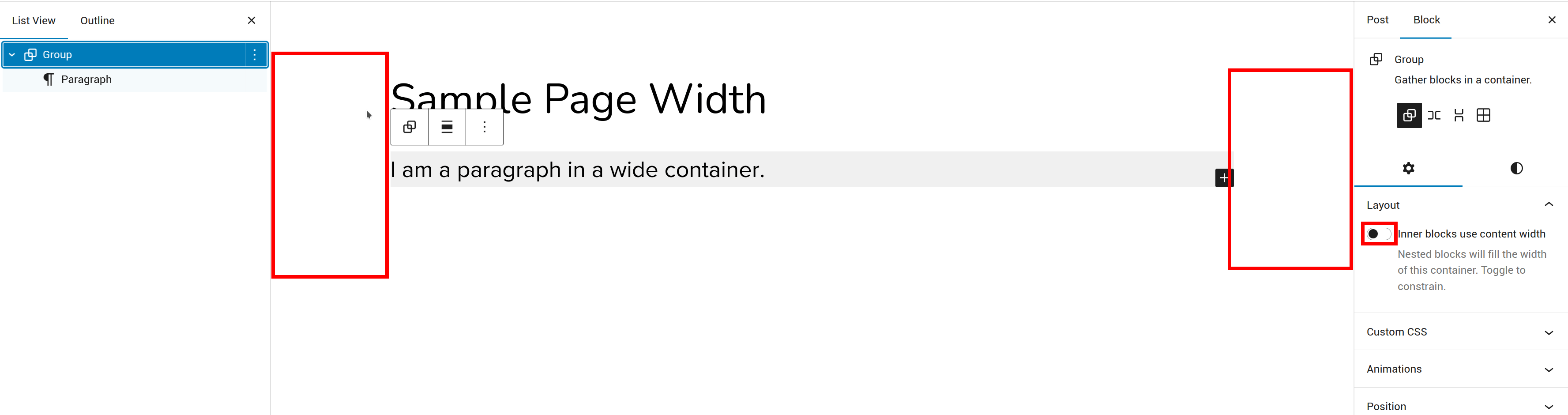
In reply to: [Twenty Twenty-Four] How to change editor width?I don’t see that option on ‘Page’, only on ‘Post’.
E.g. if i say ‘new post’, group gets that option, but ‘new page’, it does not.
 Forum: Themes and Templates
In reply to: [Twenty Twenty-Four] How to change editor width?the group is set to full width, and it is the group w/ the background colour.
when viewing the post, the group expands w/ colour to the entire width, but not when in the editor.
Forum: Themes and Templates
In reply to: [Twenty Twenty-Four] How to change editor width?I have this as a simple page/
<!-- wp:group {"backgroundColor":"light-grey","layout":{"type":"default"}} -->
<div class="wp-block-group has-light-grey-background-color has-background"><!-- wp:paragraph -->
<p>I am a paragraph in a wide container.</p>
<!-- /wp:paragraph --></div>
<!-- /wp:group -->
I then see this: