feri6

Forum Replies Created
-
That may have been the original goal, but it doesn’t work. We’ve tested it.
There is a product that comes in two variations: a 100-unit pack and a 1,000-unit pack. A total of 20,000 units of this product can be purchased (from both pack sizes combined!).
Even though we set this up, we added 20,000 units of the 1,000-unit pack to our cart, and it allowed us to add 100 units of the 100-unit pack as well, meaning there were 20,100 units in the cart, which is not allowed.Yes, does not help.
It works, but what’s the solution for variations with a shared inventory? In other words, you can’t buy more than x items in total across all variations.
For example, we offer both 100-piece and 1,000-piece packages of a product, but we source them from a single inventory. And we don’t want someone to buy all of the two different package sizes by adding them all to their cart.Here is the video with version 5.2.9: https://drive.google.com/file/d/1pt2GYvmxLK4iaXY-uqfmkM67O67mF48F/view?usp=sharing
The maximum quantity that can be purchased is displayed directly above the “Add to Cart” button on the product page (“Maximálisan vásárolható: x db”).
Error message at the end: “You have added 3 items to your cart, but the maximum quantity that can be purchased is 4.” (This doesn’t make any sense, and besides, it’s not even true.)It cannot be empty, it can be 0. It is 0 at our side.

Empty. We do not use this value for any product.
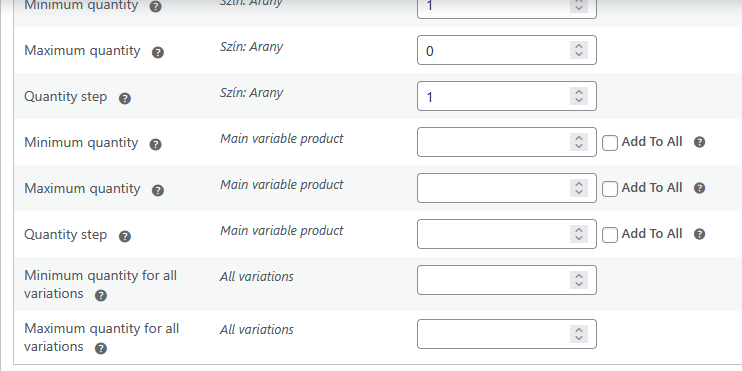
The problem is the same. Here are the settings:
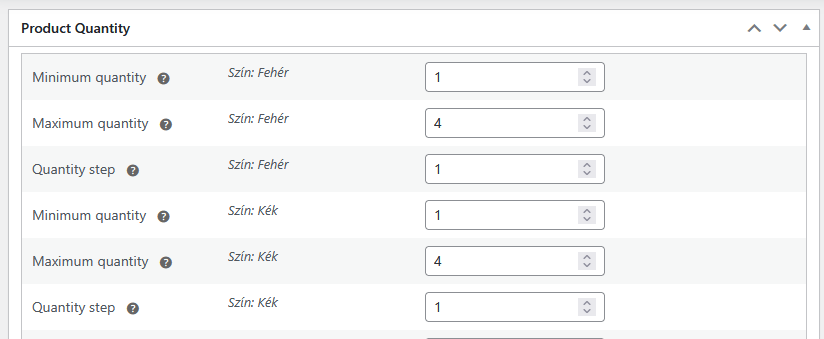
If I put 3 “Fehér” (white) items into the cart, I cannot put 4 “Kék” (blue) items into the cart, yet the two quantities are maximized separately and their stocks are managed individually.
- This reply was modified 3 weeks, 6 days ago by feri6.
The same problem occurs with version 5.2.8. If I order the maximum quantity of a particular color, I can’t add another color to my cart.
That works for now, but the original problem still remains.
We distinguish between two scenarios depending on whether the variants have separate inventory management or not.
1. If there is no separate inventory management: Then the current behavior is correct, meaning you cannot allow the customer to add more than the maximum purchase quantity to their cart in total across the two (or more) variations. You can allow a maximum of the highest maximum purchase quantity among the variations. Otherwise, the customer could use the individual variations to buy up the entire quantity in stock, which is exactly what we want to prevent.
2. If there is separate inventory management: Then the plugin isn’t working properly, because it doesn’t allow me, for example, to add 3 of the yellow product and 2 of the blue product to my cart if the maximum purchase quantity for the yellow product is 3. Yet in this case, I should be able to buy 2 of the blue product. (And of course, assuming there is sufficient stock of both.)
I hope this clarifies the issue.
We tested: If you add 1 units to the cart, and then add another 3 units of the same item, for example, it will display a message stating that you cannot purchase 7 units of that item, only 4 units. (The maximum purchase limit is 4 units in this example.)
It’s as if the system doubles the quantity placed in the cart (3 units) during the calculation, so it only allows you to add half of the maximum purchase limit to the cart.
Here is the video:
https://drive.google.com/file/d/1yIh9H0fU-qgeVX_yT2vaGMUtC9t6mMbg/view?usp=sharing
The text is Hungarian, but I hope you see the problem. Max. quantity is 21pcs from “Sötétzöld” variation, it is already in the cart. Max. quantity setting is 15pcs for “Nemzeti színű”, and I try to add 15 to the cart. It is not allowed, the error message says that it will be 36pcs in the cart (which is true, but theoretically I can still buy them separately in packs of 21 and 15). The max. quantity is displayed abouve the “Kosárba” (Add to cart) button.
I don’t recall changing the default settings, but what settings could be affecting this?
Thanks, works.
I ran a few tests and found out that W3 Total Cache is causing this problem. More specifically, it’s the Database Cache. When I disable it, everything works fine. (And the previous version works fine with the Database Cache enabled.)
It might be worth looking into what’s causing the problem.Unfortunately, we don’t see any change.
The step size for the variable product does not change. It remains 1, even though the step size is not 1 for any of the variations.Forum: Plugins
In reply to: [WooCommerce Analytics] Non-braking space is not handled in sumsGood question, and the answer will surprise you: I was not familiar with the unicode version of non-braking space. This really solves the problem, thanks!