wowlayers

Forum Replies Created
-
Hi David.
Thanks for replying.
1. There are no conflicts
2. There are no errors in the developer consoleI am running WordPress 5.9.2 and the last version of Yoast 18.3
Here it’s the code I use to update:
<?php //exit if accessed directly defined( 'ABSPATH' ) or exit; class Description_Yoast{ function __construct( $post_ID ){ $this->post_ID = $post_ID; add_action( 'wp', [ $this, 'desc' ]); } function desc(){ $new_focus_kw = 'New focus keyword'; update_post_meta( $this->post_ID, '_yoast_wpseo_focuskw', $new_focus_kw ); $desc = 'Some description'; $post = array( 'ID' => $this->post_ID, 'post_content' => $desc, ); wp_update_post( $post ); } } new Description_Yoast( $id );Sorry for pitching in on this topic, but I have a related question, and I don’t want to explain this situation again.
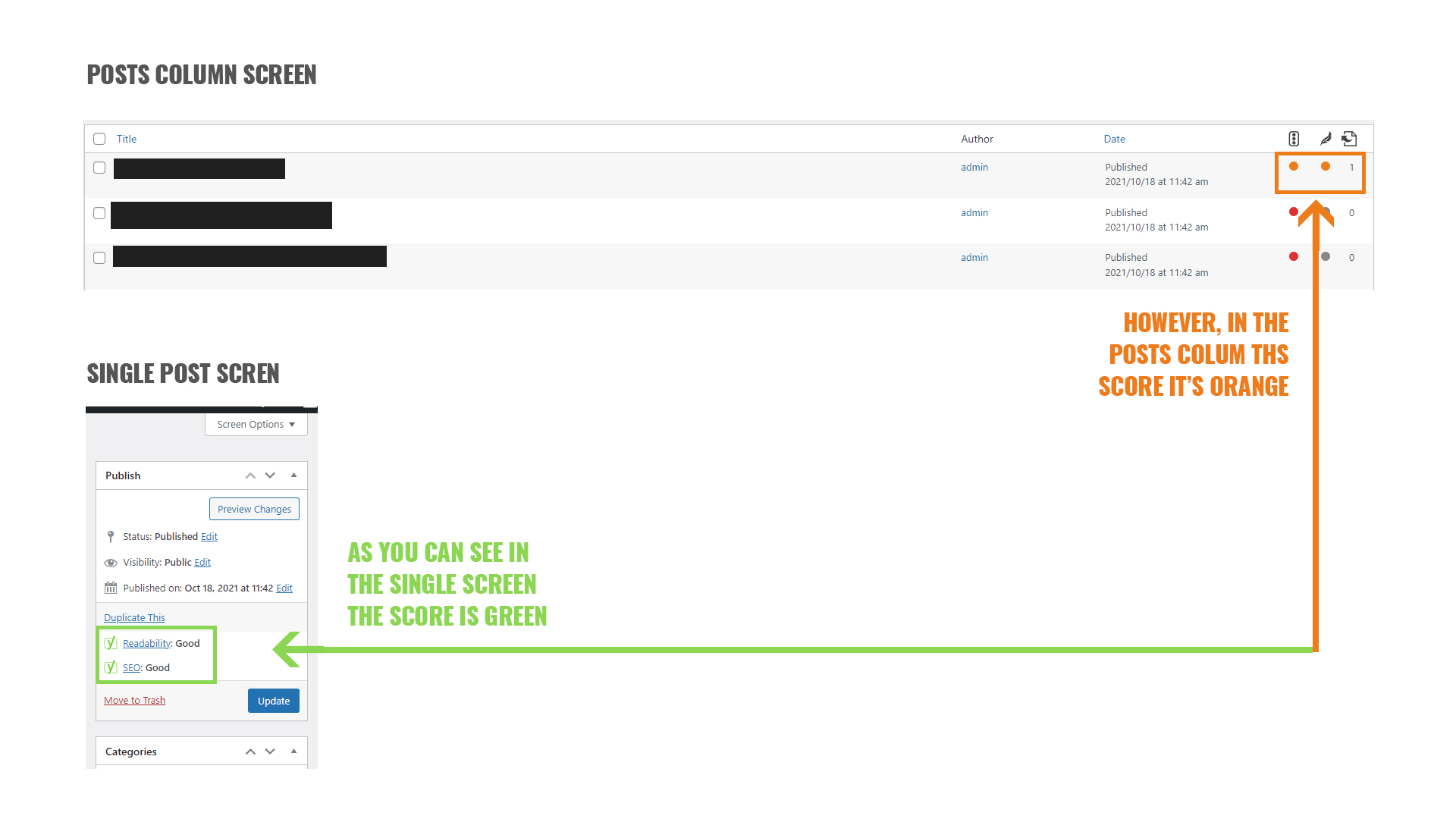
Anyway, I managed to update the meta description and focus keyword programmatically, but my problem it’s that the bullets from SEO Score and Readability won’t turn green in the posts columns list. However, in the single post edit screen, the bullets are green.
My question would be, how can I trigger Yoast to also make green the bullets from the post columns list? I used the
wp_update_postfunction right after updating the meta description and focus keyword, but it does not seem to work.Here it’s a screenshot to see this behavior in action and to better understand the problem.
Is there another trick to this?
Thanks so much.
Forum: Reviews
In reply to: [Uber WPBakery Addons] Thanks for this great plugin.Thank you for your kind words 🙂
Stay tunned, there are more blocks coming your way 🙂Login with FTP and add the following code in functions.php :
if ( !function_exists( 'wp_kses_normalize_entities' ) ){

function wp_kses_normalize_entities( $string ) {
    // Disarm all entities by converting & to &
    $string = str_replace( '&', '&', $string );

    // Change back the allowed entities in our entity whitelist
    $string = preg_replace_callback( '/&([A-Za-z]{2,8}[0-9]{0,2});/', 'wp_kses_named_entities', $string );
    $string = preg_replace_callback( '/&#(0*[0-9]{1,7});/', 'wp_kses_normalize_entities2', $string );
    $string = preg_replace_callback( '/&#[Xx](0*[0-9A-Fa-f]{1,6});/', 'wp_kses_normalize_entities3', $string );

    return $string;
}

}
That should temporary fix the problem, until you find the origin of the problem.
- This reply was modified 6 years, 6 months ago by wowlayers.
Forum: Fixing WordPress
In reply to: Fatal ErrorIf you can login to your backend, go to Appearance > Theme Editor
Open functions.php, and paste the following code at the end of the filefunction theseo_set_globals(){ }Please note that this is a temporary fix, you’ll need to contact the theme developer and inform him about this error.
Forum: Fixing WordPress
In reply to: website migration adviceYup, that is correct.
Add this code in the .htaccess file of the wegoplaces.me website#Options +FollowSymLinks RewriteEngine on RewriteRule ^(.*)$ https://gocampingexpert.com/$1 [R=301,L]Cheers