funkyplaid

Forum Replies Created
-
Forum: Plugins
In reply to: [Extensions for Leaflet Map] Hover with Other Leaflet ElementsOkay, interesting update. If I append [hover] to only leaflet-marker and leaflet-polygons, hovers work on all elements on the page. If I append my leaflet-circles with [hover], none of the hovers work. Should I be using [hover] with each element on my page, or one universal instance of it?
Also, do you know if there is a way to disengage the pop-up upon clicking if the hover function is working? Both seem to come up upon hovering and clicking.
Lastly, is there a way to control formatting of style and location the hover window appears? I have no problem formatting the window upon clicking, but the hover window doesn’t respond to the same CSS code.
Examples:
hover pop-up
click pop-upForum: Plugins
In reply to: [Extensions for Leaflet Map] Hover with Other Leaflet ElementsThanks very much!
Confirming that polygons work now:
[leaflet-polygon latlngs="-37, -129; -45, -128; -44, -120; -36, -120" color="green" fillColor="yellow"]Meal Market[/leaflet-polygon][hover]but my circles still do not:
[leaflet-circle lat="-12" lng="-130.25" radius="5" fillColor="#D54C27" color="red" weight="2.2" fillOpacity="0.4"]Parliament Close[/leaflet-circle][hover]Your latest update also seems to have fixed
[zoomhomemap fit/!fit], which did not work for me until the latest version.Forum: Plugins
In reply to: [Extensions for Leaflet Map] Hover with Other Leaflet ElementsJust a couple examples of my elements are below.
[leaflet-circle lat="-12" lng="-130.25" radius="5" fillColor="#D54C27" color="red" weight="2.2" fillOpacity="0.4"]Parliament Close[/leaflet-circle]

[leaflet-polygon latlngs="-37, -129; -45, -128; -44, -120; -36, -120" color="green" fillColor="yellow"]Meal Market[/leaflet-polygon]
Forum: Themes and Templates
In reply to: [MinimalistBlogger] Customizing Content OptionsI might be cheeky and also ask if there is a way to display categories and tags on each individual post page. I know the title of the theme includes “Minimalist”, but it would be great to have these options available!
Thanks,
DarrenForum: Plugins
In reply to: [Leaflet Map] Leaflet Image IssuesThanks for dropping this here. We’ll give it a shot in the coming weeks and see how it all works!
Forum: Plugins
In reply to: [Leaflet Map] Leaflet Image IssuesUnderstood. I’ll be watching closely to see what happens with the plugin going forward. Would love to see those mouseovers at some point, too!
Once again, thanks for all of your work on this.
Forum: Plugins
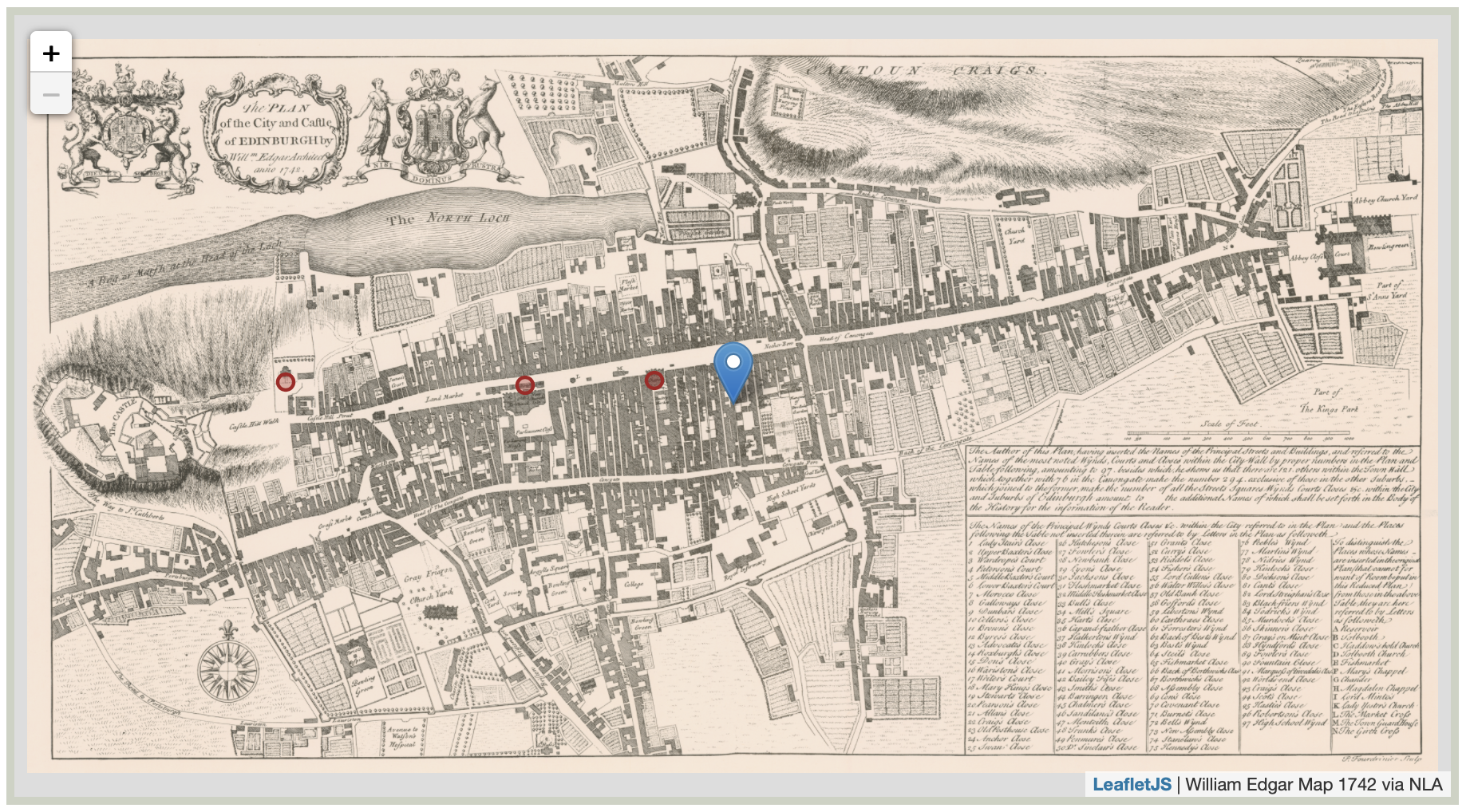
In reply to: [Leaflet Map] Leaflet Image IssuesThanks for your response! Regarding the zoom issue, I seemed to have figured it out through trial and error. My problem now is that I’m unable to set the initial default zoom to show the full map upon load. The full line is here:
[leaflet-image source="https://jdb1745.net/littlerebellions/wp-content/uploads/2020/03/Edgar1742Map.png" width="100%" height="500" zoom="2.5" max_zoom="4" zoomcontrol scrollwheel attribution="<a href=https://leafletjs.com>LeafletJS</a> | William Edgar Map 1742 via NLA"]Max zoom is working correctly and the ‘zoom’ tag is actually capping the zoom-out to the full size of the map as depicted in the image below. Yet I would think that ‘zoom’ should set its initial display upon load. Instead, the default zoom shows a close-up upon load. Min zoom doesn’t seem to do anything, hence it not being present in the code above.
https://jdb1745.net/littlerebellions/wp-content/uploads/2020/03/leaflettest.png
Your suggestion about removing the quotes around the URL works in the attribution tag. Thanks for that. WP puts them in automatically upon switching to the WSYWIG editor, so the post needs to be published from the text editor to keep them out. Fun stuff!
Separate to this, is there any chance of seeing two specific functions being brought into a future version of this plugin:
1) Mouse-over tooltips rather than click to display
2) An option for a display box to remove all markers, like this:http://www.meiotic.co.uk/my/research/map-of-gaelic-placenames/
Thanks for your great work on this project and also for your help here in the forum. It’s really awesome to be able to use Leaflet with our WP installations and I’m very appreciative.
Cheers,
DarrenForum: Themes and Templates
In reply to: [Hemingway] HTML5 Markup issue?Hi, I was wondering if you might be able to have a look at my issue above and let me know if there is any veracity to the claim of the Simple Lightbox author regarding out-of-date HTML5 markup in Hemingway. Unfortunately, my image captions are still not displaying.
Thanks kindly,
DarrenForum: Plugins
In reply to: [Simple Lightbox] Image Titles/Captions No Longer AppearingI’ll do that right away. Thanks very much for your attention and your suggestions – and, of course, for the great plugin!
Cheers,
DarrenForum: Plugins
In reply to: [Simple Lightbox] Image Titles/Captions No Longer AppearingThanks for your response. You are correct that my images in the Media Library are not showing any captions, but as you see in the attached image, I entered captions in the Image Details view from the WP post editor. This method worked for many months with no problem and the captions are still present in this view, as well as actually in the editor view, so I’d be interested to know what’s caused this change.
In the interim, it’s good to know that I can double-up on the captions and add them into the Media Library view. Do you have any idea why they’re not pulling from the other view?
Hi Fotis;
I have the newest version of Adblock Plus on both browsers, so that shouldn’t be the issue. I did try deactivating the extension anyway, which failed to yield any results.
I updated my laptop to Mohave last night and the Like button still won’t work on my MacBook Pro. So strange!
Thanks,
DarrenHi MH;
Thanks for your quick reply. This seems to be an intermittent issue which makes no sense to me. Very odd, indeed!
• I’m using Safari Version 12.0 (13606.2.11) on both my desktop and laptop Macs while logged into WP. I am able to activate the click while on my desktop but not on my laptop, whereas I was able to do so on my laptop yesterday before I logged out of WP and back in again. I was also then unable to activate the button on mobile Safari, but I am now able to do so.
• I remain unable to activate it on my laptop, even after a full browser restart. Again, it works fine in both Chrome and Firefox.
• I was first alerted to this by my wife using a different Mac laptop running the same, newest version of Safari. Even though she was logged in to WP, she was not able to activate the button on either her or laptop or mobile devices. She was, however, able to like the latest post from her iPhone while at work (at a different location).
For some reason, both my wife’s laptop and my laptop no longer allow us to click the button with success. The pop-up window’s URL appears to show public.api/connect/verify? and some other string of characters before closing with no effect. Both of our phones seem to work now, regardless of location. We’re using the same wi-fi network and we have fairly new MacBook Pros.
I appreciate you working with me on trying to figure this out and I’m sorry that it’s such a weird, convoluted issue!
Thanks kindly,
Darren