glaeswer

Forum Replies Created
-
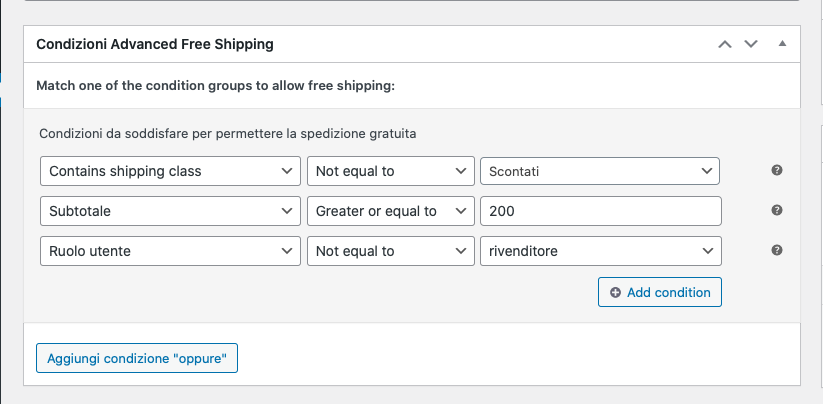
Here is how the conditions are set:
https://i.postimg.cc/CKVSxdm8/Schermata-2022-03-01-alle-15-29-53.png
but the user role “rivenditore” still sees the free shipping method.
–
Here, as you can see (I’m sorry it’s in Italian), there’s no “coupon” option.
Forum: Plugins
In reply to: [WooCommerce] SKU not recognised during CSV ImportYes, I don’t remember what was the header before too! Anyway I resolved the problem and now is updating also the new products.
Forum: Plugins
In reply to: [WooCommerce] SKU not recognised during CSV ImportFor some obscure reason this is the procedure: first I must put a letter before the SKU number, then save, delete the letter and save again.
Forum: Plugins
In reply to: [WooCommerce] SKU not recognised during CSV ImportI’m slowingly resolving the issue. I’m rewriting the SKUs on the catalogue one by one.I cannot find something wrong in them and they worked in the past, but something must be wrong.
Forum: Plugins
In reply to: [WooCommerce] SKU not recognised during CSV ImportTried again…nothing has changed.
Forum: Plugins
In reply to: [WooCommerce] SKU not recognised during CSV ImportI have another wordpress/woocommerce installation with the same products (but WordPress 5.0.4) that I use for testing and is working fine.
- This reply was modified 7 years, 1 month ago by glaeswer.
Forum: Plugins
In reply to: [WooCommerce] SKU not recognised during CSV ImportThe columns match, there are not hidden characters and the codes are the same. I also tried to import directly (not updating) and it indeed imported the code in the correct position. Strangely the codes used were the same of the existing products and there wasn’t any warning about it.
Forum: Plugins
In reply to: [WooCommerce] SKU not recognised during CSV ImportThe csv file is a converted json file because is from a supplier which provides only JSON or TSV files. And the TSV is very difficult to convert.