Shubham

Forum Replies Created
-
Forum: Plugins
In reply to: [Dark Mode Toggle] Images stopped invertingI still do not see it. Check in a new browser tab (incognito) as a non-logged-in user.
Could you temporarily deactivate the cache plugin so I can look into the issue?
Forum: Plugins
In reply to: [Dark Mode Toggle] Images stopped invertingHi @mikehindle,
Your homepage seems to be cached for non-logged in users.
I don’t see the toggle button on your homepage.
Could you purge the page cache?
Forum: Plugins
In reply to: [Login Security Captcha] Allow specific IPs to bypass CaptchaIf you mean a web server whitelist, then no. The plugin works inside WordPress, so server-level rules will not bypass it.
Forum: Plugins
In reply to: [Login Security Captcha] Allow specific IPs to bypass CaptchaHi @koulouridis,
Currently, the plugin does not support IP whitelisting. Also, I do not have an estimate on when it can be added.
Forum: Plugins
In reply to: [Dark Mode Toggle] Stop FooGallery Lightbox images invertingHi @cuffley,
You can try this CSS in “Appearance” > “Customize” > “Additional CSS”:
.darkmode--activated .fg-media.fg-loaded .fg-media-content { filter: invert(0); }
.darkmode--activated .fg-panel-thumb-media { filter: invert(1); }
Forum: Plugins
In reply to: [Dark Mode Toggle] Stop Lightbox Images InvertingIn the previous CSS, you would add another line, so it would be:
body.darkmode--activated #glightbox-slider .gslide-image {
	--glightbox-image-shadow: 1px 2px 9px 0px rgba(255, 255, 255, 0.65);
	filter: invert(1);
}
In the above value, you can adjust this value: rgba(255, 255, 255, 0.65)
CSS with possible values:
body.darkmode--activated #glightbox-slider .gslide-image {
	--glightbox-image-shadow: 1px 2px 9px 0px rgba(0, 0, 0, 0.25);
	filter: invert(1);
}
body.darkmode--activated #glightbox-slider .gslide-image {
--glightbox-image-shadow: 1px 2px 9px 0px rgba(0, 0, 0, 0.40);
filter: invert(1);
}body.darkmode--activated #glightbox-slider .gslide-image {
--glightbox-image-shadow: 1px 2px 9px 0px rgba(255, 255, 255, 0.35);
filter: invert(1);
}Forum: Plugins
In reply to: [Dark Mode Toggle] Stop Lightbox Images InvertingHi @mikehindle,
You can use this global CSS. It should fix the issue.
body.darkmode--activated #glightbox-slider .gslide-image {
	filter: invert(1);
}
In “Appearance” > “Editor” > Click anywhere on the page. It will open the block editor view.
Then, click on 3 dots beside “Styles” > “Additional CSS”, paste the above CSS code and click “Save”.
You may also use “Additional CSS” field in the customizer instead.
In the URL, your domain and then /wp-admin/customize.php?autofocus[section]=custom_css
The sidebars go down to the bottom when there is less space (small screens).
If you want a single sidebar layout, then simply remove all the widgets from any one of the sidebars.
Hi @kmp2,
The sidebars show up in a single post view.
This is how the theme works. It shows the sidebars when you view the single post. It does not show them in the grid of posts.
I can see both the sidebars are visible on your website when viewing the single post view.
Forum: Plugins
In reply to: [Login Security Captcha] Captcha Settings not workingThere is no support for third-party plugins at this time, as they can be difficult to maintain.
You may let them know in their support forum about this.
Forum: Plugins
In reply to: [Login Security Captcha] Captcha Settings not workingNo, it will not work for forms coming from those plugins. It only works with standard WordPress forms.
Those plugins you mentioned have built-in reCAPTCHA feature. You can check their docs to know where to provide the keys.
Forum: Plugins
In reply to: [Login Security Captcha] Captcha Settings not workingThe plugin supports CAPTCHA on WordPress standard forms.
May I know which form it is on your site?
Forum: Plugins
In reply to: [Login Security Captcha] Captcha Settings not workingHi @mikelimit9999,
First, you need to provide the site key and secret key.
Go to “Settings” > “Login Security” > “Captcha Settings”. Here, select the captcha type and provide its keys.
Each captcha type, such as Cloudflare Turnstile or reCAPTCHA v3, requires a different set of keys.
Once set, you can check “Enable Captcha” for a form and select which captcha type you want to use for that form.
Forum: Plugins
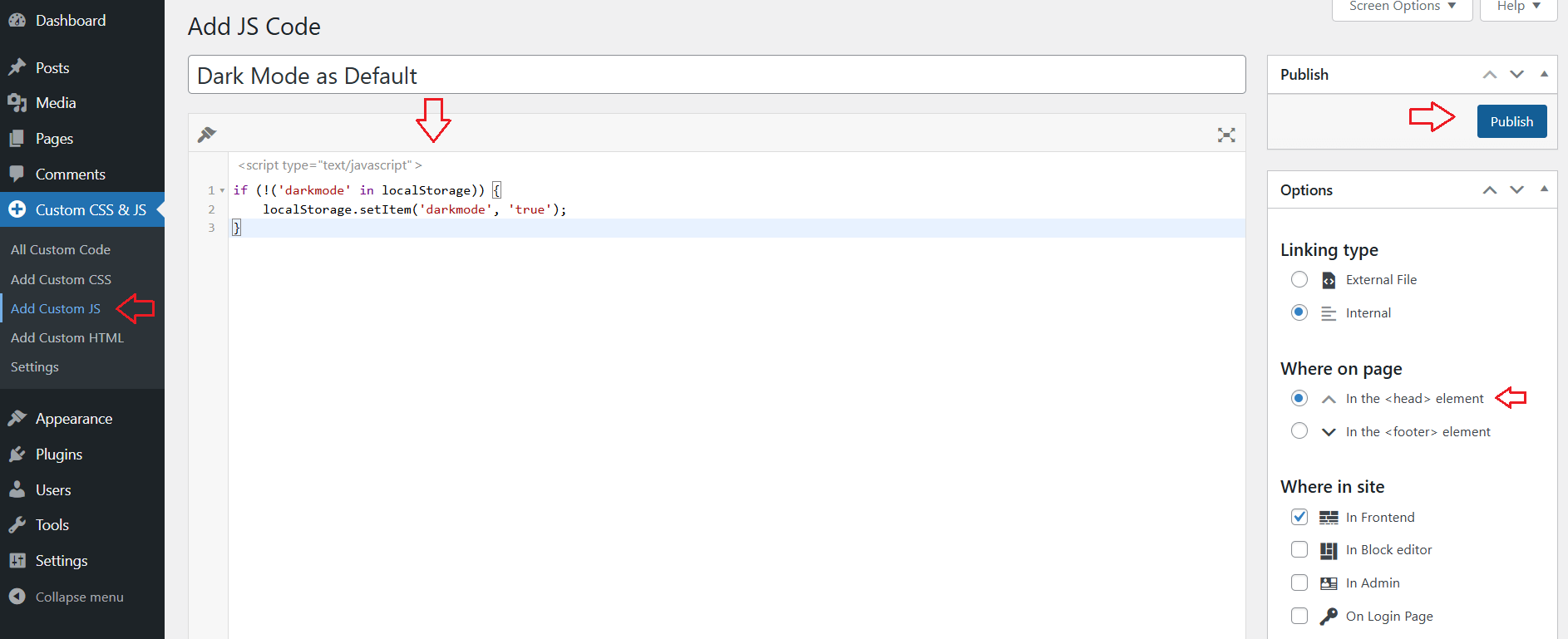
In reply to: [Dark Mode Toggle] Is there a way to have the light mode active?See the below screenshot, this is what you would need to do after installing “Simple Custom CSS and JS” plugin, the JS code is:
if (!('darkmode' in localStorage)) {
    localStorage.setItem('darkmode', 'true');
}
Also, purge the cache after applying the JS code in case you are using any caching plugin.
 Forum: Plugins
In reply to: [Dark Mode Toggle] Is there a way to have the light mode active?Hi @ellain3gab,
To set dark mode as default, you can install and activate this plugin “Simple Custom CSS and JS”:
https://ww.wp.xz.cn/plugins/custom-css-js/Then, you can navigate to your WordPress admin menu > “Custom CSS & JS” > “Add Custom JS”.
You can give that code any title like “Dark Mode as Default” and add this JS code (replace everything with below 3 lines of code):
if (!('darkmode' in localStorage)) {
    localStorage.setItem('darkmode', 'true');
}
Set “Where on page” to “in the head element”.
Lastly, click “Publish” to load the JS code. This will turn on dark mode by default for the first page load.
You can then check this behavior in any browser with Incognito mode.