hazzardzone

Forum Replies Created
-
Forum: Fixing WordPress
In reply to: New Computer Logging in ProblemsIf you have the chrome browser on both machines you might try using cast from the logged in browser to send a dashboard page to the other machines chrome browser.
@jnashhawkins Are you speaking of Chromecast? If so, I don’t have the device. Assume some sort of cast capability from one browser to another doesn’t come built-in? So I’d need to order the device and deal with the issue until it gets here, right? Just trying to clarify. Thanks for your help.
- This reply was modified 5 years, 11 months ago by hazzardzone.
Forum: Fixing WordPress
In reply to: New Computer Logging in ProblemsAre you using a security plugin of any type that changes your login URL?
If you’re talking about a WordPress plug-in, no. But this new machine has been full of surprises, so I suppose it’s possible it’s been throwing curves at my admin area access.
Also not familiar with the McAfee anti-virus/web protection program which came on the machine w/1 year introductory membership.
Transitions shouldn’t be this hard! I seem to kill 3-4 weekends trying to power through issues every time I get a new device. CHEESE N’ CRACKERS!!!
Forum: Fixing WordPress
In reply to: Password Protecting a Staging SiteOne more question. If I password protect the subdirectory appearing right after the root, does that then protect the entire subdomain?
Forum: Fixing WordPress
In reply to: Password Protecting a Staging SiteThank you Steve.
Can I assume each subsequent page or post will have that URL with its own subdirectory extended out beyond? A la: subdomain.rootdirectory.com/passwordprotectedsubdirectory/newpost
Sorry, I’m a bit thick
Forum: Fixing WordPress
In reply to: Password Protecting a Staging SiteI see a disclaimer there stating: It is up to search engines to honor this request. I believe when content is pw protected they have no choice in the matter. I’d like to be sure. So I re-submit my question.
Forum: Localhost Installs
In reply to: Test WordPress SiteTY. I may need clarification at some point. Can this topic be left open for a month or so?
Forum: Localhost Installs
In reply to: Test WordPress SiteMy understanding of a WordPress test site is that it involves writing code to partition off a portion of your server space so you can hide a new or duplicate site for testing.
My understanding of a sandbox is that a new site, or a duplicate of your existing site is created using a plugin.
Evidently both the “test site” and “sandbox” methods are limited as to what can actually be accomplished. For example, the sandbox allows you to test different themes and CSS, but you cannot use plugins. Also partitioning my server space requires that my server support some algorithm or other, which it does not.
And that brings us back around to to my original question. About downloading WordPress, as well as a backup of my existing site to my desktop computer. This is called a “localhost” and makes it possible to put WordPress through its paces. Plugins and all.
That’s what I want to do. Have a totally separate and independent work area with full WordPress functionality. Where I can test themes, create content, use plugins, fiddle with style sheets, et al.
Then, when I get it all as I want it, I wish to back it up and restore it to my current publicly accessible server. Effectively overwriting my existing site.
A search brought up a page in the WordPress forums which claimed to give step-by-step instructions for doing all that. So clearly it’s possible, and has in fact already been done. Unfortunately, the page was incomplete. With a short sentence at the end saying something like “More to come.” And that was the end of it. More never came.
I’d think such a localhost setup would be so popular as to elicit a myriad discussions, but I can’t find anything else.
So far I’ve succeeded in loading the latest version of WordPress on my computer, as well as a backup of my existing site. However without instructions on how to proceed from there, then overwrite my existing site with the resulting content, it’s for naught.
Please help.
- This reply was modified 6 years, 10 months ago by hazzardzone.
- This reply was modified 6 years, 10 months ago by hazzardzone.
- This reply was modified 6 years, 10 months ago by hazzardzone.
- This reply was modified 6 years, 10 months ago by hazzardzone.
Forum: Localhost Installs
In reply to: Test WordPress SiteNot sure what’s meant by “Everyone has their own workflow”?
If you’re referring to the Workflow plugin, its objective appears to be helping manage content publication on multiple author websites. Nothing to do with my scenario.
I need to test a new themes and layouts off the grid so-to-speak. Then, when it is to my liking I wish to overwrite my current site with it.
Forum: Localhost Installs
In reply to: Moving your test wordpress site to your websiteThanks for your response. I appreciate the tip, though I had some difficulty following it.
My question remains unanswered. Perhaps I should revise it to include two more specific parts:
-
1. How is an existing website downloaded to my desktop for re-tooling with full WP functionality?
2. How then is the existing live site replaced with the re-tooled site from my desktop?
I’m not interested in creating a sandbox, or a WP test area at this time.
Thanks in advance for any help on this.
- This reply was modified 6 years, 10 months ago by hazzardzone.
Forum: Everything else WordPress
In reply to: Theme Support Discontinued. Where Does that Leave Me?Thank you.
Any idea why it is still offered here on ww.wp.xz.cn? And it’s forum is still open, even though apparently abandoned?
Thank you Chris.
Please explain why MonsterInsights (purple section in pie chart below) shows up as one of the top three impacts (18%) on my page load time when I do a plugin profile.
Thanks,
Dave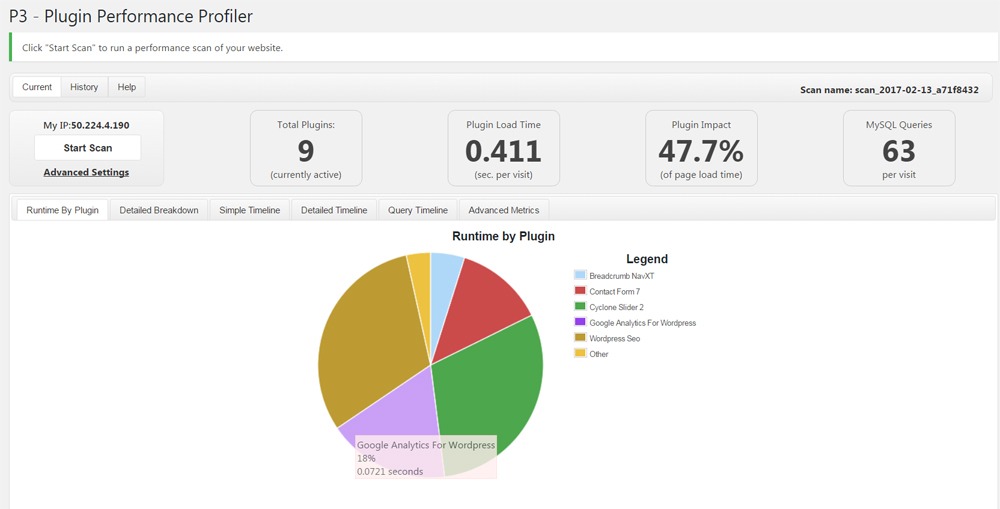 Forum: Themes and Templates
In reply to: [HappenStance] Search FormWell, I’ve cleared my cache (Duh!). I now have more favorable results, but, when clicked on, the border around the text entry field remains the original theme color – in Google only.
?
Forum: Themes and Templates
In reply to: [HappenStance] Search FormThanks! Works great in Firefox and, what? IE? But NOT in Google.
Any thoughts? What must I do? Put “!important” in there somewhere?
Thanks again,
Dave