hellbertos

Forum Replies Created
-
Thanks @anotherdave
Like flaggfish, I couldn’t get to the admin panel due to a “fatal error”. Using your technique I was able to get in and get it updated. Now only 8 more sites to go 🙂
@chrisakelley Thanks for jumping on this and getting a hot fix out there. Much appreciated!
Forum: Plugins
In reply to: [Ultimate Responsive Image Slider] Migrating site images disappearHi Weblizar-
Thank you for the informative post. Considering I’m very far into the migration process; in fact, I only have to fix the slider image paths…
I wonder if there is a way to manually change that path in a php file or?? I’m just worried that A) I might muck something else up B) I’ll forget the next time I need to do this and be in the same position.
Thank you for any guidance you can share and for such a wonderful plugin!! I hope to sell the pro version on my upcoming projects!
-J
Yeah, that’s what I thought and pretty much how it worked previously, so I have no idea how or why this happened; twice in 24 hrs to two different products, one of which I know was configured correctly.
I’m completely mistified.
Sure Mike. Thank you for the help. I have no idea why its doing this since everything has worked so well up to this point.
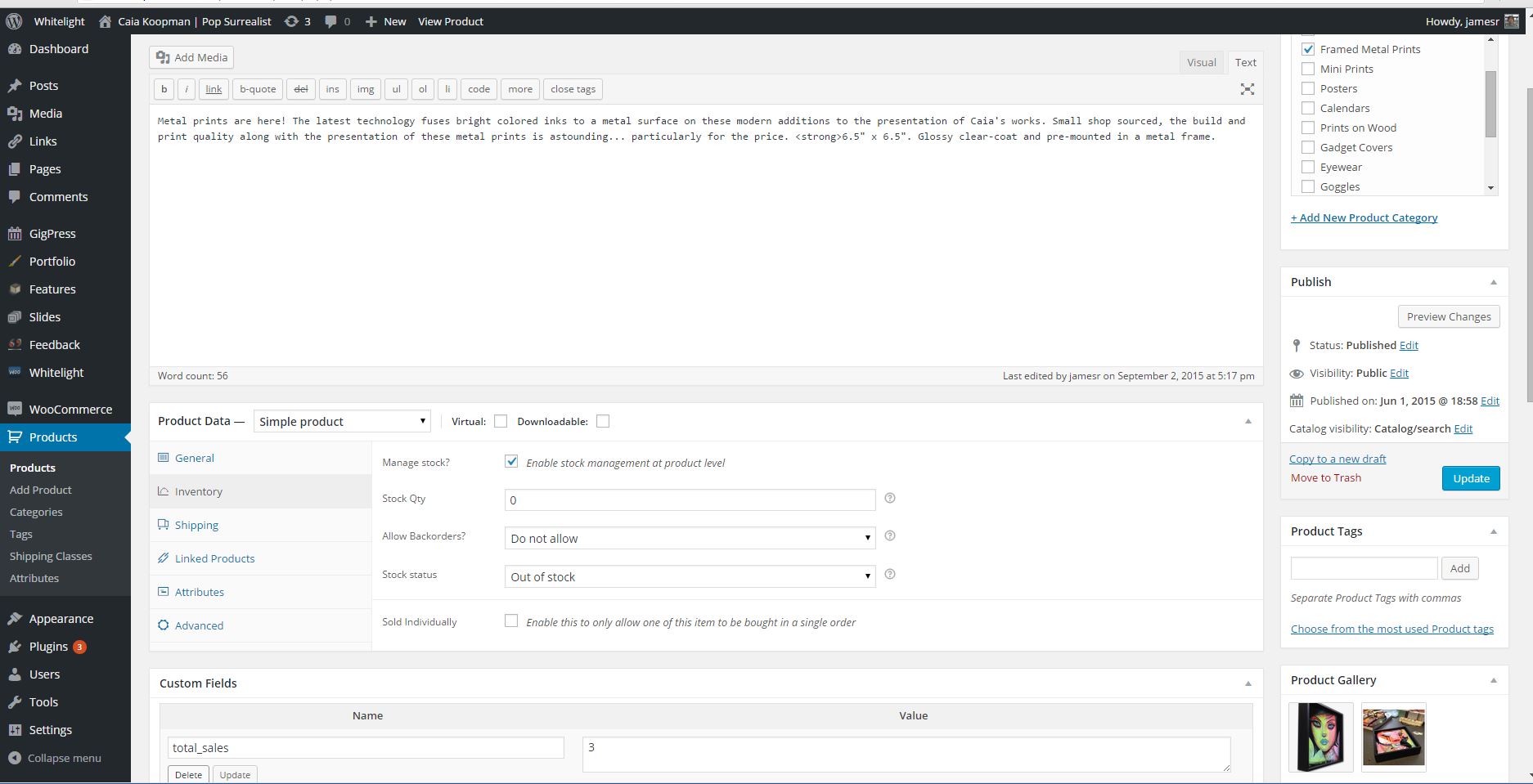
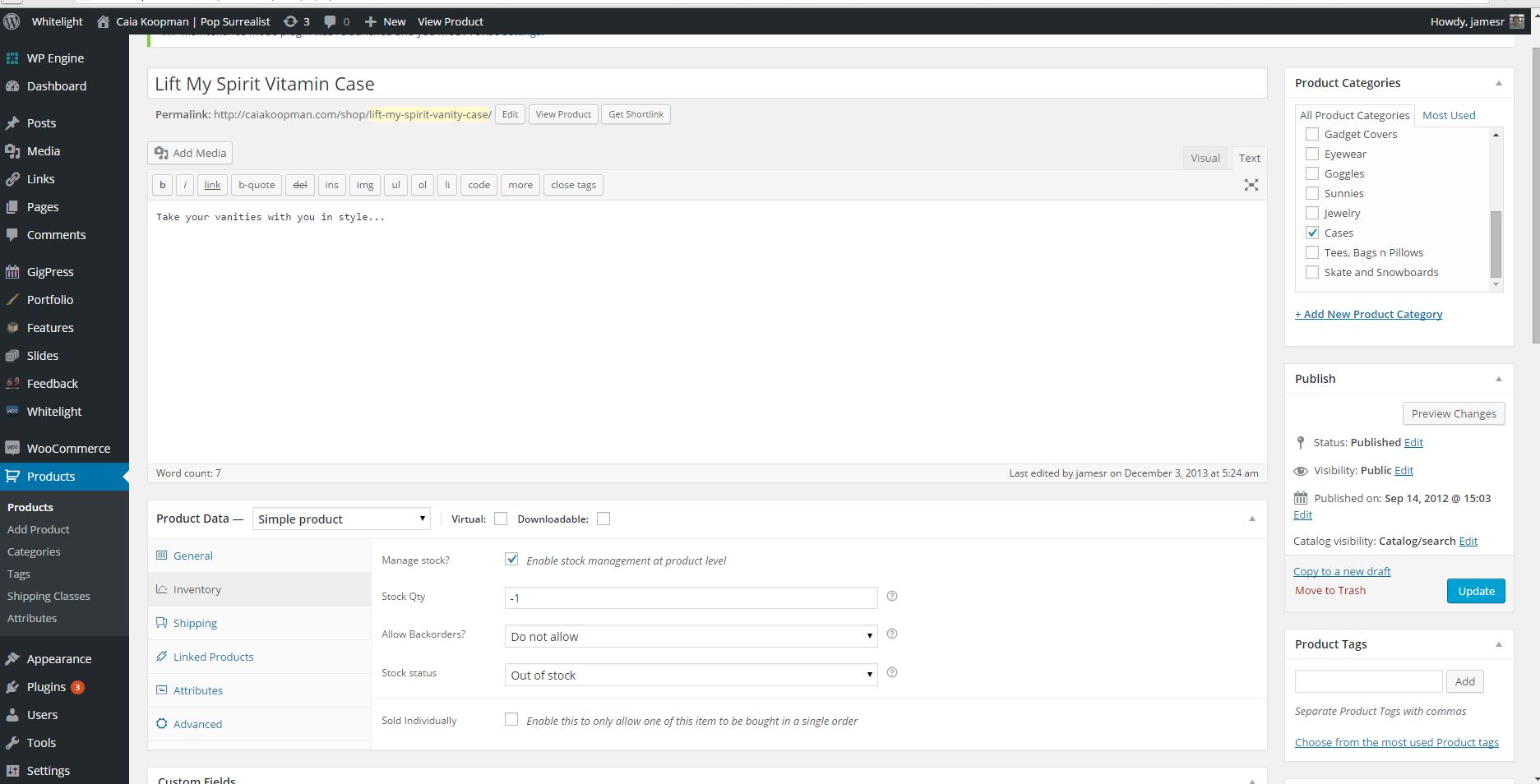
Here are the two products inventory sections (note: I changed the framed print initially back to 0 when this first occurred. It formerly indicated an inventory of -1; just like the case).
Can’t figure out how to include an image, so heres a couple links
http://www.mineralmedialabz.com/caia-screens/inventory-screen-1.jpg
http://www.mineralmedialabz.com/caia-screens/inventory-screen-2.jpg
Hope this helps! Thanks again for taking a look
They are both simple product types.
Thanks for getting back Mike! I checked in the db (wp_posts) and didn’t see a “product_type”. Under post_type the are both classified as “product”. Neither are of variable product types.
Is that the information you’re asking for??
Resolved!
Hey there Malihu! Thanks so much for getting right back. I followed the link you gave back to where I started and went back through it. Going back through, I figured it out. I wasn’t loading in the correct sequence. Duh.
I’m really appreciate the rapid response to help me get going. Really looking forward to tinkering w/ your plugin on this little site. Thank again! And, great work!
Forum: Plugins
In reply to: [Contact Form 7] File Attachment is sent as binaryFOLLOW UP: Hi Takayuki-
In the scheme of things, I needed to make something happen fairly expediently, so I went back to my dev site and tried some other stuff like updating, etc. Still didn’t work. In the end, I uninstalled, resigned to use a different plugin… when it hit me, I should do a fresh install. Nothing to lose at this point.
That did it! I had to redo all of the forms, but I am happy to say CF7 is working as it should! Thank you SO much for responding. 🙂
Forum: Plugins
In reply to: [Contact Form 7] File Attachment is sent as binaryHi Takayuki-
Thank you so much for responding. I did try that. I deactivated every plugin (only had Revolution Slider and Google Site Maps besides CF 7 and RSCaptcha) and switched to 2014 Theme. It still doesn’t work. I spent a fair amount of time w/ GoDaddy support to try to determine is wasn’t a setting on their side.
Its strange as it works fine, just not the attachment part. Any ideas?? Its pretty crucial as they want respondents to upload their resume.
I’d be happy to pay you for your time if you can help me get this going. PM me if you have the time desire to log in and look.
Thank you
Forum: Plugins
In reply to: [Contact Form 7] File Attachment is sent as binaryI thought it might help if I added the email headers. This is what is there:
MIME-Version: 1.0
Content-Type: multipart/mixed;
boundary=”b1_915bf4492e4a90f6f0ad49496d232ad2″
Content-Transfer-Encoding: 8bit–b1_915bf4492e4a90f6f0ad49496d232ad2
Content-Type: text/plain; charset=UTF-8
Content-Transfer-Encoding: 8bitAlso, below is an example of what the “attachment” looks like:
–b1_915bf4492e4a90f6f0ad49496d232ad2
Content-Type: application/pdf; name=”test-chapari-resume.pdf”
Content-Transfer-Encoding: base64
Content-Disposition: attachment; filename=test-chapari-resume.pdfJVBERi0xLjQKJcOkw7zDtsOfCjIgMCBvYmoKPDwvTGVuZ3RoIDMgMCBSL0ZpbHRlci9GbGF0ZURl
Y29kZT4+CnN0cmVhbQp4nH2OywrCMBBF9/mKWQuNM2nzKISB1taFu0LAhbjzsRPsxt93GkuRIhLI
DSdzmIua4KWegHIcGfC1gfGqjht4zBRhvKs2Ket0AG8qEdIFtnsCGU+3U0RiFyIapoglFyZixXJZ
dN/MY5hoJhZrLiSbibRc2IXvsMNeck9IJIhMDmFNHpt+ZpAN83mXfE4H1Sc1/CrtaqftqjSV7CJ2
sqb67waj/dq1LFU6Wb6YA7wBOnFGyQplbmRzdHJlYW0KZW5kb2JqCgozIDAgb2JqCjE3OQplbmRv
YmoKCjUgMCBvYmoKPDwvTGVuZ3RoIDYgMCBSL0ZpbHRlci9GbGF0ZURlY29kZS9MZW5ndGgxIDI2
Mzg4Pj4Kc3RyZWFtCnic7bx7fBvFtTg+s7vSrt4ryXrL0sqSLMuS/H7JMfE6tvOygw152SnGdmwn
cV5+JhAgxC0ESALEpI just got the same error exactly. Am I using too large of jpgs at 960 wide and 550 height?
I’ve always had great luck with this slider. Anyone have any ideas here??
Thanks in advance…
Forum: Plugins
In reply to: Woocommerce theme with TaxCloud.net or something similarHi there- I’m interested in trying out your plug-in, but your site seems to be non-functional. I cannot purchase the plugin or send you a message. Is there an alternate way to download or contact you? Thanks.
Forum: Plugins
In reply to: [WooCommerce] My plugin to import tax rates updated for woo 2.0…Hi-
I tried to send you this message on your site, but it failed to send, so I thought I’d try you here:
Hey there- I installed your tax rate importer for Woo Comm on a WP site I built. It is exactly what I am looking for. Unfortunately, it doesn’t seem to work. Is it possible the updated version only works for V2.0? I am running V1.6.5. Any chance I can try the previous plug in? I don’t want to upgrade to V2 yet as I have some significant mods to the style sheets and php files, so I’d like to hold off on that for now. Much appreciate any info you can share! Thanks in advance!
Forum: Plugins
In reply to: [WooCommerce] [Plugin: WooCommerce – excelling eCommerce] Category List?Great post Mithadriel. I want to do the same thing with a site I am working on; though I am interested in adding the product category list with links to products w/in that category.
My question to you is, which file are you modifying with the code above to get the list to print?
Thanks for you post and in advance for any additional info you can share 🙂