helpmeplsaa

Forum Replies Created
-
Just to show other posts
@sebd86
I want to not replace the URL in the browser when loading posts- This reply was modified 6 years, 11 months ago by helpmeplsaa.
Forum: Plugins
In reply to: [LuckyWP Table of Contents] The widget is not displayed in the right sidebar@theluckywp к сожалению такой возможности нет. В любом случае – спасибо вам, за то что попытались помочь.Первый раз вижу, чтобы ради поддержки меняли язык -респект и удачи в развитии!
Я, пожалуй остановлюсь на варианте вывести через шорткод в шаблоне)
Судя по всему проблема или в сайдбаре или в моём шаблоне вывода постов…Forum: Plugins
In reply to: [LuckyWP Table of Contents] The widget is not displayed in the right sidebarвот тема: https://ru.ww.wp.xz.cn/themes/newscard/
Forum: Plugins
In reply to: [LuckyWP Table of Contents] The widget is not displayed in the right sidebar@theluckywp при включении метабокс виджет не отображается, а если отключаю и выключаю “Обработку заголовков” тип поста “Пост”, виджет показывается но нет якорей.
Если выключаю “Обработку заголовков” тип поста “Пост”, но оставляю метабокс, то виджет не показывается.
Если выключаю метабокс и выключаю “Обработку заголовков” тип поста “Пост”, то виджет не показывается
- This reply was modified 6 years, 11 months ago by helpmeplsaa.
- This reply was modified 6 years, 11 months ago by helpmeplsaa.
Forum: Plugins
In reply to: [LuckyWP Table of Contents] The widget is not displayed in the right sidebar- This reply was modified 6 years, 11 months ago by helpmeplsaa.
Forum: Plugins
In reply to: [LuckyWP Table of Contents] The widget is not displayed in the right sidebarОтлично) Давайте я постараюсь описать поэтапно:
1. Добавляю виджет в сайдбар;
2. Если я включаю “Обработку заголовков” и выбираю тип поста “Пост”
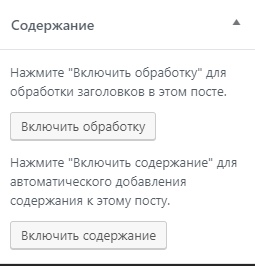
3. Включаю обработку заголовков в этом посте (скрин)= Виджет не показывается.
1. Добавляю виджет в сайдбар;
2. Выключаю “Обработку заголовков” тип поста “Пост”
3. Выключаю Включаю обработку заголовков в этом посте (скрин)= Виджет показывается, но нет якорей к заголовкам.
Forum: Plugins
In reply to: [LuckyWP Table of Contents] The widget is not displayed in the right sidebarForum: Plugins
In reply to: [LuckyWP Table of Contents] The widget is not displayed in the right sidebar@theluckywp
Sorry, my english is very bad. my first problem:1. Enable processing headings this on the post
2. Add a widget
3. activate content processing= Widget not showing
1. Enable processing headings this on the post
2. Add a widget
2. Turn off content processing= Widget is shown, but the anchor is not working
Forum: Plugins
In reply to: [LuckyWP Table of Contents] The widget is not displayed in the right sidebar@theluckywp my site is on a local machine
Forum: Plugins
In reply to: [LuckyWP Table of Contents] The widget is not displayed in the right sidebar@theluckywp form – TOC widget
Forum: Plugins
In reply to: [LuckyWP Table of Contents] The widget is not displayed in the right sidebar@theluckywp I have a new problem. If I turn on Always for post types and turn on processing in the widget, the form disappears again. If I turn off widget processing, it appears, but the anchor does not work.
Forum: Plugins
In reply to: [LuckyWP Table of Contents] The widget is not displayed in the right sidebarGood! Helped off option.
In that case, I will have a question. I load posts when scrolling. And I would like the contents to be hidden after the post. How can i do this?
@sebd86 When posts appear, URL is not replaced.
How can I turn off replacement url?