imcheery

Forum Replies Created
-
Forum: Plugins
In reply to: [The Events Calendar] Latest Past Events do not include today’s Event@atousanajafi, I know it. That is why I tried to describe the problem in more details. When the end time passes, the event disappears from the
Upcoming(which is correct), but does not appear in theLatest Past Eventslist until the next day (because the view selects the events ended before the beginning of the current day).Event if I modify the repository argument
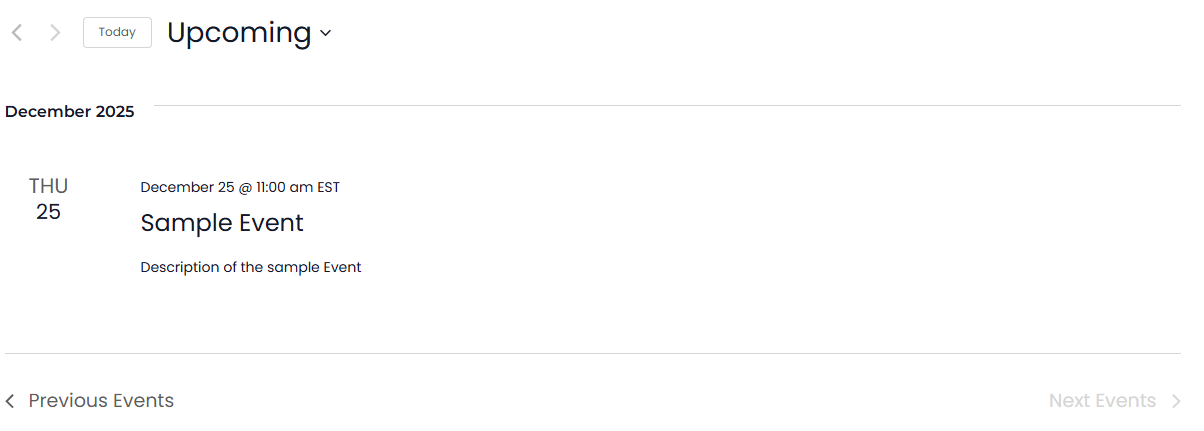
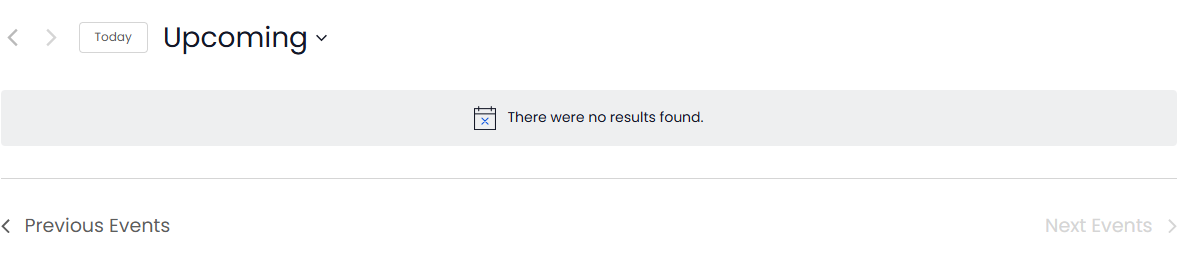
ends_beforeas current time, in case of a single upcoming event, theLatest Past Eventslist won’t appear until the local time passes theUTCend time of the event. OK, I made the screenshots although the code is obvious by itself.Sample Event starts at 11:00 am, ends at 11:30 am EST. At 11:29 am the Event is still in the
Upcominglist (OK)
https://i.ibb.co/psGDm6j/upcoming.pngAt 11:30 am it disappears from the
Upcoming, but theLatestis not shown (not OK)
https://i.ibb.co/S70vR58b/default.pngIt happens because
$nowinView.phpcontains string2025-12-25 11:30:26(local EST time), while$latestcontains2025-12-25 16:30:00(the UTC end time of the event) and theLatestview won’t be loaded for the next 5 hours. Even if I remove the condition, theSample Eventwon’t be in the list as its repository argumentends_beforeuses the midnight of the today’s date, not the current time.
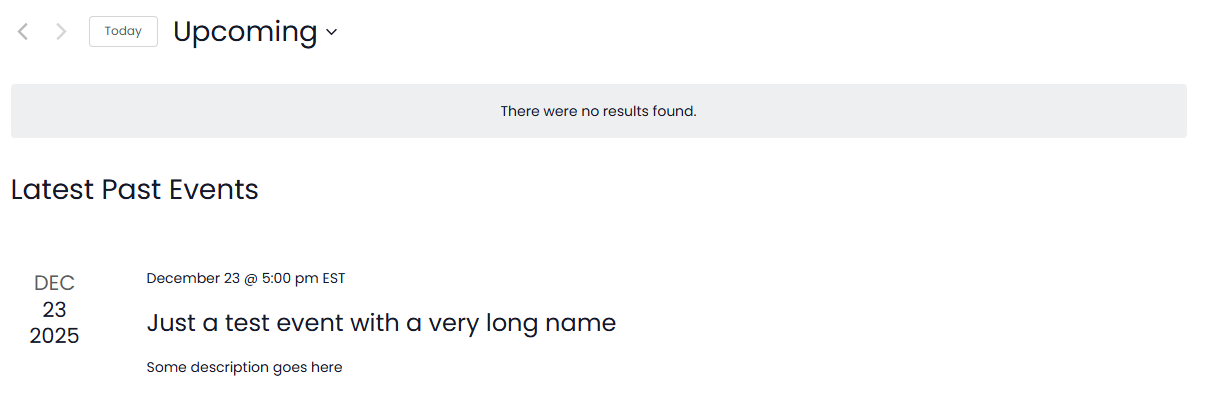
https://i.ibb.co/PGRmjs5z/Views-fix.png$args['ends_before'] = current_time( 'mysql' );provides the expected result
https://i.ibb.co/mFYXnwBQ/Latest-List-fix.pngHi @d0153
1) Fresh WP
2) Astra Theme + The Events Calendar plugin + 1 future event
3) Customize header, add Widget 1 with the Events List block into menu in Desktop view, add the same Widget 1 into the Mobile view. Both will be present on the same page at the same time (only one is visible) with the same UUID indata-view-breakpoint-pointerattribute.Result:
Uncaught SyntaxError: Unexpected non-whitespace character after JSON at position 5265 (line 2 column 2)
    at JSON.parse (<anonymous>)
    at Object.setup (breakpoints.statopt_ver.1765957124.js:1:1382)
    at HTMLDocument.initBreakpoints (s-qgzw3lyh9g79/:253:42)
and
Uncaught SyntaxError: Unexpected non-whitespace character after JSON at position 5265 (line 2 column 2)
    at JSON.parse (<anonymous>)
    at Object.setup (breakpoints.statopt_ver.1765957124.js:1:1382)
at HTMLDocument.initBreakpoints (s-qgzw3lyh9g79/:423:42)- This reply was modified 5 months, 3 weeks ago by imcheery.
No, I can not – it is not public yet.
I looked closely into the problem, only multiple same widgets on the same page create this problem, not the calendar itself.
I added the widget with featured events to the header of the Astra theme, which doubles them for desktop and mobile version. Browser console showed a couple of errors related to the JSON parsing. Looked into the HTML code, found that every widget (2 in total) adds it’s own code (cut to reduce space):<script data-js="tribe-events-view-data" type="application/json">
{"slug":"widget-events-list","prev_url":"","next_url":"","view_class": ..</script>Two same errors are in the console:
Uncaught SyntaxError: Unexpected non-whitespace character after JSON at position 5149 (line 2 column 1)because variablesis an array with 2 same elements. The codes.text()combines them into invalid JSON string{...}\n{...}Two errors are due to the same javasript code for widgets inserted twice – function
initBreakpoints:var container = document.querySelectorAll( '[data-view-breakpoint-pointer="UUID"]' );
if ( ! container ) { return; }
window.tribe.events.views.breakpoints.setup( container );containerhas 2 elements in array as there are two same DIVs with the samedata-view-breakpoint-pointer- This reply was modified 5 months, 3 weeks ago by imcheery.