iyuvalk

Forum Replies Created
-
Forum: Fixing WordPress
In reply to: Validating post fields and taxonomy before saveHi,
Thanks. I’ve already read that article and although it is very important it is not what I was looking for.
I’m trying to enforce a certain logic before the post is saved, for example let’s say that I’m using WordPress to keep track of my animals in a small zoo. I have a custom post type called “animal” that contains a list of custom fields assigned to it like name, id, herbivorous_food, carnivorous_food. This custom post type also has custom taxonomy assigned to it called “prey_type” and contains three possible values like herbivorous, carnivorous and omnivorous.
Now, for example, if I’m currently creating a post for a fox, I’ll write fruits and seeds in the herbivorous_food and mice and rats under carnivorous_food and I’ll select omnivorous in the prey_type taxonomy.
What I need is a way to verify that if both fields (herbivorous_food and carnivorous_food) contain value the user will get an alert when he/she tries to save the post unless the only taxonomy that is selected is omnivorous, and if only carnivorous_food contains value than the user will get an alert when he/she tries to save the post unless the only taxonomy that is selected is carnivorous and so on.
Is that possible? If so – how?
Forum: Fixing WordPress
In reply to: Sorting a custom column that contains color (ColorPicker)Hi,
Sorry… I think that probably I didn’t explain myself properly… Let’s try again:
I have a custom field (meta data) that contains a color represented by an RGB hex value like #FF00FF. I want WordPress to sort the posts by this value but in a particular order like red, dark-orange, light-orange, yellow, dark-green, light-green regardless of the alphabetical order of the hex values.What would be the best way to achieve this?
Tnx
Yuval.Forum: Fixing WordPress
In reply to: Filtering posts based on a custom field (ACF)I think that I finally understood what you meant and change the sygnia_filter_best_practices function (which is hooked to the parse_query filter) to this:
function sygnia_filter_best_practices( $query ) {
global $pagenow;
// Get the post type
//modify the query only if it admin and main query.
if( !(is_admin() AND $query->is_main_query()) ){
return $query;
}//we want to modify the query for the targeted custom post and filter option
if( !(‘best_practice’ === $query->query[‘post_type’] AND isset($_REQUEST[‘pillar_filter’]) ) ){
return $query;
}$post_type = isset( $_GET[‘post_type’] ) ? $_GET[‘post_type’] : ”;
if ( is_admin() && $pagenow==’edit.php’ && $post_type == ‘best_practice’ && isset( $_GET[‘pillar_filter’] ) && $_GET[‘pillar_filter’] !=’all’ ) {
$query->query_vars[‘meta_key’] = ‘pillar’;
$query->query_vars[‘meta_value’] = $_GET[‘pillar_filter’];
$query->query_vars[‘meta_compare’] = ‘=’;
// var_dump($query);
// error_log(var_export($query, true));
}
}and now it seems that it works correctly. thanks a lot!
Now, I have few more questions but to keep everything neat I’ll post them as new tickets.Thanks a lot for all your help!
Yuval- This reply was modified 8 years ago by iyuvalk.
Forum: Fixing WordPress
In reply to: Filtering posts based on a custom field (ACF)Hi,
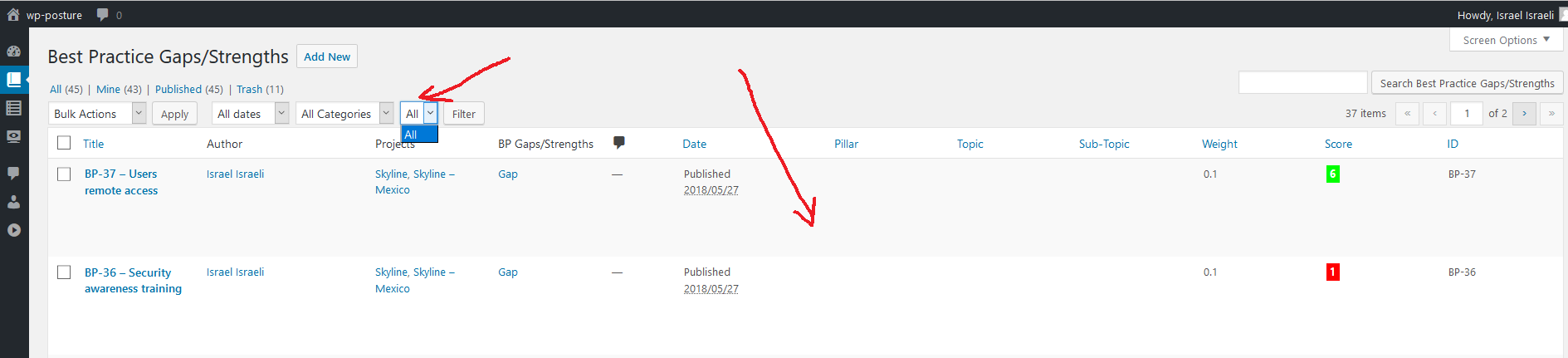
Thanks for the quick reply. I’m not sure that I fully understand what you mean by “filter the list table query, but not filter the options query” (I’m quite new to WordPress programming…), so I have uploaded both my relevant functions and two screenshots that show the posts list before and after the filtering. Here are the links:
Filtering code: https://pastebin.com/fnYG9gYk
Screenshots:
https://www.artifex.co.il/he/wp-content/uploads/2018/05/before_filtering.png
https://www.artifex.co.il/he/wp-content/uploads/2018/05/after_filtering.pngHi,
I had a similar problem with Jetpack. For me the way to solve it was to copy the stylesheet file by using these commands on the server:
cd /<path_to_my_blog>/wp-content/plugins/jetpack/modules/contact-form/css/
sudo cp editor-style-rtl.min.css editor-style.min-rtl.cssHope it helps…