jacobrossdev

Forum Replies Created
-
Forum: Plugins
In reply to: [Redirection] get_option fires 2000+ times per page loadI have added an issue in github. Here is an xhprof report showing this is exactly what’s happening:
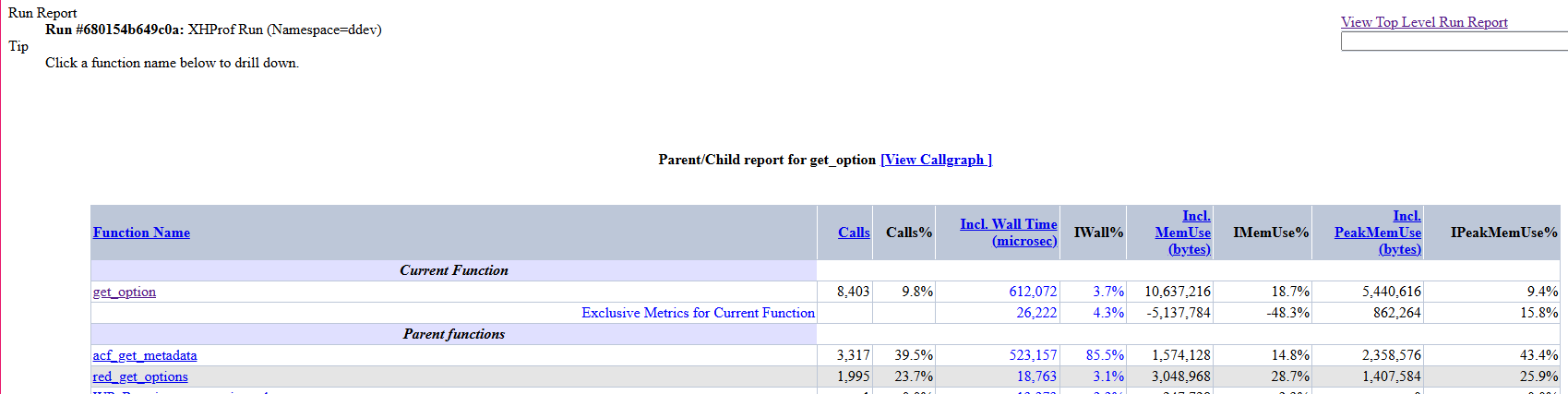
Further, here is a test showing an iteration variable in one run:

This demonstrates that the counter runs 1995 times in one page load. I ran this a few times.
Ah yes! You’re correct. My mistake. When I installed the plugin for the first time, it altered the order of a taxonomy menu on one of our pages. I had to sort the categories within your plugin menu in order to correct it. This led me to believe that other pages with taxonomy menus will also be affected. My test was an attempt to create a control to prevent this.
I can send you an example but I don’t want to post images that is exposed to the public.
Also, this persists regardless of turning off ‘automatic compression on upload’
Forum: Plugins
In reply to: [WP Plugin Update Server] Simply doesn’t workI found two other bugs. When trying to activate a plugin by license key on a localhost, I get an error “Malformed response” in the XHR requests.
Second bug, the inline notice/warning is persistent asking for a license key depite having successfully activated one. This causes confusion for clients that think they haven’t registered my plugin correctly. It’s also kinda ugly lol.
Forum: Plugins
In reply to: [WP Plugin Update Server] Simply doesn’t workI got it working. It so happened that PHP zip extension was not installed on my server. I think that if you have an error triggered where ZipArchve is no found, it would be helpful.
Forum: Plugins
In reply to: [WP Plugin Update Server] Simply doesn’t workOk. I think I found the problem. My plugin dies on new ZipArchive in the zip_package method of
\wp-plugin-update-server\inc\class-wppus-zip-package-manager.phpForum: Plugins
In reply to: [WP Plugin Update Server] Simply doesn’t workI downloaded the newest version but I’m not finding where the logs are showing up. I checked
wppus/logsand the log is not being updated. I checkedwp-config.phpto enable debug mode, but still no new logs.Also, checked my
https://bitbucket.org/user_name/package_name/src/branch_name/and the main files of my package are there, they are not nested in another directory or anything of the sort.When I goto BitBucket downloads and download the package, I get
username-package-name-id.zipand extracting the zip file gives meusername-package-name-id/username-package-name-idand all my files are within that folder includingpackage_name.php.Forum: Plugins
In reply to: [WP Plugin Update Server] Simply doesn’t workI did some digging and it turns out that bitbucket is connecting just fine and downloading my plugin. The problem is somewhere in repack_package method in the zip package manager class. It’s either unable to zip it or it zips it and fails to register it to the package manager and deletes it.
This is not a problem with connecting to Bitbucket, it’s the part where it tries to repackage it and register it. I already spent 3 hours trying to find the issue and I just don’t have anymore time to devote to fixing this.
Forum: Plugins
In reply to: [WP Plugin Update Server] Simply doesn’t workGreat! I’ll check it out and see if I can get a new clue.
Forum: Plugins
In reply to: [WP Plugin Update Server] Simply doesn’t workError - could not get remote package. Check if a repository with this slug exists and has a valid file structure.I’m not getting anything in Query Monitor that tells me why the plugin can’t find my repo.
The folder, file and repo slug all match
woocommerce-product-tableand I have an auth key that is permitted on my domain with “private consumer” checked. The permission set is to read repos.Forum: Plugins
In reply to: [WP Plugin Update Server] Simply doesn’t workI checked again and realized that I didn’t add the fourth argument to the WP_Package_Updater class. I changed this because of testing and added it back.
Ok. I can use this plugin without errors manually uploading my plugin to your plugin package manager.
The final issue is that I haven’t been able to use a bitbucket repo.
- This reply was modified 7 years, 8 months ago by jacobrossdev.
Forum: Plugins
In reply to: [WP Plugin Update Server] Simply doesn’t workHi Alex,
I can assure you that my naming convention is correct. In fact, I updated the
WP_Package_Updaterclass as you suggested and I am able to update my plugin as expected.However, I updated my plugin with a new version number, manually updated the package and toggled the license requirement. I was still able to update my plugin without being prompted for the license key.
I deleted the plugin from my local wordpress installation, redownloaded the plugin from the package manager and added it to my local wordpress installation. After activating it, I was still not asked for a license key.
I created a license key and went back to my local machine and “checked for updates” I was still not asked for a license key.
No more errors, but I’m not being asked for a license key.
Forum: Plugins
In reply to: [WP Plugin Update Server] Simply doesn’t workI’ll check this again and get back to you.
Forum: Plugins
In reply to: [WP Plugin Update Server] Simply doesn’t work{ "name": "WooCommerce Product table", "version": "1.0.0", "homepage": "https:\/\/jacobrossdev.com", "author": "Jacob Ross Web & App Development", "author_homepage": "https:\/\/jacobrossdev.com", "last_updated": "2018-10-14 00:03:29", "slug": "woocommerce-product-table", "license_error": {}, "request_time_elapsed": "0.060" }This comes from manually uploading, although I would prefer that I use bitbucket, I don’t mind doing it this way if I can get rolling on this right away.
- This reply was modified 7 years, 8 months ago by jacobrossdev.
Forum: Plugins
In reply to: [WP Plugin Update Server] Simply doesn’t workI can check the bitbucket connection using Query Monitor, however, I was using WP Plugin Update Server on a remote hosting server and not on localhost. I only tested whether I can update my hosted plugin from my local machine.