JesperW

Forum Replies Created
-
Forum: Plugins
In reply to: [MC4WP: Mailchimp for WordPress] Field data not passed to MailchimpHi,
I will just keep the dialog here, since your suggestion(s) seem to have worked, and it might help others with a similar problem: I renewed the lists, re-added all fields with the buttons, and now it works!
It’s entirely possible that we’ve had a workflow of copying forms by copy-pasting the code, I’ll rememeber not to do that 😁
Thank you for helping out with this, much appreciated 🙏🙏🙏
Forum: Plugins
In reply to: [MC4WP: Mailchimp for WordPress] Field data not passed to MailchimpSorry, this time I missed some notifications 😝 yes, we’re using Premium, and an MC4WP form, served via the shortcode.
I’ve set up a test page here: https://theviewbusinessclub.com/test-tilmeldings-side/ (everything is in Danish but I’m pretty sure you can see what’s what, otherwise let me know)
Thank you for looking into this!
😊
Forum: Plugins
In reply to: [MC4WP: Mailchimp for WordPress] Field data not passed to MailchimpI can see that this topic, lone among a crowd of resolved ones, remains unaddressed – is this because my query is unclear? I would really like to know how to fix this issue.
Thanks in advance!
Forum: Plugins
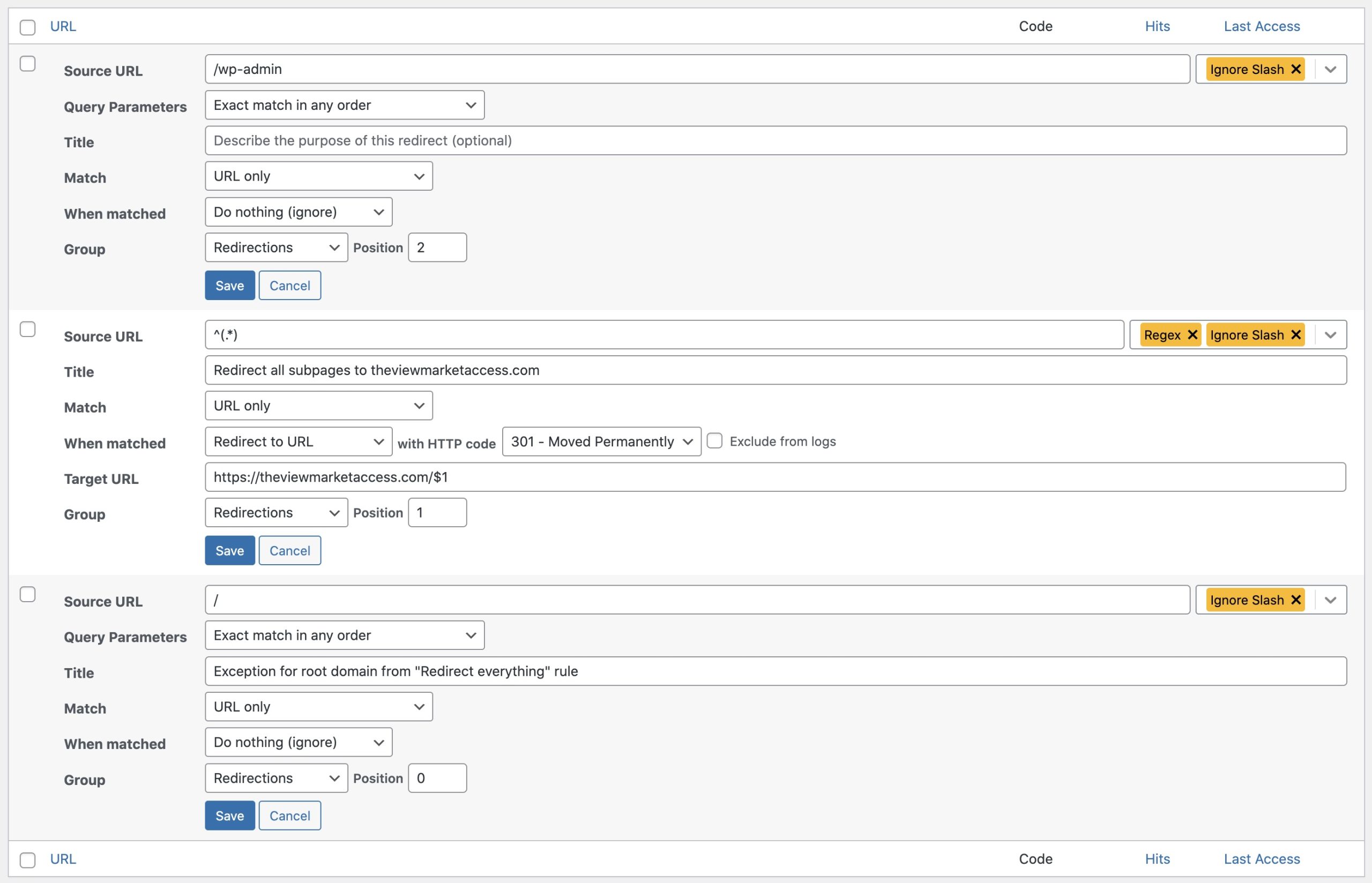
In reply to: [Redirection] Exception for admin login at “old” URLQuick follow-up: I think we got it now, and thought I would share for anyone else with this issue – this is how I managed to redirect everything except the root url, and make an exception for login/admin:
/wp-login.* – regex, position = 0, redirection “Do Nothing”
(excepts login from redirect)/wp-admin.* – regex, position = 1, redirection “Do Nothing”
(excepts admin from redirect)/ – ignore slash, position = 2, redirection “Do Nothing”
(excepts root url from redirect)^(.*) – regex, ignore slash, position = 3, redirection [newurl]/$1
(redirects everything else to the new url and keeps everything after that)Again, thanks to John for a great plugin 🙏😊
/W
Forum: Plugins
In reply to: [Redirection] Exception for admin login at “old” URLHi John,
Duh… I am trying it out now, just to know I’m not leaving you hanging, now that you’re so patient with me – I want to be sure I am not being cheated by some browser caching stuff, will get back when I feel confident.
Looks pretty promising, though 😊
/W
Forum: Plugins
In reply to: [Redirection] Exception for admin login at “old” URLHi John,
I appreciate that you still have the patience to try and help 🙂 you can see my redirects here: https://theviewmarketaccess.com/wp-content/uploads/2022/04/redirections-setup-scaled.jpg
As you see, I am redirecting everything but the frontpage – also, I have tried to set up an exception for wp-admin.
I just re-tested right now, it still doesn’t work; I have to FTP in and deactivate Redirection to log in to theviewaccess.com, and when I try to log out, it prompts me “you are trying to log out of theviewmarketaccess.com, are you sure?”, with the corresponding URL in the address bar…
(I tried adding an exception for wp-login, too – didn’t work either)
I sincerely hope any of this makes sense to you.
Thanks again!
🙂
/WForum: Plugins
In reply to: [Redirection] Exception for admin login at “old” URLHi John,
What happens is:
– oldurl.com/wp-admin or /wp-login is redirected to newurl.com/wp-admin or /wp-login
– consequently, I cannot log in at oldurl.com without first disabling Redirection via FTP
I don’t see how this can be a standard WordPress redirect, since the only way the site “knows” about newurl.com is via the Redirection plugin. Standard WP redirection has no reason to send me there.
Also, the redirect_to string (which is WP standard) does, in fact, point to the correct backend at oldurl.com/wp-admin. After login, however, I am sent to newurl.com/wp-admin – and it obviously only accepts login credentials for that site, not for oldurl.com…
Halp me, Obi Wan JohnGodley, you’re my only hope!
(if screenshots / recordings will help I can provide them, but I don’t feel entirely comfortable putting my various backends etc. on public display)
🙂
/WForum: Plugins
In reply to: [Redirection] Redirect Domain without Paths (everything to homepage)Hi John,
First of all, what a great plugin 🙏
I am trying to do exactly what you describe, but I can’t get it to work.
When I set up the “catch everything” rule alone, using (.*) as the regex, it works fine, redirecting from oldurl/some-page to newurl/some-page.
However, when I add a “do nothing” rule for /, it doesn’t work; the root url is still redirected.
I’ve tried setting the former to position 0, and the latter to 1, and vice versa. Neither works.
Am I missing a setting?
🙂
/Jesper W.Hello again,
Update: I got this to work, and I imagine others might like to know how 🙂
Best I can gather, IOS is very particular about date formats – because what turned out to work was changing the date to a US format, i.e. year month day. Apparently this is required regardless of your iPhone or iPad system language.
Hope this helps someone else!
/W
OK; already time for an update…
It seems like this issue is resolved – but I suspect you would like to know how 😉
It turns out my theme has a rather non-prominent option for turning off WordPress Menu Cache (which is a standard function which is on by default, apparently…?), and doing so apparently fixed my problem.
In the hope that it stays fixed, I am hoping you can consider this thread closed.
Thank you!
🙂
/JWHi Kriti,
OK – I tried using it because you suggested it, but as long as I know why it isn’t working 😉
That still leaves my original problem: How can I see the poll results as administrator (i.e. without having to go to the poll and vote)?
/W
Hi Kriti,
OK, now I got it – the “from” email address has to be under the site’s domain, then the emails are sent! Apparently my host doesn’t allow for a website to send emails under different domains.
Unfortunately, getting that to work revealed another problem (*sigh*, so sorry): The email simply says “%POLL_RESULTS_4%”… the code works fine on the “Results” page, and if I enter another code, say, %QUESTIONS_ANSWERS%, the results are displayed correctly in the email, but the poll results code isn’t parsed.
What to do about that…?
🙂
/WHi Kriti,
I assume you mean that I should create a new email to be sent, in addition to the “default” one – I tried that, still not working, sadly. Also tried with different email addresses.
Is it possible that it has to do with my hosting settings? Some hosts have special requirements for letting a website send emails. I know that this site can, in fact, send emails using other plugins, but maybe there’s something special about QSM…?
– or is it a “Pro Version Only” feature?
‘best,
/WHi –
Hmm, I am not getting any emails at all…
I have set an email to be sent if “points > 0”, and each question in my poll is point = 1, so any answer should trigger an email – but I am not getting any (checked spam folder, too).
What am I missing this time?
🙂
/WHi Kriti,
I would have thought so, too, but I can only see the scores, not the answers (and a poll isn’t scored) – and I can only see them as a list of responses, so even if the individual answers were there, I would have to count them manually.
What I would love to have is the output of %POLL_RESULTS_X% on a page (which I can then limit the access to). Is that possible?
Thank you for taking time to help me!
🙂
/W