jfbprivate

Forum Replies Created
-
Update 2:
Above mentioned fields will only be discovered when selecting all types. In addition to that, they cannot be cleaned. The plugin will scan and then pretend to clean, yet the outcome remains the same.Here’s an update:
Some fields have actually been deleted, including meta keys.
But it looks like there’s an inconsistency in how the plugin is scanning for fields: When I select “All,” it still returns thousands of fields, but checking individual post types (i.e. “Pages” or “Posts”), it discovers nothing, literally “0.” This discrepancy is likely due to a bug or a caching issue within the plugin.
Forum: Plugins
In reply to: [Yada Wiki] Quotation Marks in Yada Wiki Shortcode Links@dmccan Thank you for bearing with me. Yes, that’s what I thought too. Something like that would indeed help. Holler if you should have any questions regarding the implementation. I would probably refer to how Wikipedia handles the italicization of certain titles or parts of titles. For examples see above.
Thanks again!
Forum: Plugins
In reply to: [Yada Wiki] Quotation Marks in Yada Wiki Shortcode LinksScratch everything up to here. I just realized it has nothing to do with body, table, or TOC. That was all just coincidence because the editor automatically converted some links after switching from text to visual. The behavior is the same for all of them.
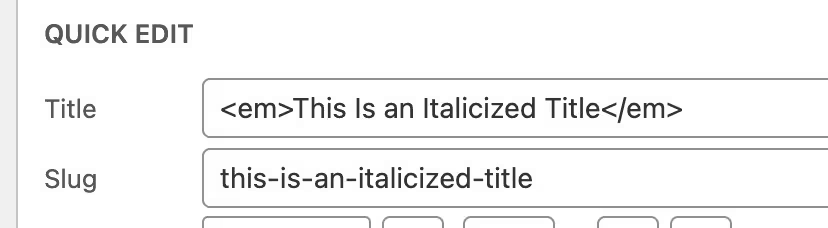
To make links that have italicized titles work, they would have to look like this:
[yadawiki link="<em>This Is an Italicized Title</em>"]The shortcode doesn’t seem to accept special characters, that’s all. Replacing them with their HTML entities will work:
< for the less-than sign: <
> for the greater-than sign: >So the only question would be, is there a way to fix that in order to make editing a little easier, or is this just the way shortcodes work.
Forum: Plugins
In reply to: [Yada Wiki] Quotation Marks in Yada Wiki Shortcode LinksHi David,
I hope all is good.
Did my last answer help clarify things for good?
I would appreciate a quick response so I can move on with things. Even more so if this could actually be fixed. That’s really the only issue I’m having. Everything else is working as expected.
Thanks much.
Forum: Plugins
In reply to: [User Role Editor] Unable to Deny Capabilities, Only GrantIs there such an option at all, or will I have to look for an alternative?
I would appreciate your feedback.
Forum: Plugins
In reply to: [Yada Wiki] Quotation Marks in Yada Wiki Shortcode LinksThanks for getting back.
I wouldn’t necessarily call it bad practice as it is also the only way to do it in WordPress, and publishers actually do use it that way. Just a random example:
'Sad' Keanu Reeves Memes Aren't Accurate, Says <em>John Wick</em> Director: He's an 'Incredibly Positive Guy' (Exclusive)Looking up albums in Wikipedia you’ll notice that they’re italicized using <i>. Example:
<i>Songs in the Key of Life</i>As for the CSS method: Of course I can style all page titles using CSS, but not all page titles are supposed to be italicized — only actual titles (see above example). So that’s not a solution either as that method would affect all titles.
Again, I can work around most as described in my earlier post, but in tables, page titles that include HTML are being ignored and won’t generate a wiki link which is a knock-out criterion.
So, if that can’t be fixed, I will have to roll back and live with the fact I won’t be able to display titles the correct way.
I hope this clarifies it.
Thank you again.
Forum: Plugins
In reply to: [Yada Wiki] Quotation Marks in Yada Wiki Shortcode LinksTrying to summarize it one last time:
The actual page title:
<em>This Is a Title</em>The page link in body copy (using the regular link without HTML will work just fine):
[yadawiki link="This Is a Title"]The page link in the TOC page (the HTML bit needs to be included or the page won’t be recognized):
[yadawiki link="<em>This Is a Title</em>"]All index pages will display the italicized page titles correctly.
The issue with tables:
Links to a page with an italicized title (<em>This Is a Title</em>) will not be recognized when placed inside tables. Neither this ([yadawiki link=”This Is a Title”]) nor this ([yadawiki link=”<em>This Is a Title</em>”]) will work.
This is NOT about DISPLAYING them italicized as in your last example. The problem is that they’re not being recognized as pages in tables in the first place.
Forum: Plugins
In reply to: [Yada Wiki] Quotation Marks in Yada Wiki Shortcode LinksNot needed, I’m not feeling any frustration, I was only trying to make things as clear as possible.
First of all, thank you again for your time and efforts. Now let me try to narrow it down—it’s actually not as complicated as it might sound.
<td><em>[yadawiki link="Beaver Builder" show=""]</em></td>Your example above is working for me too. But that’s not the point. I have a page title that is italicized. Those links are not working anymore when put in a table. I have attached a screenshot to illustrate what I’m talking about. I probably should have done that earlier.
 Forum: Plugins
In reply to: [Yada Wiki] Quotation Marks in Yada Wiki Shortcode LinksThanks but that isn’t what I’m talking about at all. I don’t think we’re on the same page here.
I know my way around CSS and how to italicize text. This is about page titles that are italicized using <em> and therefore no longer being recognized as proper Yada Wiki links.
The page title actually is “<em>This Is a Title</em>” appearing like This Is a Title on a page and on index pages.
The problem is that in tables (<table>) they are NOT being recognized as valid links any longer (see my post above).
The other problem is that on the TOC page, the <em> part has to be INSIDE the shortcode to make it work and generate links successfully, like this:
[yadawiki link="<em>This Is a Title</em>"]Everywhere else in the wiki the following will do (without the <em>):
[yadawiki link="This Is a Title"]I think if you read my posts again you’d understand. But I will try again and summarize what we have so far:
(1) I need SOME (page) titles to be italicized, which requires HTML, like in the following (please note that I’m referring to actual WordPress page titles here):
<em>This Is a Title</em>(2) In order to have those titles appear italicized in body copy as well, I can do the following:
<em>[yadawiki link="This Is a Title"]</em>(3) So far, all is working fine, including on the index pages (All Pages, Categories). The links will work, and even the respective titles will automatically be italicized on those pages. For body copy I use the HTML workaround as described in (2).
(4) Now the problem is, that in tables neither the regular Yada Wiki link ([yadawiki link=”This Is a Title”]) nor the workaround needed for the TOC page ([yadawiki link=”<em>This Is a Title</em>”]) will work.
Bottom line: I could live with the workaround for the TOC, adding <em> inside the shortcode (even if inconvenient), but if italicized WordPress page titles won’t be recognized in tables at all, then that’d be a knock-out criterion and I would have to relinquish that concept. I admit it’d be a pity, especially for a wiki since that’s how title are being formatted in this context.
That’s why I was asking whether or not you know why wiki links in TOC and tables behave differently than in the rest of the wiki and if this is something that can be fixed.
Thank you.
Forum: Plugins
In reply to: [Yada Wiki] Quotation Marks in Yada Wiki Shortcode LinksWhen the actual page title is italicized using <em> I also want the title to be italicized everywhere, otherwise I wouldn’t format it that way.
So far I have figured that I need to add the <em> OUTSIDE of the shortcode to italicize titles in the body copy.
I also found out that index pages will automatically recognize and honor the italicization and display the links accordingly (working links with italicized titles), unlike the TOC page which acts differently. There, I would have to include the <em> INSIDE the shortcode in order for the TOC page to recognize those titles in the first place.
Lastly, in tables, none of the workarounds will do, as wiki pages that have an <em> in their title won’t be recognized at all.
Does that clear things up?
Forum: Plugins
In reply to: [Yada Wiki] Quotation Marks in Yada Wiki Shortcode LinksUnlike the index page items which are wrapped in <div>, maybe this behavior is caused by list items since the TOC links are wrapped in <ul> and <li>. Just an idea.
I also noticed that in tables, italicized page titles won’t work or be recognized as links at all — not even with the help of the workaround that does the trick for the TOC.
None of the following will be recognized as links:
<td><em>[yadawiki link="This Is a Title"]</em></td><td><em>[yadawiki link="<em>This Is a Title</em>"]</em></td><td>[yadawiki link="This Is a Title"]</td><td>[yadawiki link="<em>This Is a Title</em>"]</td>Unless you can figure out these two issues, I will probably have to go back to normal page titles and live with that for now.
Forum: Plugins
In reply to: [Yada Wiki] Quotation Marks in Yada Wiki Shortcode LinksYes and no, because the links aren’t being generated. Instead I get a span with .wikilink-no-edit.
It should be a link with .wikilink-published though.
The problem is that, unlike in other areas of the wiki, the TOC page will not accept/ignore the <em> in the page title. So my workaround is to actually include the <em> in the titles of the TOC page.
So instead of [yadawiki link=”This Is a Title”] like for the rest of the wiki, I would have to use [yadawiki link=”<em>This Is a Title</em>”] to make them work. Which is a little confusing and makes it more complicated than necessary because now I will have to remember which titles are italicized.
Is there a way to make title links in the TOC work like everywhere else, not needing to include the <em> in the title?
Thanks again.
Forum: Plugins
In reply to: [Frontend Admin by DynamiApps] Create Edit Button to Trigger Edit FormHi,
Any news on this?
Thank you.
Forum: Plugins
In reply to: [Yada Wiki] Quotation Marks in Yada Wiki Shortcode LinksHi,
Any news on this?
Thank you.