jmiha

Forum Replies Created
-
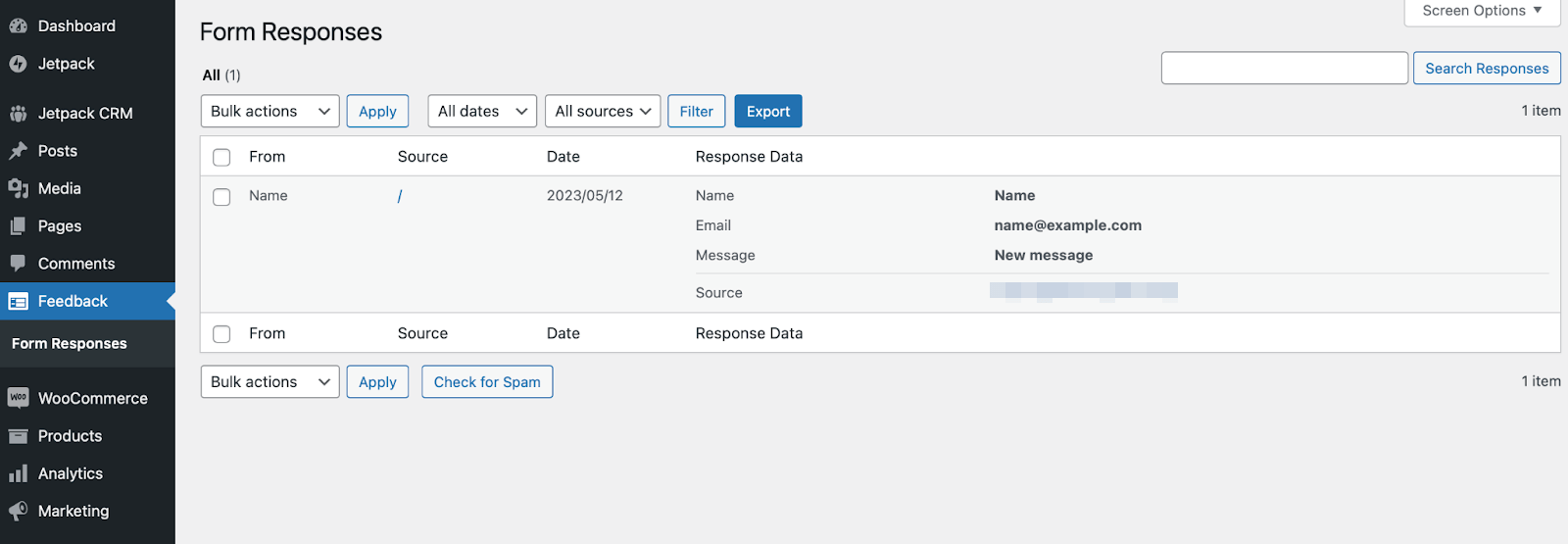
While the current setup requires you to click each entry individually to view its details, I understand you may be referring to the previous layout where a preview of each form submission appeared directly in the dashboard; is that correct?
Yes, in your video, it shows you having to click on every single message to see the content, whereas the old view showed the message content without having to click. And I’ll give you the new view is “more concise” but it’s waaaay less efficient. Before, I could scroll down the page, look at the content of every single message without clicking anything, and then trash the messages if there wasn’t anything worth saving.
I don’t have a screenshot of the old view because I didn’t expect it to go away, but I found this one from Akismet. It shows the response message right in the main view, no clicking required. Please make this an option in the new view. Thanks!
Hey, thanks for reaching out! After going through all of my plugins one by one on my dev site, I found the issue is actually with the Check & Log Email plugin (I think, the error definitely starts when I enable that plugin), and someone else has already reported the conflict to them, so I’m marking this as resolved. Thanks for the help and sorry for the bother. 🙂
Any update on a timeline for this fix? I checked Github, but it doesn’t have a proposed date, and I’m having the same issue.
The job still fails in troubleshooting mode with only BackWPup active. I can authenticate a new job with Dropbox now, but that job also fails with the same error on line 92 when trying to upload the file.
Forum: Plugins
In reply to: [Mooberry Book Manager] Unable to dismiss upgrade notice?Awesome, thank you so much!!
Forum: Plugins
In reply to: [Mooberry Book Manager] Unable to dismiss upgrade notice?I get where you’re coming from, but an extra large notice at the top of every single admin page is a lot. 🙂 If you don’t want it dismissible, then if you could at least limit it to the book admin pages or even just the main dashboard page, that would be better. I’ve hidden it with CSS for now, so I’m going to go ahead and mark as resolved. Thanks.
Thank you! Looking forward to the fix. 🙂
Okay, after some more digging, I see that the following change was made on line 469 in front-render: Changeset 2921804 for forminator/trunk/library/modules/quizzes/front/front-render.php
That same change also needs to be made on line 335 in that file.
And in front-action, starting on line 332, I made two changes, marked by //jmiha fix comments:
<?php if ( isset( $result['image'] ) && ! empty( $result['image'] ) ) { ?>

    <?php
        //jmiha fix
        $image_alt   = isset( $result['image_alt'] ) ? $result['image_alt'] : '';
    ?>

    <div class="forminator-result--image" style="background-image: url('<?php echo esc_html( $result['image'] ); ?>');" aria-hidden="true">
        <img src="<?php echo esc_url( $result['image'] ); ?>" alt="<?php echo esc_attr( $image_alt); //jmiha fix ?>"/>
    </div>
<?php } ?>
This same change probably also needs to be made elsewhere in the file for quizzes that have right answers, since this is the fix for the personality-type quiz that I’m using.
Please let me know if you have any questions. I would LOVE to see these changes implemented so I don’t have to keep doing them manually. 🙂
Forum: Plugins
In reply to: [Mooberry Book Manager] Show Book Title in Widget Won’t Stay Disabled in 4.13Nevermind, I was missing a div tag, it’s all fine. Sorry for the confusion!!
Forum: Plugins
In reply to: [Mooberry Book Manager] Show Book Title in Widget Won’t Stay Disabled in 4.13Thank you so much for the quick reply and fix! The widget titles are working properly now!
However, I’m seeing a new issue where on the book page, the wrapper div for the reviews section (mbm-third-column) has moved under mbm-second-column which puts it only on the right part of the page. Was this intentional? And let me know if you’d rather I create a new thread for this!
Hey Nebu John,
It looks like the functionality is already there for background images (there’s a hidden span tag in lieu of the img alt text), but the alt text isn’t being set correctly so it doesn’t show up. And the results image alt text should also be an easy addition. Hoping the devs will implement a fix, thanks!
Forum: Plugins
In reply to: [Mooberry Book Manager] Make “Back to Grid” optionalThank you, thank you, THANK YOU!!
Forum: Plugins
In reply to: [Mooberry Book Manager] Make “Back to Grid” optionalThank you! I appreciate it and the quick response!
Forum: Plugins
In reply to: [Mooberry Book Manager] How to dismiss the Apple link update notice?Thanks for the info. If anyone else runs into this and is on a dev server, I ended up “fixing” it by manually setting the mbdb_retailers_with_itunes option to no (which might not have been needed, but it was what I tried first) and then, when that didn’t help, adding a call to remove_admin_notice if the option was set to no, both in the mbdb_remind_about_itunes_link function. The notice is still gone now that I’ve reverted the changes, so I’m happy. Obviously, don’t try this on a production server.
I understand why you might not want a dismiss option, but it should’ve been a little more clear that manually updating was an option and the notice would go away (eventually) once that had happened. Although, I feel like a week is a bit long for an admin notice to linger without an option to at least temporarily hide it, but that is personal preference. 🙂 Perhaps rather than a permanent dismiss, a temporary hide until the next week would work.
Thanks again for looking into it!
After more searching, I found this is a known issue. Hopefully it gets fixed soon.