Shadi Habbal

Forum Replies Created
-
Confirming the updated version fixes the issue.
Kudos!
Comment line 280 in the mentioned file. I’ve done it and orders are back to normal.
This will solve the issue temp until an official fix is released.
Hello,
Most likely yes, unless Google Analytics resolves the CF headers. But I can’t say for sure.
WordFence Live Traffic should also display CloudFlare’s IPs IMHO.
As for the blocked IPs, the block is most likely temp. hence you couldn’t find them in the blocked IPs list. The stats are most likely a snapshot in time of what happened so far, and not a live update.
Hello @silumant,
You can use this CloudFlare’s WP plugin: https://ww.wp.xz.cn/plugins/cloudflare/
Read more about it here: https://blog.cloudflare.com/introducing-the-cloudflare-wordpress-plugin/It will restore the original visitor IP and works well with WordFence.
Hope this helps.
Regards
Shadi- This reply was modified 9 years, 3 months ago by Shadi Habbal.
Hi,
FYI, this bug still exists in the latest version of the plug-in, and it’s been causing some issues lately until it has come to our intention after investigating the reason behind multiple form submissions.
Thanks @rtpharry.
Regards
Hi,
Event Tickets Plus.
Let’s continue here: https://theeventscalendar.com/support/forums/topic/orders-view-doesnt-consider-discounts-on-sales/
Forum: Plugins
In reply to: [Event Tickets and Registration] Invalid sold tickets count!Hi,
Let’s continue here: https://theeventscalendar.com/support/forums/topic/invalid-sold-tickets-count/
Forum: Plugins
In reply to: [WooCommerce Autocomplete Orders] Breaks Woocommerce CheckoutHi,
I used this plugin for months, and the issue you mentioned never happened to us.
Perhaps you wanna try the plugin on the default theme, and also make sure all other WooCommerce plugins are disabled.
The theme you are using might have some overrides on Woo templates, and that could be causing the problem you mentioned.
How silly of me, I have totally forgotten about the users enrollment sync option available already.
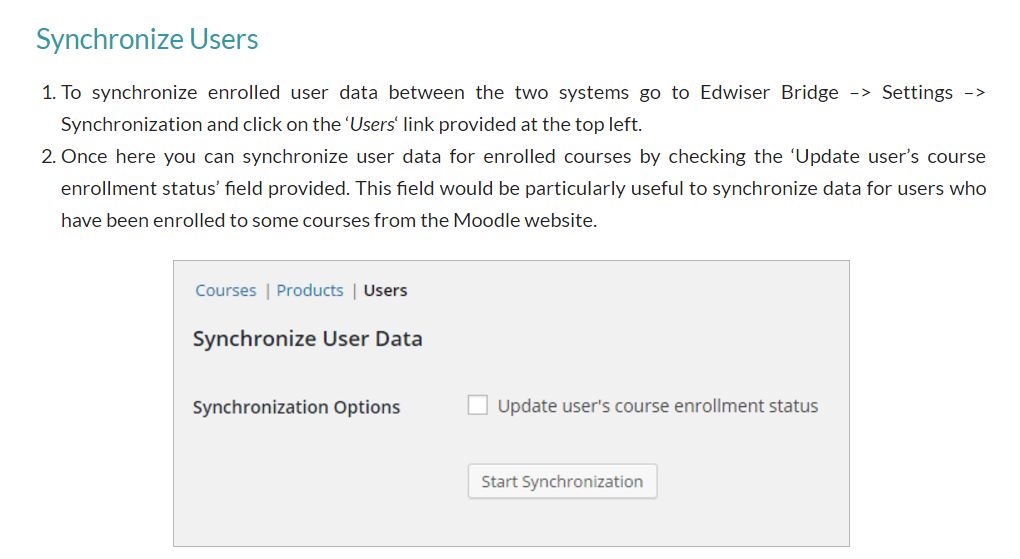
So to answer my own question:
– the plugin will not be self aware of the changes made on Moodle.
– after users are either manually/auto/self un/enrolled on Moodle; we should run a manual sync using the option available in the plugin settings.Regards
Forum: Plugins
In reply to: [Business Worldpay Gateway for Woocommerce] Success PageThe error mentioned by @andybarn56 is still there, even if not using that backup plugin.
One just have to look at the Dev Console.
Ah, great. Thanks for the feedback Marco.
Yes, I have just took a look at the source code.
Regards
ShadiHi,
I see, thanks.
However, I must say that I have already switched to MDL 3.2x and the plugin is working; is there anything incompatible with MDL 3.2x still that I should be aware of?
Thanks
Forum: Plugins
In reply to: [Event Tickets and Registration] Invalid sold tickets count!Hi,
There were actually 4 successfully sold tickets (check out the Total Revenue), but there were also 2 customers that tried to sign up and the order was cancelled due to time limit on stock hold.
So you see, the number of sold tickets should be 4, not 2.
Forum: Plugins
In reply to: [Event Tickets and Registration] Invalid sold tickets count!It looks like that, beside those 4 sold tickets, there were 2 cancelled orders.
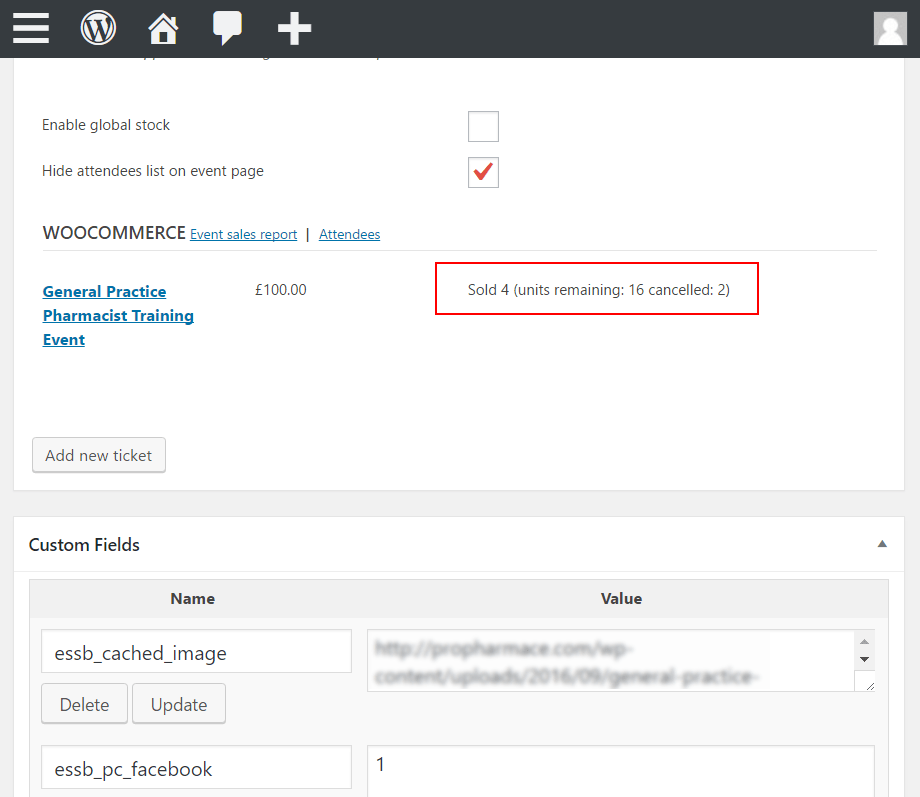
Could it be that the plugin wrongfully calculated the number of the sold tickets due to this behaviour?
Forum: Plugins
In reply to: [The Events Calendar] “; appear in body tag since the last updateAs a temp workaround, edit the following files, search for:
</script>";
then remove the trailing
";
and save./wp-content/plugins/the-events-calendar/vendor/tickets/common/src/Tribe/Main.php
/wp-content/plugins/the-events-calendar/common/src/Tribe/Main.php
/wp-content/plugins/event-tickets/common/src/Tribe/Main.php