kilbot

Forum Replies Created
-
Forum: Plugins
In reply to: [WCPOS - Point of Sale (POS) plugin for WooCommerce] print invoiceHi @shaar7,
I have just release a massive update which introduces support for Thermal Printers. I would love to hear you feedback if you have a Epson TM-T20III.Forum: Plugins
In reply to: [WCPOS - Point of Sale (POS) plugin for WooCommerce] Issue with couponsHi @adviserc,
Sorry for the late reply. I have just released a massive update with comprehensive testing for correct coupon calculations.
Let me know if you have any further problems.Hi @pwoodrow,
The previous system (0.4.x) used a custom API which allowed orders with negative totals. This was a ‘hack’ and not really the correct way to handle refunds.
In the latest version of WCPOS (1.9.0+) it is possible to apply a refund on the orders page. This uses the correct WooCommerce APIs.Refunds in WCPOS is a Pro only feature. If you don’t have Pro you should apply refunds via the
WP Admin > WooCommerce > Ordersinterface.That shouldn’t happen. I just tested on the demo.wcpos.com/pos and I couldn’t reproduce it. Could you email [email protected] so I can investigate further?
Forum: Plugins
In reply to: [WCPOS - Point of Sale (POS) plugin for WooCommerce] Issue with couponsThanks for the bug report! I am looking into this now. You can follow the progress here: https://github.com/wcpos/woocommerce-pos/issues/506
Forum: Plugins
In reply to: [WCPOS - Point of Sale (POS) plugin for WooCommerce] print invoiceSupport for Thermal Printers in currently in development. You can follow this issue on Github for updates: https://github.com/wcpos/roadmap/issues/14
Forum: Plugins
In reply to: [WCPOS - Point of Sale (POS) plugin for WooCommerce] Language lostCould you try clearing your local data, this will reset the cached translations.
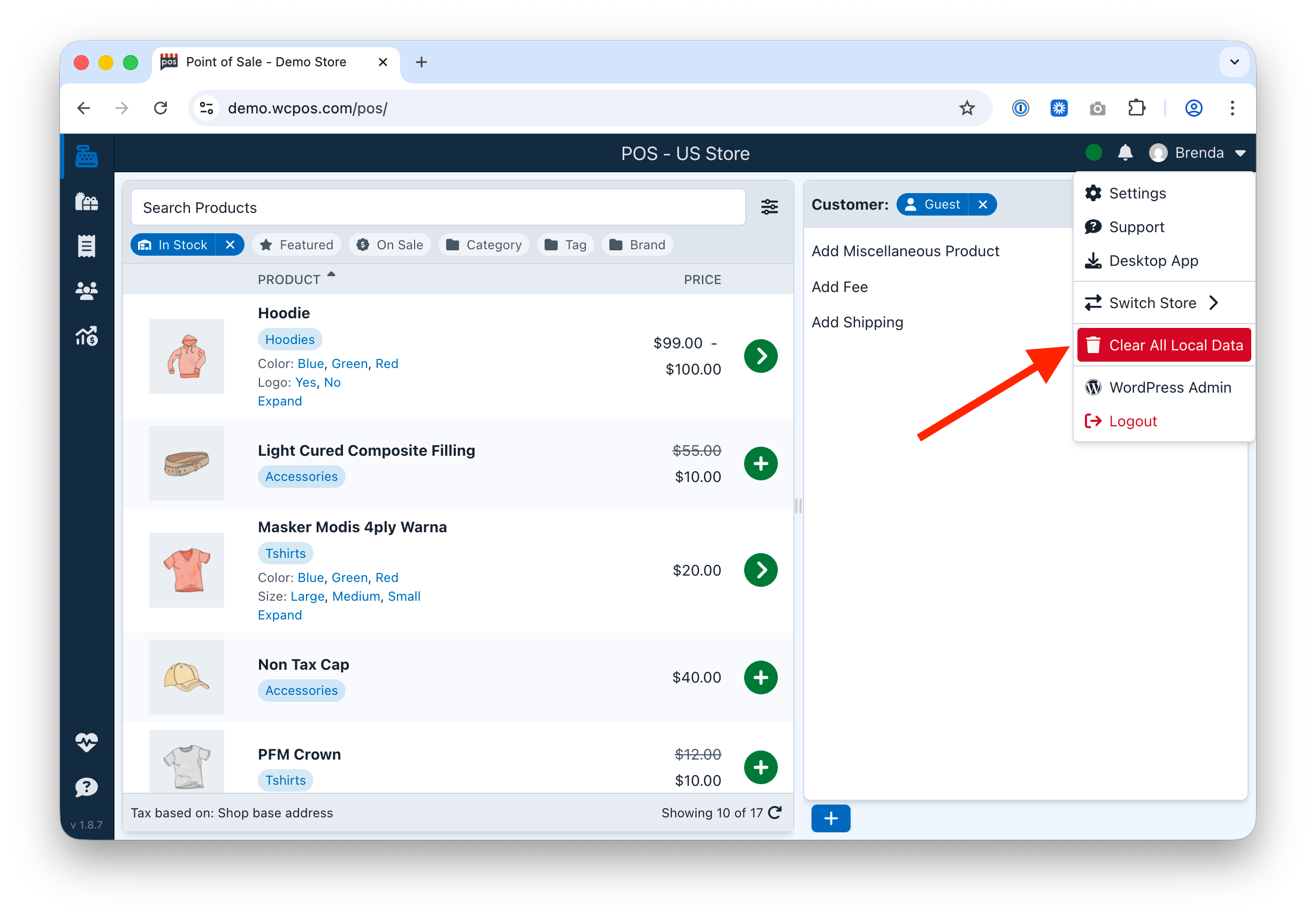
For more information see https://docs.wcpos.com/support/troubleshooting/clear-local-data
This is the analysis from Gemini AI:
It looks like you have “junk code” or Google Search metadata wrapping your text. This usually happens when content is copied and pasted directly from a Google Review, a Google search result, or a browser-translated page into the WordPress editor.
I’m honestly not sure what is causing that issue. Even the VIEW tab problem earlier shouldn’t have been a problem. This is the line of code I that I changed. There was a check for
'wcpos_template' === $post->post_type, I have no idea why it effected the Divi Blurb plugin.Unfortunately the Divi Blurb is not open source so I can’t review the code to see exactly what is happening.
This should be fixed in the latest version 1.8.5. Can you check and let me know?

To fix this error, please do a local data reset by clicking the
Clear All Local Databutton in the user menu.Forum: Plugins
In reply to: [WCPOS - Point of Sale (POS) plugin for WooCommerce] Delay to POSThe POS will automatically get products if their modified date has changed. If you change product data and it does not change the modified date, then the POS won’t know it has been updated. This sometimes happens if you import data directly into the database.
If your product data is out of sync with the POS for any reason, you can always ‘long press’ the sync button, this will give you an option to clear and refresh all the local product data.
WCPOS does not currently support bluetooth readers like the M2 reader from Stripe. Support will be coming after the iOS and Android applications are released.
Forum: Plugins
In reply to: [WooCommerce] Error Rendering the Email PreviewHi @smhcis & @saivutukuru, I am the developer of WooCommerce POS. Just a short note to say that my plugin doesn’t add any email templates. It’s possible they come from another POS plugin, or perhaps they were added by the user.
Yes, or you can use the Plugin File Editor in your WordPress Admin if it is available under your Plugins menu.