llucssll

Forum Replies Created
-
Forum: Plugins
In reply to: [Simple Custom Post Order] get_terms() brokenHi @beatrice12 ,
I’ve tried to disable all plugins and it works fine. But as soon as I enable Simple Custom Post Order it stops working.
Enabling WP_DEBUG shows this:
WordPress database error: [Unknown column ‘t.term_order’ in ‘order clause’]
SELECT t.term_id FROM wp_terms AS t INNER JOIN wp_term_taxonomy AS tt ON t.term_id = tt.term_id WHERE tt.taxonomy IN ('prod-categories') ORDER BY t.term_order ASCIm pretty sure this is a plugin bug, as there’s nothing else on my end affecting the result.
Thanks!
Forum: Plugins
In reply to: [Contact Form 7] first_as_label not workingHi, shoudn’t that be the include_blank attribute? As stated in the documentation, it bears closest resemblance to what you described in the previous answer.
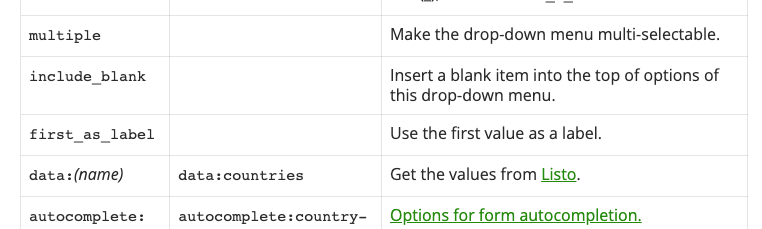
If tried changing the ‘first_as_label’ attribute for the ‘include_blank’ and it seems to work just fine, it adds a new option named “–Choose an option–“. But replacing it for the ‘first_as_label’ attribute doesn’t do anything, it shows the same behaviour if you add it or not.
So im just left with the conclusion that ‘first_as_label’ doesn’t work anymore.
Thanks,
Forum: Plugins
In reply to: [Contact Form 7] first_as_label not workingShouldn’t the ‘first_as_label’ attribute set the first ‘<option>’ as disabled? So it becomes the label and not a selectable option.
Forum: Plugins
In reply to: [Contact Form 7] first_as_label not workingHi,
This problem ocurs with the ‘select’ field, as stated in my original question, its the ‘firs_as_label’ attribute that doesn’t appear to work
Thanks
Forum: Plugins
In reply to: [Contact Form 7] first_as_label not workingHi,
This site in question is still in development so its not online yet. I’ve got another site with the same issue (https://consultoriabosch.com/contacte-consultoria-bosch/).
This site’s languages are ‘Catalan’ and ‘Spanish’, in case you want to translate something to understand the contents.
Hi there, Im using the string translation feature in WPML and searching “Enter password again” nothing appears, it doesn’t find this string, but it does find others from the form.
Hi there,
Thanks.
Hi,
I’ve tried with WPML and wasn’t able to find any strings to translate. Its not compatible with WPML?
Thanks!
Hi there,
Im not trying to use any translation manager. For most of the fields you can change the label’s text. But I couldn’t find a way to change the “Enter password again” label. I was just asking if there’s a native way to change it within the plugin options. Im using wpml and Im aware that this plugin isn’t compatible with it, so Im looking for alternative options to modify the text.
Im using version v5.1.8.5 Standard. Id like to translate it to Catalan and Spanish
Thanks
Forum: Plugins
In reply to: [Weight Based Shipping for WooCommerce] Show price/kg anywhereResolved
Forum: Plugins
In reply to: [Weight Based Shipping for WooCommerce] Show price/kg anywhereOk
Thanks for the help
Forum: Plugins
In reply to: [RegistrationMagic - User Registration Forms Plugin] Use mail as usernameHi,
Thanks, Im using the standard version so I guess there’s no solution in my case.
Thanks for the reply anyway!
Hi,
Im using the standard version
Forum: Plugins
In reply to: [Weight Based Shipping for WooCommerce] Show price/kg anywhereHi, thanks for the answer.
If I understood correctly, the only way to achieve this is by coding it manually, right? I looked though the plugin’s code but I wasn’t able to find anything to help me. Im not experienced in plugin development, do you know how or where to find the values of price/kg in the code to then print it?
Thanks for the help!