lookazd

Forum Replies Created
-
Forum: Developing with WordPress
In reply to: Where can I change default wordpress error login messages?Guys tnx for your help and suggestions.
I managed to solve the issue with a little help from Chat GPT and the code he provided me.
The code is:
function custom_login_errors($user, $username, $password) {
// Only run this logic if the username and password fields are filled
if (!empty($username) && !empty($password)) {
// If the username doesn't exist
if (!username_exists($username)) {
return new WP_Error('invalid_username', __('The username you entered is not registered. Double-check or use your email address to log in.'));
}    // If the username exists but the password is incorrect
    $user_data = get_user_by('login', $username);
    if ($user_data && !wp_check_password($password, $user_data->user_pass, $user_data->ID)) {
        return new WP_Error('incorrect_password', __('The password you entered is incorrect. Please try again or reset your password.'));
    }
}
// Return the user object if everything is fine
return $user;
}
add_filter('authenticate', 'custom_login_errors', 20, 3);
And it’s working great! 🙂
Tnx again.Forum: Developing with WordPress
In reply to: Where can I change default wordpress error login messages?I inserted this code into my child theme’s functions.php file but unfortunately it’s not working :/
I also purged all cache and even deactivated cache plugin but still no luck :/Forum: Plugins
In reply to: [Admin and Site Enhancements (ASE)] Hide Howdy not workingIf you uncheck “Remove ‘Howdy’”, click “Save Changes” re-check “Remove ‘Howdy’” and “Save Changes” again on ASE settings page, do you still see ‘Howdy’ on the admin bar?
Yes I tried that, but it’s still there
Forum: Plugins
In reply to: [Admin and Site Enhancements (ASE)] Hide Howdy not workingI also have the same issue.
Hide Howdy is checked, but it’s still there :/Forum: Fixing WordPress
In reply to: How to hide newly added comments after 24h?Hy Justin
yes I have asked a question about this in their support forum and they answered if I’m familiar with development, I can use the pre_get_comments hook and filter the comments, but since I’m not a developer I really can’t find that helpful 🙂
Alternatively I can send request for their gVectors Team paid plugin customization, in order for them to write me the code for some charge.
So if I can’t find the code with help of GPT or some developer I will go with that route.tnx 🙂
Hy Molongui
So if I understood correctly with the next update this list order issue will be fixed?
That’s great!
So will I need to add this code you provided with that new update, or that code will be implemented in the update itself?
If not where should I insert this code? I would like to avoid any additional plugins like code snippets or something like that just for adding a single line of code, and would like to insert it in the original file in the wp backend file manager if possible. But would like to know in which one.For the list exclusion option No. 1 works great!
tnx!
Forum: Plugins
In reply to: [Admin and Site Enhancements (ASE)] “Change login URL” won’t login anymoreYou need to click on the filter icon next to the eye icon and look for the ASE options like shown here: https://www.imagebam.com/view/MERKW47 then click and delete each.
Tnx, it works now!
But in case that somone else get stuck with the same issue maybe try to fix that “bug” in the next update.
Btw plugin is fantastic.Forum: Plugins
In reply to: [Admin and Site Enhancements (ASE)] “Change login URL” won’t login anymoreOk, now I tried to replicate this issue on another website and the same thing happened.
What I did is in Change URL section entered “wp-admin”.
Then when I log out and try to log in again with same pass and user the page just reloads and wont enter dashboard.
So I guess there’s some bug if you enter “wp-admin” there to change URL.
(I know wp-admin is default one so there’s no need to enter anything, but now I can’t change that cause I can’t enter dashboard anymore.)
The only solution now for both pages to login to dashboard is if I delete “Admin and Site Enhancements” folder from “plugin” folder.Please is there solution to fix this. Bassicaly now I can’t use this plugin for these 2 sites anymore until I fix this issue.
You can try and replicate the same thing on your side and see if it’s the same for youForum: Plugins
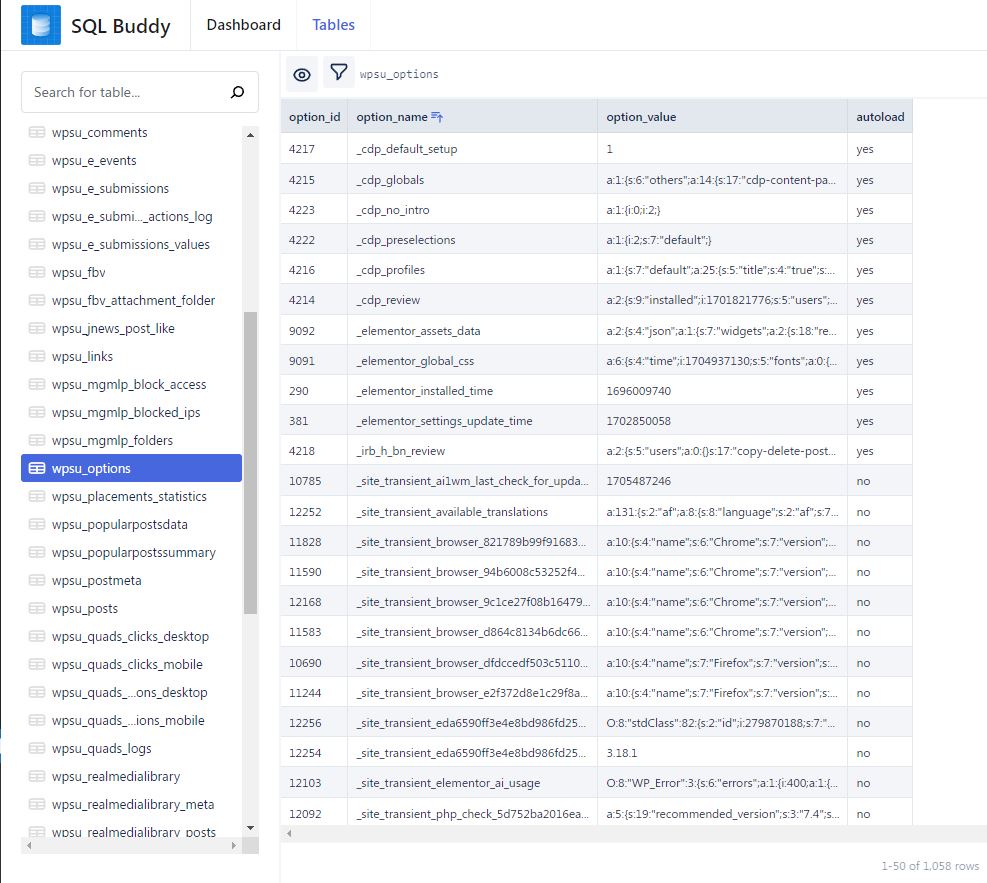
In reply to: [Admin and Site Enhancements (ASE)] “Change login URL” won’t login anymoreUnfortunatelly I don’t have that ‘admin_site_enhancements’ option under wp_options table.
Here’s screenshot.
Is there any other way that I can delete all leftovers from this plugin?
TnxForum: Requests and Feedback
In reply to: No thumbnail settings in edit image mode?Ok so I found the soultion/what was causing this plugin to not work.
It’s so basicaly stupid that I feel a little ashamed right now after searching for solution for almost a week.
All I needed to do was in Settings>Media under thumbnail size set for width and height whatever number.
(I changed all numbers in Media settings to 0 long time ago.)
After I set any number to thumbnail size, any image that is newly added have under edit image that section for changing thumbnail size from that plugin. But any previously added old images doesn’t have that option, so it was hard to detect why it’s not working until I added new image and checked it again. And that was trial and error process until I accidentally figured this out.
What is funny/sad in all of this is now that I have this plugin finally working I figured out that it’s not doing what I thought it would do XD
I still have problem that I want to crop featured image that is displaying as the main image of the single post, the way I want to, and not by default where only middle of the image is croped and affecting the original one too.
So I still need to find the solution for this.
One problem solved, many more to go 😀Forum: Requests and Feedback
In reply to: No thumbnail settings in edit image mode?UPDATE:
well I was trying to solve this issue but so far no luck.
I was looking through net to find some alternative plugin that will do the job, or at least something similar, and found one that is actually really bad, but it does the job.
But that is acctually not the big news. The big news is that this alternative plugin that I found is somehow triggering that first one ( Edit Image Thumbnails Separately) to at least display, but unfortunately it’s not working.
I don’t even know kow to explain it so I recorded a video to show you what I mean.
https://drive.google.com/file/d/1i-LvYNeTpuq9AHL-7QZ1aZDC1dbhJVKu/view
So when you watch that video you’ll see it’s obvious that something is overlaping and happening in the background, and something is holding that first plugin to work properly.
But what that is and how to fix that I really have no idea :/Forum: Requests and Feedback
In reply to: No thumbnail settings in edit image mode?Well I can try my luck, although I see I’ll be the first one to create any topics there xD
Forum: Requests and Feedback
In reply to: No thumbnail settings in edit image mode?Maybe I can help with some more informations that could be or not related to the core issue of this problem.
I have plugin called “Simply gallery” installed on this website.
In administrator role it’s working as it should, but in editor role it doesn’t have option to create galleries or albums… The only option it has it’s “Questions and FAQ”.
I tested this same thing on other website and on there editors can create new galleries and albums. It’s only this website that have some restrictions or whatever.
So obviously it’s something changed on this site that I have no idea what that is and where to look at.
Both this plugins are images related so maybe there’s some hint, but I’t could be completly unrelated.
If you want I can give you in private user and pass for my WP admin if you want to take a look, I would really appreciate it.
It’s on testing domain and everything is in staging phase, and everything is backuped so don’t worry about anything if there’s need to change something in order this work.Forum: Requests and Feedback
In reply to: No thumbnail settings in edit image mode?I detected that error above was displayed because of the Advanced Ads – tracking plugin.
When I deactivated it there’s no error logs anymore.
Not single one.
But now still this “Edit Image Thumbnails Separately” doesn’t work unfortunatelly.
Do you please have any more suggestions?Forum: Requests and Feedback
In reply to: No thumbnail settings in edit image mode?Why the Edit Image Thumbnails Separately – WordPress plugin | ww.wp.xz.cn does not work?
Well that is something that I would also really like to know.
I have tried to install the same plugin on the other website and it works with no problem, the only issue is obviously only on this one where I need it most.
I tried uninstaling every single plugin except this one in case it’s conflicting with any other but no luck. I tried installing default twenty-twenty two theme, but also no luck.
I’m really stuck with this and need to fix this issue :/
this is my debug.log:[17-Jan-2024 01:42:08 UTC] PHP Deprecated: Function Advanced_Ads_Plugin::user_cap is deprecated since version 1.47.0! Use \AdvancedAds\Utilities\WordPress::user_cap() instead. in /home/lukavihar1/public_html/057info/wp-includes/functions.php on line 6031 [17-Jan-2024 01:42:09 UTC] PHP Warning: Cannot modify header information – headers already sent by (output started at /home/lukavihar1/public_html/057info/wp-includes/functions.php:6031) in /home/lukavihar1/public_html/057info/wp-admin/includes/misc.php on line 1431 [17-Jan-2024 01:42:09 UTC] PHP Warning: Cannot modify header information – headers already sent by (output started at /home/lukavihar1/public_html/057info/wp-includes/functions.php:6031) in /home/lukavihar1/public_html/057info/wp-includes/functions.php on line 7049 [17-Jan-2024 01:42:09 UTC] PHP Warning: Cannot modify header information – headers already sent by (output started at /home/lukavihar1/public_html/057info/wp-includes/functions.php:6031) in /home/lukavihar1/public_html/057info/wp-admin/admin-header.php on line 9