luispico

Forum Replies Created
-
Forum: Plugins
In reply to: [Jetpack Social] Question about character limit in autopostingHi,
Thanks for the update. I understand that the development team has urgent, important things that are top priority, and I appreciate that their time is used wisely.
As I have tried to explain in my posts here and on GitHub, I know the limitations and uses of the social media platforms:
- Tweeter: Hey, new article here / Excerpt—>280 characters
- Facebook: Hey new article here. In it we talk about X, Y and Z—>2000 characters, for example
I do not know if I am explaining myself as well as I think. Not priority, I know, but would be nice.
Best regards, and thanks for the time and effort.
Luis
Forum: Plugins
In reply to: [Jetpack Social] Question about character limit in autopostingHi everyone,
Sorry to bump this old post, but it seems it went stale in Github.
As I mentioned there, I do understand that my user-case is not the norm.
Please do note that some platforms require the link to the post to be included in the message for it to be actionable (click on the link/featured photo to go to the actual post). I my particular user case (long form posts, a descriptive title, hashtags and squeezing in two languages to avoid doble posting) with WordPress posts set to Scheduled to match a different timezone, it is very complicated to achieve a result that is effective. As noted on #17223, one option would be to disable the hard-coded character limit and warn the user that the message will be truncated when the limit set by the social media platform is reached. I can tweak a Twitter post to respect the 280 character limit -it is what it is- but be able to use the larger limits from other platforms.
And #261 is not the answer I was looking for. I do not know if I made my request clear and understandable enough.
- Platform Character Limit
- X (formerly Twitter) 280 characters (can be increased with premium subscription)
- Facebook 63,206 characters for posts, 200 characters for status updates
- Instagram 2,200 characters for captions
- LinkedIn 1,300 characters for status updates, 2,000 characters for summaries
- YouTube 100 characters for video titles, 5,000 characters for video descriptions
- Threads 500 characters
- Bluesky 280 characters
For me, it kind of goes down to aesthetics. The original post has the “bling” and the tranlated ones are “plain”. I do appreciate the work, and the plugin works as intended and flawlessly (as intended). It is just it would be nice to have a way to have TOCs, carousels, etc. Now I know it can be done. As I said, I’ll try your suggestion and let you know how it goes. Good work.
Roger that! Nice to know theres is a way to do it even if it is a little “convoluted”. I will create a new post for testing with different blocks and let you know how it goes.
So, use the “copy/transfer” button to copy the exact text from the original source language post and type the translation over the copied text (in the text tab, not the vual one), right? I’ll try that and let you know how it goes.
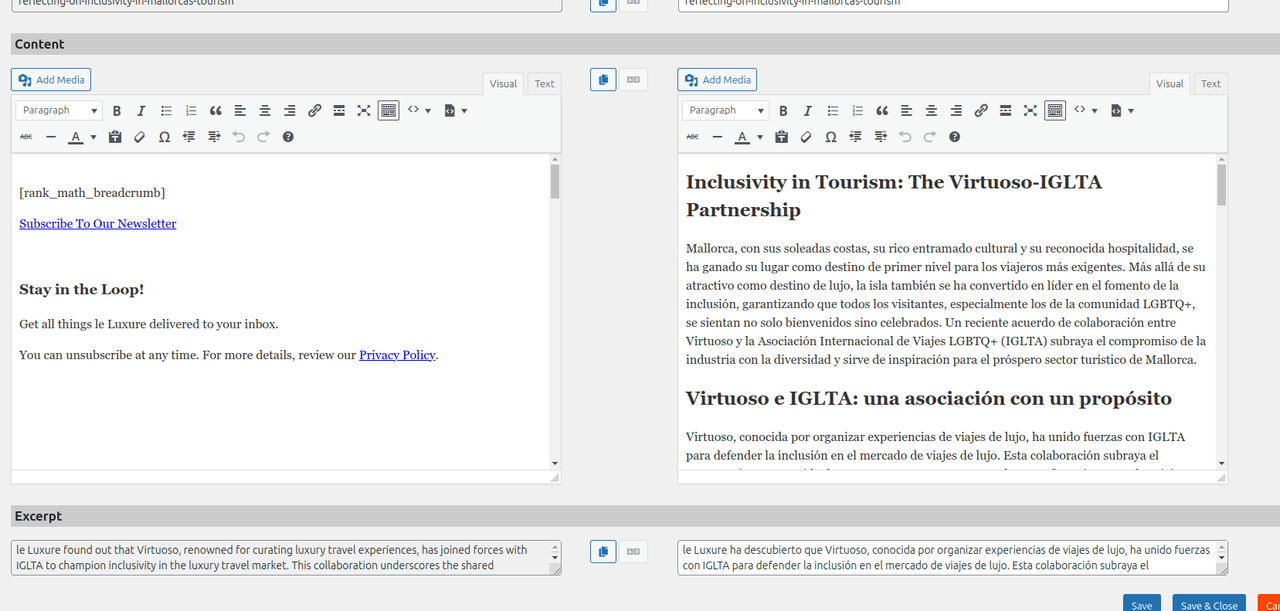
As you can see, the editor is not pulling the format from the source language.
Hi,
I added the URL in the original post.
Hi!
The “quick fix” seems to work so far. Had to dig deep into the theme subdirectories to find the folders I needed added.Thanks,
Luis
Forum: Plugins
In reply to: [Jetpack Social] Question about character limit in autopostingHi,
Thanks for your answer, feature requested:
Feature Request: Modification of character limit in Jetpack Social autoposting feature #40170
Cheers,
Luis
Hi there!
It went perfect, first try. All accounts connected. I’ll report back if I see any problem with posting and autoposting. Thanks for your help and any adjustments you made!
Best regards, and thanks again!
Luis