markk26

Forum Replies Created
-
Forum: Plugins
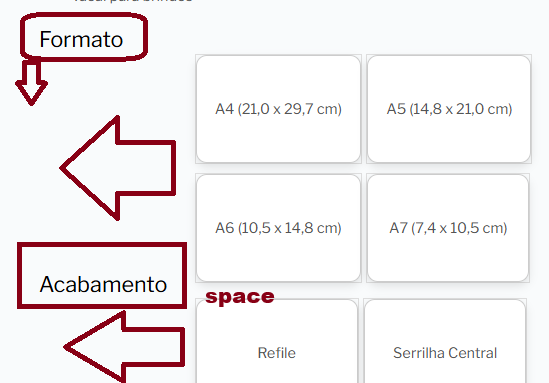
In reply to: [YITH WooCommerce Product Add-Ons] PositionWith CSS and help from a freelancer, I was able to adjust the positions, but the image term labels still aren’t showing…
Do you know if you could help me with this?Forum: Plugins
In reply to: [YITH WooCommerce Product Add-Ons] PositionI added this code to functions.php and now it looks like this: https://cdn.imgpile.com/f/CMZmefm_xl.png
function custom_product_variations_styles() {
// Only applies CSS to single product pages
if ( is_product() ) {
?>
<style type="text/css">
/* --- LABEL "Format" --- */
.woocommerce div.product form.cart .variations label {
/* Ensures the label occupies its own line and is on the left */
margin-top: 90px !important;
display: block !important;
float: none !important; /* Remove any float that might be pulling it to the side */
position: relative !important;
top: -110px !important; /* Adjust the top if you need to move the label */
font-size: 1.5em !important;
font-weight: 400 !important;
color: #000 !important;
margin-bottom: 100px !important; /* Space below the label */
text-align: left !important;
padding-left: 0 !important;
width: 100% !important; /* Ensures the label occupies the full width */
}

/* --- OPTIONS CONTAINER (where A4, A5, A6, A7 are) --- */
/* This is the div with the 'value' class that is the label's sibling */
.woocommerce div.product form.cart .variations .value {
display: flex !important; /* Uses flexbox to organize the options */
flex-wrap: wrap !important; /* Allows options to break lines */
justify-content: flex-start !important; /* Aligns options to the left */
gap: 15px !important; /* Spacing between options (horizontal and vertical) */
margin-top: 5px !important; /* Space between the label and the beginning of the options */
padding: 0 !important; /* Removes any default padding that might push */
clear: both !important; /* **VERY IMPORTANT:** Ensures it starts on a new line below any float. */
width: 100% !important; /* Ensures the options container occupies the full width */
box-sizing: border-box !important;
}

/* --- INDIVIDUAL VARIATION OPTIONS (A4, A5, A6, A7) --- */
.select_option .yith_wccl_value {
display: flex !important; /* Centers the content (text) vertically and horizontally */
align-items: center !important; /* Centers the content vertically */
justify-content: center !important; /* Centers the content horizontally */

min-width: 180px !important; /* Sets a minimum width for the buttons */
min-height: 120px !important; /* Sets a minimum height for the buttons */
padding: 20px 20px !important; /* I adjusted the padding. It can be 50px 30px if you want more space inside */

text-align: center !important; /* Centers the text inside each button */

border: 2px solid #ccc !important;
border-radius: 12px !important;
background: #fff !important; box-shadow: 0 4px 10px rgba(0,0,0,0.1) !important;
cursor: pointer !important;
transition: all 0.3s ease !important;
box-sizing: border-box !important;
}

/* --- EFFECT ON MOUSE HOVER / SELECT --- */
.select_option .yith_wccl_value:hover,
.select_option .yith_wccl_value.selected {
border-color: #000 !important;
background: #f9f9f9 !important;
transform: scale(1.05);
}

/* Adjust YITH's "check" icon so that it is inside the box */
.yith_wccl_value.selected::after {
position: absolute !important;
top: 5px !important;
right: 5px !important;
font-size: 1.2em !important;
line-height: 1 !important;
width: auto !important;
height: auto !important;
}
</style>
<?php
}
}
add_action( 'wp_head', 'custom_product_variations_styles' );
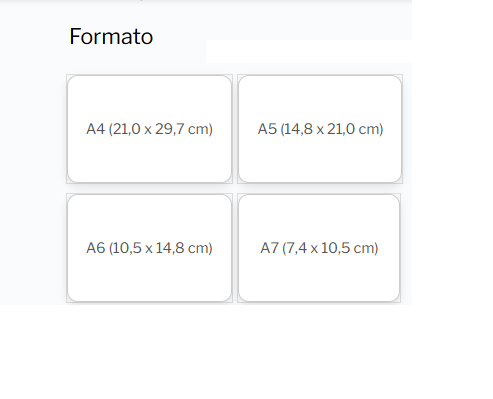
But I need it this way: https://cdn.imgpile.com/f/wXXMejs_xl.png
Also, the names of the image labels aren’t appearing.Yes, it’s the Testimonial widget!
It’s actually any widget that contains a paragraph text box!
- This reply was modified 1 year, 1 month ago by markk26.
Same errors here!
I posted the same question on your site’s community and they kicked me out!
Okay!
Thank you!
Forum: Plugins
In reply to: [Verified Member for BuddyPress] Document SubmissionNo need for something complex!
Just open a url, by clicking on the “request verification” button…
Is there a way to redirect the user to some page on the site after clicking the button?Thank you! 🙂
Okay! Thank you!
I found out how to do it, just using the dynamic tags with the author’s image and name..
2 – By the way: I used Loco Translate and even so I can’t translate this string “added new product” at all, on the activities page!

I’ve also tried adding gettext to both my child theme’s bp-custom.php and functions.php, to no avail!https://gist.github.com/KaineLabs/7cb85161783d83f7a1947df55e5482e9#file-yz-translate-like-button-php
- This reply was modified 2 years, 10 months ago by markk26.
Forum: Themes and Templates
In reply to: [Neve] StringI found that a plugin was generating the issue…
Forum: Fixing WordPress
In reply to: /* */ StringOk! Thank you!
Forum: Plugins
In reply to: [PayPal Brasil para WooCommerce] ForbiddenEu desisti do Paypal! Muitos erros!
Vou usar só PagSeguro mesmo!
Obrigado!Forum: Plugins
In reply to: [PayPal Brasil para WooCommerce] Forbidden