masterr77

Forum Replies Created
-
Forum: Plugins
In reply to: [WP Super Cache] how often does wp-cron preloads WP super cache pages?Hi,
ok, and how will I adjust it? pls
Forum: Plugins
In reply to: [WP Super Cache] super cache + claudfare – dost not worksolved
Forum: Plugins
In reply to: [WP Super Cache] super cache + claudfare – dost not workcf-cache-statusDoes not have anything to do with that, I guess. When I set on CF “development mode” the “cf-cache-status” is the same (dynamic) as without it. But it behaves differently. There is something hidden…Dont know what. ANY ideas? pls
Forum: Plugins
In reply to: [WP Super Cache] super cache + claudfare – dost not work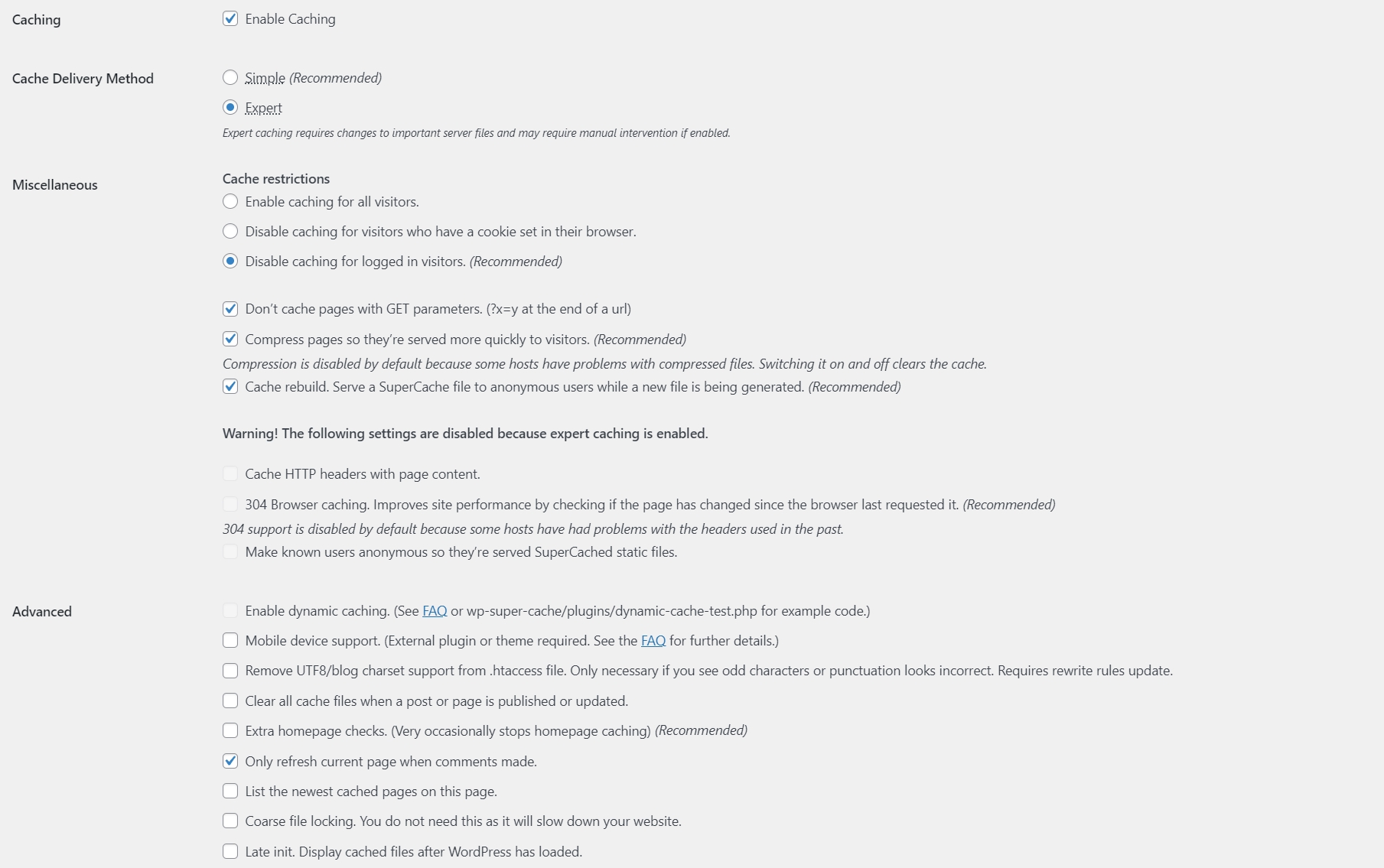
Hi, thank you for your help. You can see my caching settings above.
The
cf-cache-status: DYNAMICheader is added by Cloudflare when a response is not cached. If WP Super Cache sees this header, it may also choose not to cache the page because it assumes it’s being served dynamically.Oh really, I did not know that, but it makes sense. So, if I somehow change the header response “cf-cache-status”, Super Cache should work, right?
Forum: Fixing WordPress
In reply to: unwanted css style adding to tablesUnfortunately, it happens even when I create a new table. Sometimes it seems like it happens when I just edit something in the table (without drag and drop).
Forum: Fixing WordPress
In reply to: unwanted css style adding to tablesNo, this is not it. You don´t understand what I want or you are spamming here backlink to your website. Probably both.
Forum: Plugins
In reply to: [Easy Table of Contents] Title changingGreat! It´s working like a charm, thx a lot.
Forum: Developing with WordPress
In reply to: add_image_size set exact width + height does not matterIn twentyseventeen is the width size 525px, maybe it´s fine for that layout, I don´t know.
“What is rather strange in your case is it appears that the full size image is not available in the image insertion dialog box. ” – No, it´s not removing it, you can see it in dialog in the image above “Původní velikost 1070 x 504”.
🙂
Forum: Developing with WordPress
In reply to: add_image_size set exact width + height does not matterHi, thanks for help. I found the problem https://codex.ww.wp.xz.cn/Content_Width it was set to 700px. In twenty* is set to 525px ($GLOBALS[‘content_width’] = 525;), that´s ridiculous.
Forum: Developing with WordPress
In reply to: add_image_size set exact width + height does not matterHi,
by floating I mean “does not matter on height, but need the exact width”.The Image is 1070px wide. I put the code to the functions.php and it added options to the dropdown menu automatically. It´s in theme setup.
The whole code looks this way:
if (!function_exists('webreseni_setup')) :
	function webreseni_setup()
	{

		load_theme_textdomain('webreseni', get_template_directory() . '/languages');

		add_theme_support('post-thumbnails');

		add_image_size('figure', 241, 140, TRUE);
		add_image_size('recommended', 85, 9999, FALSE);

		add_image_size('fb_thumb', 1200, 630, TRUE);
		add_image_size('4_x_img_nahledy_mobile_app', 155, 9999, FALSE);

		add_image_size('full_widthn', 956, 9999, TRUE);
    add_image_size('full_widthn2', 956, 9999, false);
    add_image_size('full_widthn3', 956, 9999);
    add_image_size('full_widthn4', 956, 100, false);
    add_image_size('full_widthn5', 956);

		add_filter('image_size_names_choose', 'ml_custom_image_choose');

		function ml_custom_image_choose($args)
		{

			global $_wp_additional_image_sizes;

			// make the names human friendly by removing dashes and capitalising
			foreach ($_wp_additional_image_sizes as $key => $value)
			{
				$custom[$key] = ucwords(str_replace('-', ' ', $key));
			}

			return array_merge($args, $custom);
		}

		//	add_filter('jpeg_quality', create_function('', 'return 100;'));
// This theme uses wp_nav_menu() in one location.
		register_nav_menus(array(
				'primary' => __('Primary Menu', 'webreseni'),
		));

// Enable support for Post Formats.
		add_theme_support('post-formats', array('aside', 'image', 'video', 'quote', 'link'));

// Allows theme developers to link a custom stylesheet file to the TinyMCE visual editor.
		function webreseni_add_editor_styles()
		{
			add_editor_style('custom-editor-style.css');
		}

		add_action('init', 'webreseni_add_editor_styles');

// Setup the WordPress core custom background feature.
		add_theme_support('custom-background', apply_filters('webreseni_custom_background_args', array(
				'default-color' => 'f9f9f9',
				'default-image' => '',
		)));

// Enable support for HTML5 markup.
		add_theme_support('html5', array('comment-list', 'search-form', 'comment-form',));
	}

endif; // webreseni_setup
add_action('after_setup_theme', 'webreseni_setup');
Anyway, even if I use the WordPress settings to set the sizes of a thumbnail, it only resizes to 700px wide. It almost looks like there is some width maximum, is it possible?
- This reply was modified 8 years, 8 months ago by masterr77.
Forum: Fixing WordPress
In reply to: comments – does not workI have just found the bug 🙂
Forum: Fixing WordPress
In reply to: comments – does not workDid you try to add a comment? What happened after that? There is no new comment in admin. I just tried to add a new comment and it still does not work.
Forum: Hacks
In reply to: match first page than categoryThe plugin does something else that I don´t want. But it´s really bad that wordpress can not make nice looking category.
I just want to add comments and rating widget to category page and it is not possible to add comments to category, so I wanted to create a page with the same url as category does and hide the category page and just show the “article” page.
Forum: Fixing WordPress
In reply to: bug in the_permalink functionProblem has been solved – I have used WP Category Permalink and it works fine.