monkeywrench2

Forum Replies Created
-
Forum: Plugins
In reply to: [Payment Plugins for Stripe WooCommerce] Safe API version to upgrade toHi @mrclayton
Thanks for all your advice. I have decided to do just that, leave it as it is and let the plugin manage it’s webhooks API version.
Best regards
Forum: Plugins
In reply to: [Payment Plugins for Stripe WooCommerce] Safe API version to upgrade toI temporarily upgraded to (latest: 2025-08-27.basil) and used the old webhooks (version 2022-08-01) in test mode. Everything appears to be fine and I didn’t get any errors.
Does this mean, I don’t have to upgrade the webhooks and can simply change the default API version on the stripe dashboard? Or is it advisable to recreate the webhooks for the new version?
Thanks
Forum: Plugins
In reply to: [Payment Plugins for Stripe WooCommerce] Safe API version to upgrade toHi @mrclayton
No particular reason. I just noticed that we were 3 years behind on updates and thought maybe there are some security or other improvements that could be worthwhile.
As to your advice to create them manually. I did that on stripe dashboard. But I don’t see a way to bring them into your plugin. It has the “Create Webhook” button but no way of supplying the webhook_id to the plugin.
So, unless you have some insights for me on how to accomplish this, I’ll stick with the current version.
Thanks
Forum: Plugins
In reply to: [Payment Plugins for Stripe WooCommerce] Safe API version to upgrade toThanks for your reply. Based on your response, that it’s safe to upgrade to the current version, I tried to do this by upgrading to the new API on the stripe dashboard and then recreating new webhooks with the plugin from the API Settings tab.
This however created webhooks for the same API version 2022-08-01 as before. Upon looking into it, I found that this version is explicitly set in “class-wc-stripe-api-settings.php” (and some other php files of the plugin).
Am I supposed to change the explicitly set version in these php files of the plugin? This doesn’t seem quite right to me. Is there a document where you explain how to perform a proper upgrade of the API for your plugin?
Thanks
Hi nlpro,
You might be correct that this is not only a Basic issue. But when I check it on the Security page I get 20 deprecated errors in more files than you point out. See Screenshot below.
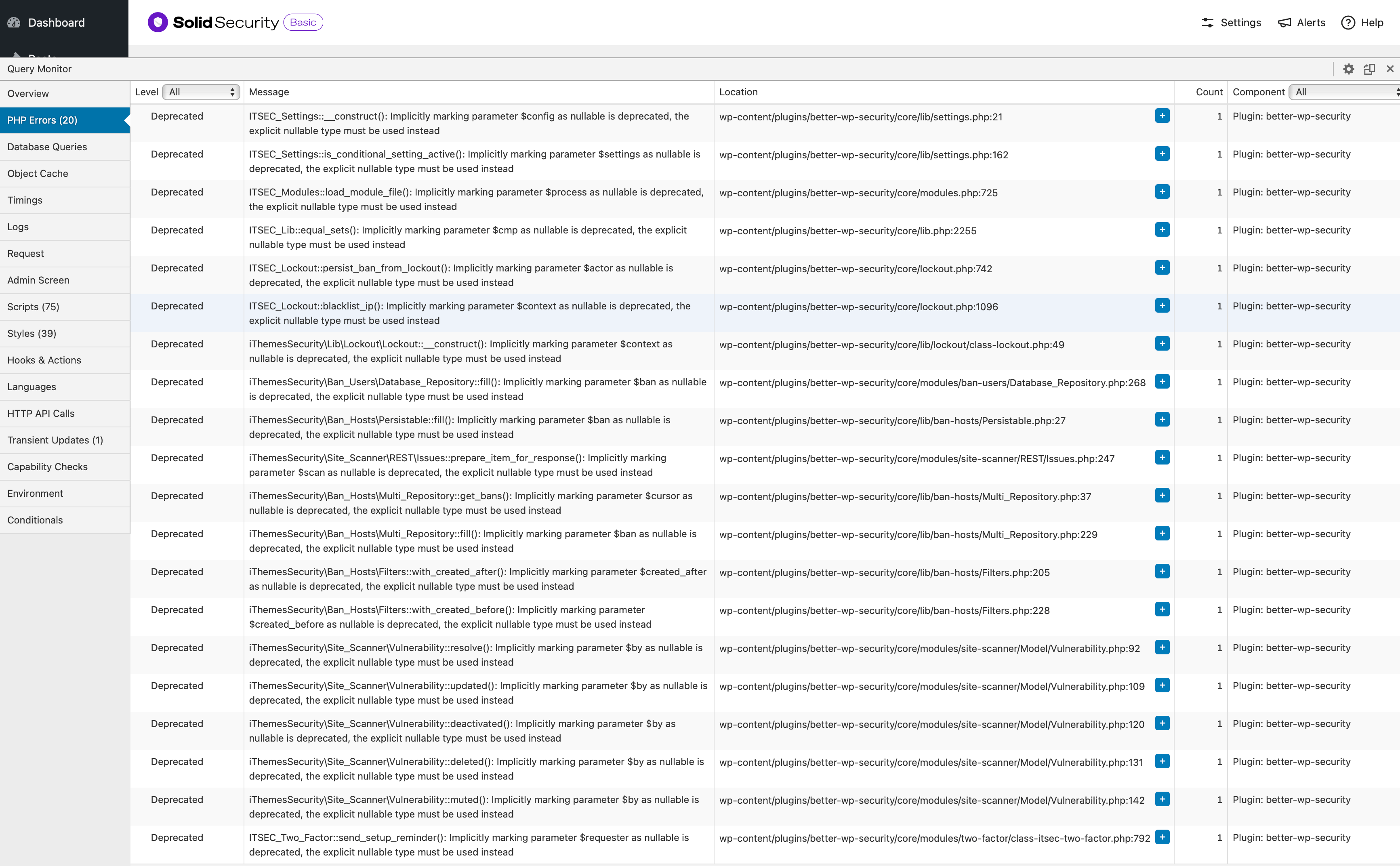
https://williamdaghlian.com/wp-content/uploads/Screenshot_SolidSecurity.png
- This reply was modified 11 months, 1 week ago by monkeywrench2.
Just one more observation — with Solid Security Pro v.8.5.6 I don’t get these deprecation warnings.
Hi Brent,
Just wanted to ask if there’s any ETA on when the code will be updated to avoid these deprecation warnings in php v8.4. My hosting provider recommends staying on php v8.2 to avoid these to be triggered.
Thanks for the update.
Hi,
I noticed that this problem only appears for me on the two pages that I use a Revolution Slider module. Does any of you use this plugin?
Hi,
I’m experiencing the same problem. I have a site that uses WooCommerce and which exists in three environments: on a local server without caching, on a staging site with caching and the production site. All three versions are exhibiting the same malfunctioning that you describe above.
I’ve noticed that Spectra changes the id numbers of the css files in many different circumstances. For example, simply doing something in the customizer (not on the page in question) will lead to id numbers changing. I’ve encountered funky behavior, where after such an interaction, the id number of the css file it was asking for in the head section was different in the logged in versus the logged out state. Therefore having the page look ok when logged in but not when logged out.
It appears to me that Spectra hasn’t worked out all the kinks in this new feature yet. I hope they will do so soon. For the moment, I have disabled this new feature and have Spectra write the css code inline again like before. Obviously not ideal but better than malfunctioning pages.
Thanks for pointing me in the right direction. I’ll correct the CSS then.
Hi,
Thanks for the quick explanation. Point taken.
I have one more observation regarding this. In Firefox browser Apple Pay isn’t supported and Apple Pay is therefore not shown in the “Express Checkout” section. This is I think the best approach — if an option doesn’t apply, don’t show it.
But in the “Payment” section the radio button for Apple Pay is still present even though it only leads to the fact that the “Place Order” button disappears when this option is chosen. It would be better NOT to present it in the first place.
Is this a possibility?
Thanks
Forum: Plugins
In reply to: [PDF Invoices & Packing Slips for WooCommerce] Custom FontsThanks for the clarification.
Forum: Plugins
In reply to: [PDF Invoices & Packing Slips for WooCommerce] Custom FontsThanks for the quick response.
Could you elaborate a little bit to what limitations and caveats I would encounter if I used web fonts.
Appreciate your input.
Hi Ironikus,
I don’t use another email protection functionality and I don’t use Cloudflare on this site. But maybe my Hosting Service is doing something that I’m not aware of. When I check the option in Email Encoder to do nothing and I use your email checker it reports that it doesn’t find any unprotected emails.
So I guess I don’t actually need your plugin.Does that sound correct?
