Norse Digital Group LLC

Forum Replies Created
-
Hi @cary_sf , thanks again for the follow-up!
Just to clarify how Text to Speech for WordPress works, so there’s no confusion going forward:
• The plugin does read the page content automatically.
• It does generate the audio automatically (no need to upload anything manually).
• And once audio exists for a page/post, the audio player appears automatically on the frontend.So your original assumption was actually correct.
If the player didn’t show up earlier, it simply means no audio was generated, which was likely due to the saved-voice limitation I mentioned above.- This reply was modified 4 months ago by Norse Digital Group LLC.
Hi! Thanks for giving the plugin a try.
A few quick clarifications that should help:
1. You don’t need your own ElevenLabs API key to test the plugin.
The free version comes with 10,000 free ElevenLabs credits, so you can generate audio without setting up anything at ElevenLabs.2. The player does in fact appear on all pages and posts.
If no audio has been generated for the page, the player will not show — this is the most common misunderstanding.3. In your case, the issue is that no audio was generated.
When there is no audio file connected to a post or page, the player stays hidden.4. Please check the “My Stats” page inside the plugin.
Make sure that the voice you selected is available under My Saved Voices.
If it isn’t listed, it means your saved voice slots are full. Just free up one slot, and the voice you want to use will work.5. We just released version 2.0.2, which includes clearer error and info messages so you can immediately see why audio didn’t generate and how to fix it.
6. And one note:
The plugin is actively supported and regularly updated, so jumping to the conclusion that it’s “defunct” isn’t accurate 😊If you try again with the steps above, the player should appear as expected.
Wish you a great day, and feel free to reach out if you need more help!
Hi there @computerhelpsos , and thank you for your message.
First, regarding support response time:
Your ticket was answered less than two hours after it was received (including your follow-up). If you haven’t seen the replies, please check your spam folder or whitelist our email domain, as replies sometimes get filtered.Regarding the PRO license setup:
Per ww.wp.xz.cn guidelines, commercial or PRO-related questions can not be handled here in the public forum:👉 https://ww.wp.xz.cn/support/guidelines/#do-not-post-about-commercial-products
To protect your privacy and comply with these rules, please contact us directly through our official support form:
👉 https://mementor.no/en/contact/
We are happy to help you get everything set up and working.
Thank you for your patience, and we look forward to resolving this for you quickly.
Forum: Plugins
In reply to: [Text to Speech - TTSWP] How can I activate the Pro version?Hi,
We can not answer any PRO releated question here. Please contact us here: https://mementor.no/en/contact/
Forum: Plugins
In reply to: [Text to Speech - TTSWP] only one admin can generate audioHi,
This issue should now be resolved in the latest version (1.8.9), which was just pushed live.
Please update to v1.8.9 and try generating audio again from multiple admin accounts. The conflict that previously limited generation to one admin at a time has been fixed in this release.
Let us know if you still experience any issues after updating — we’ll be happy to take a closer look.
Thanks for your patience and for helping improve the plugin!
Hi there 👋
Thanks for reporting this. Please make sure you’ve updated to the latest version (1.8.9) of the plugin — this release fixes several generation and encoding issues that could cause similar JSON errors.
If the problem continues after updating, we’ll need a bit more information to help:
- Where are you generating the audio (post, page, WooCommerce product, etc.)?
- Does the text include any special characters, emojis, or unusual formatting?
- Could you share the exact text or URL where it happens?
If you prefer not to post details publicly, feel free to email us directly at [email protected] — that will allow us to check the issue more closely.
Thanks for helping us improve the plugin!
Forum: Plugins
In reply to: [Text to Speech - TTSWP] only one admin can generate audioThanks for reporting this, and great that you shared those details! 👏
This issue has now been fixed in the latest version (v.1.8.6) of Text to Speech (TTS) by Mementor.
Please update the plugin to the newest release, and all admin users should then be able to generate audio normally (no need to manually adjust the database).
After updating, I recommend clearing any caching plugin or browser cache before testing again, just to make sure the new scripts are loaded correctly.
Let me know if everything works as expected after the update 😊
Best regards,
Thomas – Mementor Team
Forum: Reviews
In reply to: [Text to Speech - TTSWP] Impressed by the Simplicity and Voice Quality!I really appreciate your review. It’s great to know the plugin was simple to set up and gave you great results right away.
Forum: Reviews
In reply to: [Text to Speech - TTSWP] Best text to speech pluginThanks for the great feedback. I’m glad the sound quality meets your expectations.
Forum: Reviews
In reply to: [Text to Speech - TTSWP] Great and easy to use pluginReally appreciate this! It’s great to hear the plugin is helping you get text-to-speech working the way you wanted.
Forum: Reviews
In reply to: [Text to Speech - TTSWP] Great plugin, worldclass supportI really appreciate your review. It’s great to know the fix worked and that the plugin is running smoothly for you.
Forum: Reviews
In reply to: [Text to Speech - TTSWP] AMAZING SUPPORTThank you for this amazing review. I’m so glad we could get your problem solved quickly and that the updates worked for you right away. Your ideas really help make the plugin better for everyone.
Forum: Plugins
In reply to: [Text to Speech - TTSWP] Player placement is broken againHi @bigduke6,
Thanks for reaching out — and sorry to hear you’re running into issues.
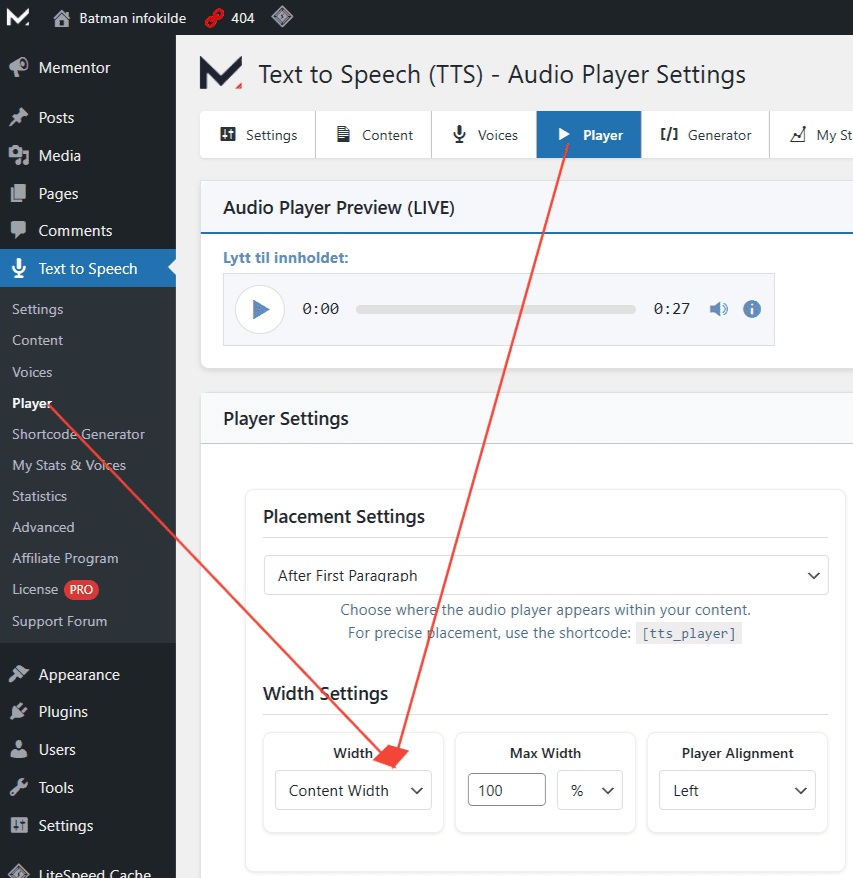
We’ve just released a fix for the “Full Width” player setting, which should resolve the problem you’re seeing. To apply the fix, please update the plugin to the latest version.
Alternatively, you can go to Text to Speech > Player (Audio Player Settings), and under Width Settings, try setting the width to Content Width, then save your changes.
Also, in the new version, you can now use the shortcode
[tts_player]to place the player exactly where you want it within your content.If the issue persists, feel free to create a temporary admin account on your site and send the login details to [email protected]. We’ll take a closer look and get it sorted for you as soon as possible.
- This reply was modified 10 months, 4 weeks ago by Norse Digital Group LLC.
- This reply was modified 10 months, 4 weeks ago by Norse Digital Group LLC.
Forum: Plugins
In reply to: [Text to Speech - TTSWP] Use my voices from ElevenlabsHi @babyyumyum.
Thank you for your question!
At the moment, the plugin does not support using custom-created voices or selecting specific ElevenLabs voices. However, this feature is already on our development roadmap and will be included as part of the PRO version in the near future.
Thanks for reaching out, and I’m really sorry for the trouble caused by the recent updates.
This issue should now be resolved in the latest version of the plugin (v1.4.6), which was just released. The update includes a fix for the unstyled and non-functional player showing on pages without audio, as well as improvements to how the player is rendered in general.
Please update to version 1.4.6 and check if the problem is resolved on your end. If the issue persists or you notice anything else, don’t hesitate to let us know — we’re happy to help.