Rami Obeidat

Forum Replies Created
-
Forum: Plugins
In reply to: [YOOAdmin] Improvement for 1.5.13Hi,
I reviewed the avatar-related reports and made additional compatibility improvements for the next update.
Please note that YOOAdmin focuses on compatibility through native WordPress hooks and APIs rather than providing dedicated support for individual third-party plugins. While compatibility is continuously improved, support for every plugin cannot be guaranteed.
The reported issues have been reviewed and any relevant improvements will be included in future updates.
Thank you for taking the time to share your feedback.
Forum: Plugins
In reply to: [YOOAdmin] Improvement for 1.5.13Hi,
Thank you again for taking the time to test YOOAdmin and for sharing such detailed feedback.
We carefully reviewed all of the points you reported and worked through them immediately. Most of the issues and compatibility concerns you mentioned have already been addressed and will be included in YOOAdmin 1.5.14.
Regarding the Login Experience and Users Experience options, we were unable to reproduce a situation where those settings are automatically re-enabled after being properly saved. The save logic appears to be working correctly, so there may be other factors involved such as caching, skipping a wizard step, or exiting the wizard before completing the save process. We will continue monitoring this area and investigate further if additional reports appear.
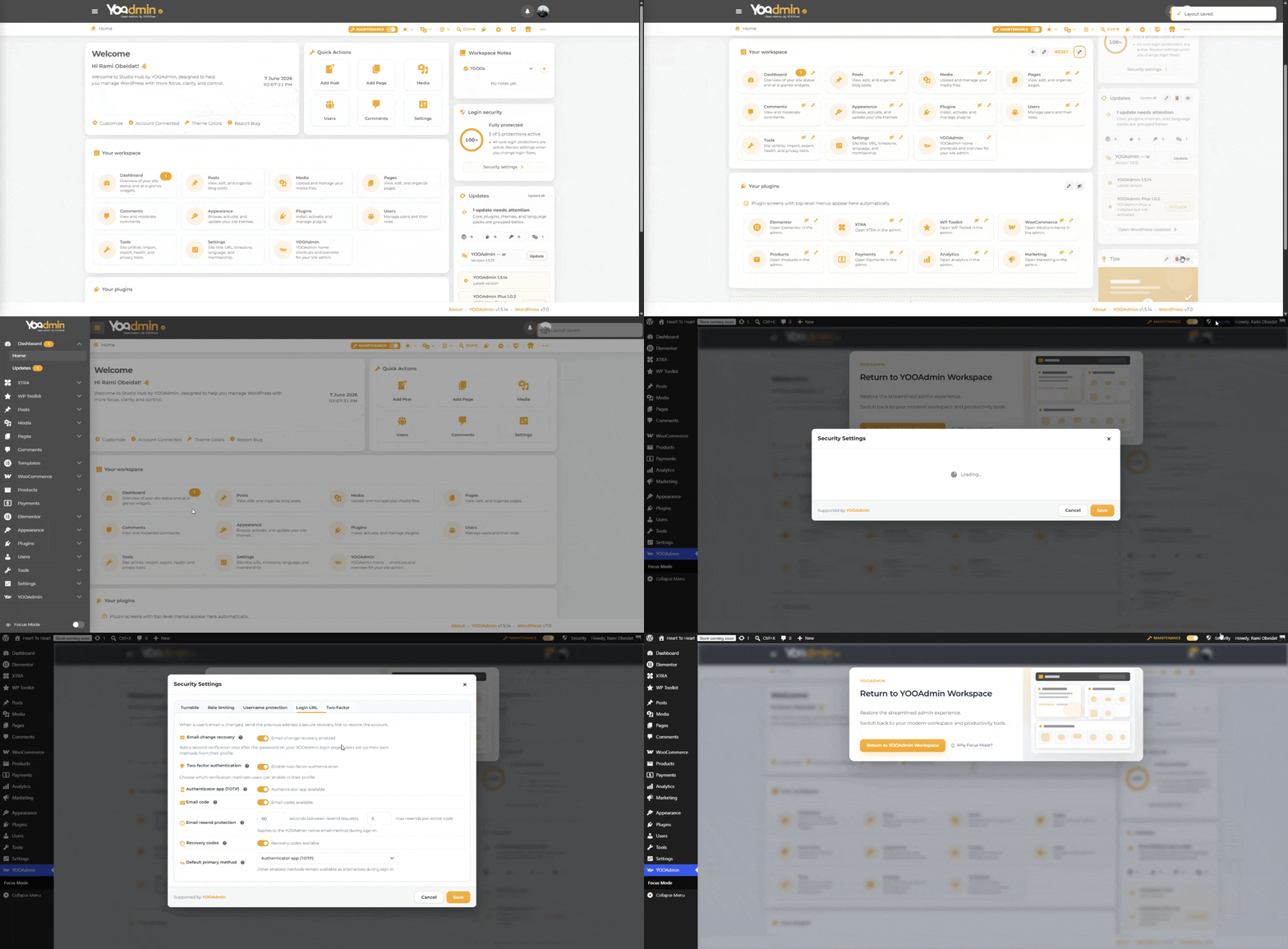
We also reviewed the Login Security widget and related notices. The security features in YOOAdmin are designed to protect WordPress login flows in general, including wp-login.php where applicable, and are not limited to the custom YOOAdmin login experience. The security widget itself can also be hidden if desired.Demonstration:
https://yooadmin.io/share/2026-06-07.gif
For user profiles, avatars, and third-party integrations, we have improved compatibility with WordPress hooks and user-related integrations. This includes better support for plugins that extend user profiles, avatars, and account-related actions. We have also improved compatibility with integrations similar to User Switching by relying more heavily on standard WordPress hooks and menus.
At the same time, while we continue improving compatibility, it is not possible to guarantee 100% compatibility with every third-party plugin. When compatibility issues are identified, our goal is to solve them in a general way that benefits the wider WordPress ecosystem rather than implementing one-off fixes for individual plugins.
Regarding interface customization requests such as Connect Account, Focus Mode controls, branding elements, and other workspace components, several of these options are being considered as part of our future white-label and advanced customization roadmap.
We truly appreciate your feedback. It helped us identify several areas for improvement, and many of those improvements were implemented within less than 24 hours and are already scheduled for the upcoming 1.5.14 release.
If you would like to test the update immediately once it is published, you can install it manually. ww.wp.xz.cn recently introduced a delay before plugin updates are distributed to sites, so automatic update availability may take up to 24 hours after release. Version 1.5.14 has already been submitted and should become available through the normal update channel soon.
We believe all reported items have now been addressed, improved, or added to our roadmap. If you discover any new issue after testing 1.5.14, please feel free to open a new support topic.
Thank you again for your support, testing, and detailed reports.
Best regards,
Rami Obeidat
YOOPixelForum: Plugins
In reply to: [YOOAdmin] Improvement suggestion and issues (tested 1.5.7)Hi @peopleinside,
Thank you so much for your kind words and continued support. It truly means a lot to hear your feedback.
We really appreciate the time you take to test YOOAdmin, report issues, and share suggestions. Feedback like yours helps us improve the plugin and make it better for everyone.
If you’d like, feel free to reach out to me directly at [email protected]. I’d love to stay in touch and hear more about your experience with YOOAdmin.
Thanks again for being part of the journey! 😊
Rami
YOOPixelForum: Plugins
In reply to: [YOOAdmin] Improvement suggestion and issues (tested 1.5.7)Quick follow-up 😊
YOOAdmin 1.5.9 has been released as a small maintenance update to address an issue discovered after the 1.5.8 release.
Thank you again for the feedback and continued testing.
Forum: Plugins
In reply to: [YOOAdmin] Improvement suggestion and issues (tested 1.5.7)Hi,
Just a quick update 😊
YOOAdmin 1.5.8 has now been released and includes fixes and improvements based on several of the points discussed throughout this topic.
The update includes improvements to the setup wizard branding flow, compatibility improvements for third-party admin toolbar actions, RTL enhancements, user management fixes, security hardening improvements, and various reliability improvements across the workspace.
We also spent additional time improving compatibility with Desktop Mode while testing both plugins together, including dark mode integration and visual consistency improvements to provide a smoother experience when both plugins are active.
If you are currently using YOOAdmin, we recommend updating to version 1.5.8 to benefit from the latest fixes and improvements.
Thank you again for all the testing, screenshots, suggestions, and detailed feedback. Several improvements in 1.5.8 were influenced by reports and observations shared here.
We genuinely appreciate the time and effort you invested in helping improve YOOAdmin, and we’re very grateful for your support and the 5-star review 🙌
Thank you!
Forum: Reviews
In reply to: [YOOAdmin] A nice useful alternative to the WordPress admin interfaceThank you so much for the kind review and all the helpful feedback along the way 🙌
I really appreciate the support and I’m happy to hear you’re enjoying YOOAdmin and the dark mode experience.
More improvements and updates are coming soon 👌
Forum: Plugins
In reply to: [YOOAdmin] Improvement suggestion and issues (tested 1.5.7)Hi,
Thank you again for the detailed feedback and for testing YOOAdmin 1.5.7 deeply with different plugins and workflows. We really appreciate the time you spent reporting everything clearly.
- Regarding the logo and favicon during the setup wizard:
We tested this again and it appears to be working correctly, including in your own video demonstration. This may have been related to caching or a temporary save issue during setup. However, we will still review the setup flow again and improve reliability further in the upcoming 1.5.8 update to avoid inconsistent behavior.
- About the menu/actions compatibility with third-party plugins:
Thank you for the detailed explanation and screenshots. You are correct that some plugin-added menu items and actions still require additional compatibility improvements. We already started working on a broader compatibility layer for custom admin toolbar/dropdown actions and we plan to improve this further in version 1.5.8.
- Thank you also for the suggestions regarding:
- hiding the “Connect Account” button,
- dashboard redirect visibility,
- and additional interface visibility controls.
Advanced branding and white label customization are currently part of the licensed version, mainly to help support ongoing development, maintenance, compatibility improvements, and long-term support for YOOAdmin.
Our goal is still to keep the free version very complete and fully usable for normal users, while more advanced agency/client customization options remain part of the licensed experience.
More details about the available plans:
https://www.yooadmin.io/pricing/And thank you again for the positive feedback about 1.5.7 , we are really glad you liked the improvements 🙂
- This reply was modified 3 weeks, 3 days ago by Rami Obeidat.
Forum: Plugins
In reply to: [YOOAdmin] Compatibility issue with WP Dashboard NotesThanks again for the detailed feedback and testing 🙌
The WP Dashboard Notes compatibility issue has now been fixed in YOOAdmin 1.5.7.
This update also adds support for managing classic WordPress dashboard widgets when Dashboard Redirect is disabled, making it easier to continue using traditional WordPress dashboard widgets and layouts when preferred.
Regarding the centered workspace layout: Studio Hub intentionally follows a more focused workspace philosophy compared to the traditional full-width wp-admin dashboard layout. However, YOOAdmin 1.5.7 now also includes new normal, wide, and full-width workspace modes so users can choose the layout width that fits their preference best.
For users who prefer the original WordPress dashboard behavior more closely, YOOAdmin also supports switching the homepage back to the native WordPress Dashboard or disabling Focus Mode entirely.
Thanks again for all the thoughtful reports and suggestions ✨
Forum: Plugins
In reply to: [YOOAdmin] [Feedback] A better dark modeThanks again for the detailed feedback and testing 🙌
The Code Snippets dark mode compatibility issues you reported have now been improved in YOOAdmin 1.5.7, including better support for code editor selection visibility, toggle states, token fields, and classic plugin admin pages inside adaptive dark mode.
We also made several broader improvements to the adaptive dark mode engine across classic WordPress admin screens and third-party plugins.
Since the remaining feedback is now being discussed in your newer thread, I’m marking this topic as resolved so we can continue tracking future improvements there more cleanly.
Thanks again for all the thoughtful reports and suggestions ✨
Forum: Plugins
In reply to: [YOOAdmin] [Feedback] A better dark modeWe also noticed that the YOOAdmin toolbar is still appearing inside customize.php.
Unfortunately the 1.5.6 update was already released before we caught this, but the toolbar visibility issue will be removed and improved in the next update as well.
Thank you again for the helpful report 🙌
Forum: Plugins
In reply to: [YOOAdmin] [Feedback] A better dark modeThanks for the report and the detailed explanation.
We were able to reproduce the issue and have already fixed it. The problem was related to compatibility between the WordPress Customizer and certain theme/admin styles (including Hestia), which affected dark mode rendering and caused slower loading behavior inside customize.php.
We have also released the new YOOAdmin 1.5.6 update which includes this fix.
Thank you again for reporting it 🙌
Forum: Plugins
In reply to: [YOOAdmin] [Feedback] A better dark modeVersion 1.5.5 is now officially live on ww.wp.xz.cn
Forum: Plugins
In reply to: [YOOAdmin] [Feedback] A better dark modeJust a quick update
Version 1.5.5 is being released today and includes the first version of a new dark mode compatibility engine we recently built for YOOAdmin.
The system is designed to automatically detect and adapt many interface colors across WordPress admin areas and third-party plugins to create a much more consistent dark mode experience overall.
In our current testing, it already improves compatibility across a very large number of plugins and covers most common interface scenarios automatically. We are still actively improving and expanding it further, and it will continue receiving updates and refinements in the coming days and future releases.
Your feedback and detailed testing genuinely had a big impact on this development direction because maintaining a good experience for users like you who rely heavily on dark mode is very important to us.
We would be very happy to hear your thoughts once you test the new update 🙂
Forum: Plugins
In reply to: [YOOAdmin] [Feedback] A better dark modeThank you again for the honest feedback
I think there may have been a small misunderstanding in my previous message. What I meant was specifically the original WordPress dashboard widgets and workspace integration system, not dark mode support in general.
Dark mode compatibility is actually one of our highest priorities right now. We are actively working on improving global dark mode coverage across more WordPress admin areas and third-party plugins so the experience feels much more consistent overall.
Your feedback and video were extremely valuable for us because they highlighted real-world usage scenarios beyond core WordPress pages, especially for users who rely on dark mode daily across many plugins.
In fact, the team already started working on several improvements based directly on your feedback, including broader dark mode compatibility enhancements, and another update is already planned for today or tomorrow 🙂
We completely understand your point that users should not have to depend on third-party developers adapting everything manually just to have a consistent dark mode experience. This is something we are actively trying to improve progressively with each update.
Thank you again for all the time, testing, and detailed observations. Feedback like yours genuinely helps shape the future direction of YOOAdmin
Forum: Plugins
In reply to: [YOOAdmin] [Feedback] A better dark modeThank you so much again for the detailed video and testing
The video was genuinely very helpful for us and contained many valuable observations and improvement ideas. We will absolutely do our best to improve and resolve as many of these issues as possible in upcoming updates.We also noticed that some features may have been missed during testing, which is completely understandable since YOOAdmin now includes many workspace customization options.
For example, inside Workspace Edit Mode you can fully customize the workspace layout, move plugins between sections using drag and drop, move cards between sections, and even hide the right widget area entirely. These features are explained during the interactive onboarding tour shown after installation, but it is possible the welcome popup and tour were skipped during setup
Regarding the default WordPress dashboard widgets, we currently do not fully support the original WordPress widgets because many of them visually conflict with the Studio Hub workspace design and dark mode system. Instead, we created a developer-friendly system and documentation that allows plugin developers to integrate properly with YOOAdmin using custom sections and Edit Mode compatibility.
About the tooltip/banner behavior at the top of the page, the current design is intentional because we want users to be able to quickly access the related settings page and optionally convert these admin banners into notifications instead of showing them directly in the workspace. However, we completely agree that the close icon should also properly support dark mode and we will improve this.
Regarding the original WordPress homepage/dashboard, there is also an option inside YOOAdmin settings that allows users to open the default WordPress dashboard instead of the YOOAdmin workspace homepage when clicking Home.
And finally, regarding global dark mode support, we are honestly very happy to receive feedback like yours. Studio Hub and the new dark mode system were introduced recently in version 1.5 and are still actively evolving. Feedback like this is extremely valuable during development and genuinely helps us improve compatibility and overall user experience across WordPress admin areas.
There were also many other important points mentioned in your video that we noted internally and will continue improving over time.
Thank you again for all the effort and time you spent testing YOOAdmin and sharing such detailed feedback with us