ocliptus

Forum Replies Created
-
I run the same diagnostics and I have same results. Please remove the following redirect chain if possible.
Forum: Plugins
In reply to: [WooCommerce] Mouse On and Mouse Out FramesIn addition, i added the code block which is given by you on every .css files in woocommerce 😀 But it is not working, i will try to edit theme’s .css files 😀
Edit : 19.3.2018 – 23.02
I found it 😀 It is about the Storefront .css files. 🙂
- This reply was modified 8 years, 2 months ago by ocliptus.
Forum: Plugins
In reply to: [WooCommerce] Mouse On and Mouse Out FramesHey @mikeyarce,
Thanks for helping. You are my super hero 😀 But i checked all of the .css files inside of woocommerce plugin directory but i couldn’t find .site-main li.product code line should i add this theme’s .css files ?
I didn’t know the name of specialty and thanks again for source. 🙂
- This reply was modified 8 years, 2 months ago by ocliptus.
Forum: Plugins
In reply to: [WooCommerce] Mouse On and Mouse Out FramesHey @mikeyarce,
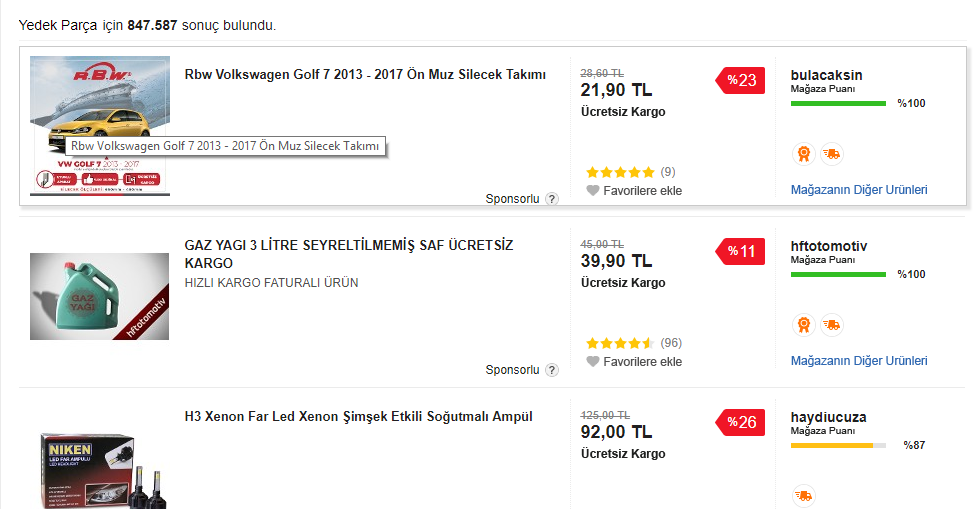
https://www.n11.com/yedek-parca-otomobil this page is really nice example for what i need and you can check the picture that i added :
https://www.imagevisit.com/images/2018/03/16/Screenshot_13.png
That’s what i need 🙂
So i guess i should edit the .js file that contains the shop product preview.
By the way, English is not my native language so i am sorry about grammer 😀
Best regards,
Forum: Plugins
In reply to: [WooCommerce] Mouse On and Mouse Out FramesOk than i can understand that but and i can guess how can do that these future but i can’t find the right .css or .js file that i have to edit. I mean which file contains the product preview content 😀 Little hints can be useful 🙂
Best wishes,
@genetech you answered someone’s problem but you didn’t answer my question. If you guys couldn’t find the right solution at least you could notice me 🙁 I’m hoping to get a answer as fast as can be.
Best regards.