Paul Bunkham

Forum Replies Created
-
Forum: Plugins
In reply to: [Jetpack Social] Unable to edit ‘Custom Message’ when sharing PostGreat, it sounds like we’ve indeed cracked the problem, and I’m really happy we could work through this together!
Since we’ve reached a successful resolution, I’d be grateful if you’d consider leaving a review for Jetpack Social. Your feedback is incredibly valuable, not just to us, but also to others who may encounter similar issues. It would be a great way to share your experience and help the community.
You can leave your review here: https://ww.wp.xz.cn/support/plugin/jetpack-social/reviews/#new-post
Thank you in advance! And if you have any other questions or issues in the future, feel free to reach out anytime.Forum: Plugins
In reply to: [Jetpack Social] Can Jetpack Social be used without a paid plan?Yes, I can see the site is self-hosted. The screenshot you shared was from WordPress.com, so you must have somehow been redirected there. Perhaps as you created the connection to the Jetpack site?
However, it isn’t a problem because the site is connected and should be able to use Jetpack Social now.
Let us know how you get on and if we can be of more help.
Forum: Plugins
In reply to: [Jetpack Social] Can Jetpack Social be used without a paid plan?Hi,
I’m not entirely sure what took you to that flow on WordPress.com, but it looks like it’s related to transferring your domain there, which I don’t think you want to do. I can see that docs.zoncircle.com is up and running, and you have a Jetpack connection, so you should be all set!
If you go to https://docs.zoncircle.com/wp-admin/admin.php?page=jetpack#/sharing you will be able to enable the auto-sharing feature (if it is not already) and there is a link to connect your social media accounts
I hope this helps, but let us if there’s anything else we can do.
Forum: Plugins
In reply to: [Jetpack Social] Unable to edit ‘Custom Message’ when sharing PostPlease do! The
_wpas_done_allmeta key will have been preventing you from editing the custom message, but the other post’s custom message may still be present an the duplicated one.If possible, it would be good to edit the post scheduled for Monday and see if you can edit the custom message for it. You could also delete the
_wpas_messkey for the post, and that will have it use the default message.Forum: Plugins
In reply to: [Jetpack Social] Unable to edit ‘Custom Message’ when sharing PostAh if it’s the same title being used for all posts, and they were duplicated from that post, then it could indeed have something to do with it. We also have other meta values that ensure we don’t accidentally share posts twice. This also would cause the controls to be disabled, so my hunch would be that those meta values are being duplicated with the post.
On one of your scheduled posts where you can’t edit the message, if you could try looking for the meta value
_wpas_done_alland if it exists, deleting it. I think that should help.For a more permanent fix, maybe there is a hook which can be used to stop certain meta values from being duplicated, or there could be another post duplicator plugin which would allow this level of control.
I hope this helps!
Forum: Plugins
In reply to: [Jetpack Social] Unable to edit ‘Custom Message’ when sharing PostIf you have LinkedIn connected, than by default the post will be shared to LinkedIn on publish, and unless you edit the custom message, it will use the post title and excerpt. You can clear the checkbox next to the connection to prevent it being shared, there is also a filter you can use to disable the connections by default publicize_checkbox_default but I wouldn’t advise using that unless you are confident making changes to the code.
The only way I could get rid of it was via the database, I cleared all occurances of it in the table and it worked. Probably not the ideal solution but it’s a fix.
What are you removing from the database? You mentioned that helped solve the problem in your previous response. Knowing more details here may help to diagnose the problem. The information used to share the post is stored in the post meta, but removing this after the post is published is unlikely to make a difference, as the process will have already been run to share the post to LinkedIn.
Could something else be sharing the post to LinkedIn? Do you have any other automations on the site?
Forum: Plugins
In reply to: [Jetpack Social] Unable to edit ‘Custom Message’ when sharing PostFrom the screenshot, it looks like the LinkedIn connection is disabled. This can happen when the connection is broken in some way. With no available connections the ‘Custom Message’ field is disabled too.
I have tried to remove it in the orignal post
Has the post already been shared? If so, then the controls will be disabled because it can’t be shared again from the classic editor.
You could try reconnecting LinkedIn https://cloud.jetpack.com/jetpack-social and then checking if you can edit the message on a new draft post.
I hope that helps, but let us know if you’re still having any issues.
Forum: Plugins
In reply to: [Jetpack Social] Ability to add Facebook groups or second facebook accountAnd jetpack also needs the ability to re-post older blog posts as well. Would be ideal!
@sjsicilia This is a feature we’re working on. I can’t give you a date at the moment, but watch this space!
It’s actually already a feature incorporated in the Jetpack plugin, which you might want to check out.
Forum: Plugins
In reply to: [Jetpack Social] Ability to add Facebook groups or second facebook accountHi @nikov
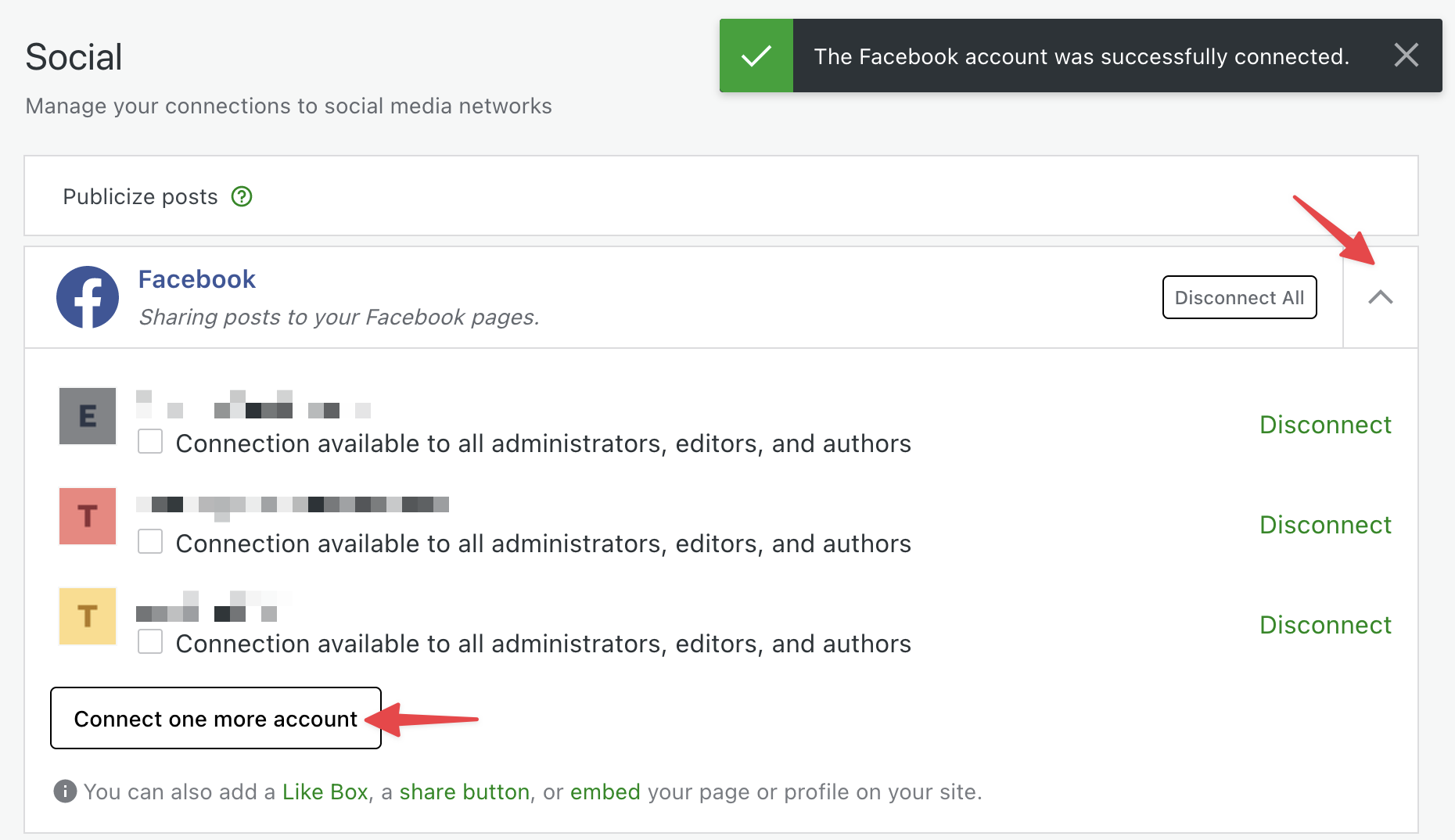
I spotted this message and thought I’d let you know that you can create connections to multiple Facebook pages, but the interface is a little hidden.
While you are managing your connections you can click on the arrow to the right of Facebook and it should expand and reveal your current connections, along with a button to connect another account.
https://cldup.com/9nZIjR_PNA.png
We don’t support groups currently, but as @deathlynotes says, if you make a feature request, it could be something that we’ll add in the future.
Thanks
Paul.
Forum: Developing with WordPress
In reply to: Convert meta boxes used to store meta data to Gutenberg> Thank you again for these details. It seems that this can be done with the plugin sidebar feature.
That’s exactly how it’s done in the Yoast plugin. You can see it being set up in the code here:
I’m not sure how up to date it is, but there’s this tutorial I found on setting up one of these sidebar blocks, that might be of use:
https://www.codeinwp.com/blog/make-plugin-compatible-with-gutenberg-sidebar-api/
Good luck with it!
I had a site that suffered from this problem and despite upgrading my default region got set to EU when I only had a domain set in the US, so everything silently failed.
Could it throw some sort of error in these situations so the site owner is aware of it? Better that than someone missing orders in their Woocommerce site – which is what happened in this instance.
Thanks for all your work on this plugin though, it’s great!
Cheers,
Paul.
- This reply was modified 7 years, 7 months ago by Paul Bunkham.
Forum: Plugins
In reply to: [WooCommerce] Can I reduce stock level by variation value?Ok, great! I’m just doing some work on the low and no stock notifications (there’s another thread I’ve started about that as it looks like the implementation is changing), then I’ve just got to tidy up the admin interface for it, and it should be good to go.
I’ll add a reply to this thread when it is.
Forum: Plugins
In reply to: [WooCommerce] Can I reduce stock level by variation value?Funnily enough I’m working on a plugin to do almost exactly this but with fabric quantities as there are varying widths the fabric is sold in, but it’s all off the same reel so I want the variations stock to be linked to the parent product.
I’ve tried a few solutions including the measurement calculator plugin which looked promising, but eventually I was told it couldn’t do what I wanted. Might be worth you checking that out though.
Alternatively, if it’s not urgent I’ll happily share my code with you once it’s done. I was going planning on sticking it on GitHub anyway.
Forum: Fixing WordPress
In reply to: Inserted line of code into php incorrectly am unable to undo it.Sorry, missed your reply! Did you fix this? You might need to update your permialinks. Just got to the settings page (wp-admin/options-permalink.php) and click save.
Also check the settings on wp-admin/options-general.php As the URL might be set in there. However, that’s what’s stored in the database so if you’ve run the search and replace it should have picked that up.
Forum: Fixing WordPress
In reply to: Inserted line of code into php incorrectly am unable to undo it.Have you tried replacing all references to the old domain in your database?
You can use a tool like this one https://interconnectit.com/products/search-and-replace-for-wordpress-databases/ to run a search and replace.