Dano at Porkopolis

Forum Replies Created
-
Forum: Plugins
In reply to: [Glance That] site is experiencing technical difficultiesHey, @uamv, Today I deactivated and deleted Glance That then followed your earlier suggestion:
I suppose one other first step you could take to try and remedy this is to manually remove any entries from your database _usermeta and _options table that contain glance_that.
I found 6 entries in _usermeta and two more in _options and deleted them all. Then I reinstalled your updated version. Everything is working terrific now! Thank you for all your help and your quick replies to my requests.
DANO
Forum: Plugins
In reply to: [Glance That] site is experiencing technical difficultiesOK, @uamv, sorry if this seems long… 🙂
Thanks for your suggestions so far! I downloaded and reinstalled “Glance That” again this morning to get a fresh look at the error.
1)
I suppose one other first step you could take to try and remedy this is to manually remove any entries from your database _usermeta and _options table that contain glance_that.
I’m assuming I do this after I have completely uninstalled ” Glance That” first? I have _not_ tried this yet. Please confirm.
2) I re-checked and confirmed the email used for “administrator email shown in Settings > General” and looked again for the message in that account including the spam file – no notice.
3) In the Error Log the only recent items where today and the date corresponding to the last time I tried to install and activate the plugin. These are are below:
[10-May-2019 15:00:21 UTC] PHP Fatal error: Cannot redeclare plugins_api() (previously declared in /home1/mysite/public_html/pigcity7/wp-admin/includes/plugin-install.php:101) in /home1/mysite/public_html/pigcity7/wp-admin/includes/plugin-install.php on line 230
[10-May-2019 15:01:36 UTC] PHP Fatal error: Cannot redeclare plugins_api() (previously declared in /home1/mysite/public_html/pigcity7/wp-admin/includes/plugin-install.php:101) in /home1/mysite/public_html/pigcity7/wp-admin/includes/plugin-install.php on line 230
[12-May-2019 10:22:10 UTC] PHP Fatal error: Cannot redeclare plugins_api() (previously declared in /home1/mysite/public_html/pigcity7/wp-admin/includes/plugin-install.php:101) in /home1/mysite/public_html/pigcity7/wp-admin/includes/plugin-install.php on line 230
[12-May-2019 10:22:10 UTC] PHP Fatal error: Cannot redeclare plugins_api() (previously declared in /home1/mysite/public_html/pigcity7/wp-admin/includes/plugin-install.php:101) in /home1/mysite/public_html/pigcity7/wp-admin/includes/plugin-install.php on line 230
I suspect that is a standard WP file, but I opened that file mentioned and here is a link to a .JPG of my editor with that section of the file’s code:
https://www.porkopolis.org/download/errorlog-line230.jpgI also ran the “PHP Compatibility Checker” plugin and received no warnings.
Then I ran your suggested ” Plugin Detective” which when activated only gave me a white screen and another plugin issue I probably don’t have time to address right now… Sorry.
Also, here is some info from my shared server in case it is helpful:
Versions
cPanel 78.0 (build 21)
Apache 2.4.39
PHP 7.0.33
MySQL 5.6.41-84.1
Perl 5.28.0Thanks for your help so far! I’ll follow your next suggestions…
DANOForum: Plugins
In reply to: [WP Popular Posts] popular items list vanishes & returnsHi Hector, glad to hear you’re fluent in ancient Valerian, as for me, well, I drink, and I know things… 🙂
Thanks for the reply above, but I did some more investigating and have an alternative answer that seems to be working.
I went to your “2. Template tags” page at https://github.com/cabrerahector/wordpress-popular-posts/wiki/2.-Template-tags#wpp_get_mostpopular
I copied your original code:
<?php

    if (function_exists('wpp_get_mostpopular'))
        wpp_get_mostpopular();

?>
Then I updated and saved my home page and refreshed it in my browser and a basic list appeared!
I proceeded to add parameters one at a time without using the comments and extra returns I had in the original. I kept checking the page after each parameter was added. I changed a few parameters and finally ended up with this:
<?php

    if (function_exists('wpp_get_mostpopular'))
        wpp_get_mostpopular("post_type=post,page,pig_poet,pig_artist&thumbnail_height=70&thumbnail_width=70&stats_views=0&pid='-190,-336'&order_by=views&limit=8&range=all");

?>
This all works. Yea!
Not sure at all what the problem actually was – the comments, line returns, the order of the parameters, ? – but maybe this is correct now. I’m going to give it a whirl for awhile (fingers crossed).
Thanks for the support!
Dano- This reply was modified 7 years, 4 months ago by Dano at Porkopolis.
Forum: Plugins
In reply to: [Post Type Switcher] Gutenberg SupportFollowup on Gutenberg
I am using WP v.4.98 with the Gutenberg plugin v.3.9.0 and the Post Type Switcher plugin v.3.1.0 installed.
I see that I can access the Post Type Switcher drop down box from both the Bulk Edit &/or Quick Edit screens of my Pages, Posts, and Custom Post Types. I have used the plugin this way and it works for me.
The drop down box is _not_ on the main Edit screen, though… Fingers Crossed this access, and a spot on the main Edit screen will be added, when the final version of Gutenberg becomes part of Core.
90,000+ Active Installations would like an answer/followup from the plugin’s Authors!!
- This reply was modified 7 years, 8 months ago by Dano at Porkopolis.
Forum: Plugins
In reply to: [WP Popular Posts] stats not showingHey, Hector!
Your help and the changes you suggested above worked perfectly. My home page at https://www.porkopolis.org/ is showing the popular post correctly and right in line with other tools I have for tracking visits.
Thank you for this great plugin and your continued support!
DanoForum: Plugins
In reply to: [WP Popular Posts] stats not showingThanks, Hector.
I disabled Data Sampling, then turned my caching plugin back on and flushed the cache. I’ll give this a few days and see how this works.
I really appreciate your help!!Forum: Plugins
In reply to: [WP Popular Posts] stats not showingHector,
Thanks for the quick reply! My site gets about 100 to 150 visitors daily. I don’t recall setting the Data Sampling to on or off, but I checked now and it is ON and the sample rate is “100.”
I read your link above, but it probably a bit beyond my grasp. My site gets few visitors, so should I turn off Data Sampling &/or lower the sample rate?Thanks!
Forum: Plugins
In reply to: [WP Popular Posts] stats not showingHi Hector, I am having a similar issue. I have already changed my caching plugin – Comet Cache – as you described in your FAQ, but this had little effect, so I turned off the caching plugin all together for a while. Now I need help with this:
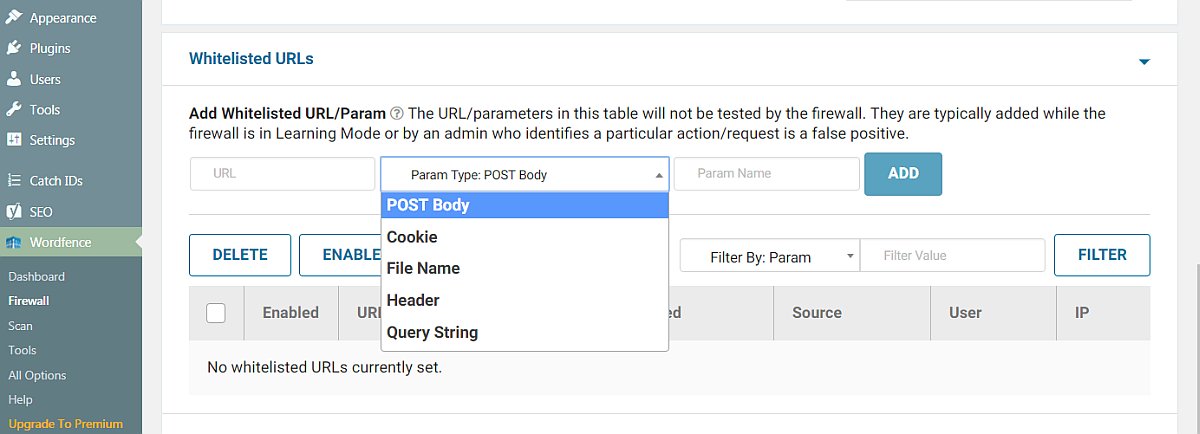
“Are you using a security / firewall plugin? Chances are access to the REST API is restricted, preventing WordPress Popular Posts from keeping track of your site’s pageviews. You need to allow WPP access to the REST API so it can do its thing (some plugins offer a feature to “whitelist” certain requests while keeping the REST API restricted / disabled, check with your security plugin developer if this is possible with their plugin).”
Per your FAQ above I checked the firewall plugin I am using – Wordfence – and found a section for whitelisting. Here is a screen image.
Could you please tell me how to fill out this section for WPP?
Thank you!
Forum: Plugins
In reply to: [Post Type Switcher] Gutenberg SupportHey, John! ditto as Toby Cryns above.
I use Post Type Switcher regularly and I’m just starting to practice with the Gutenberg plugin, Version: 3.1.0.
I’m sure lots of users would appreciate an update on your intentions as WP 5.0 should be reality before year’s end.
Thank you!
Forum: Plugins
In reply to: [ZenCache] white screen after latest upgrade v160222@raamdev Thanks for all your help with this! Turns out this was MY FAULT and not ZenCache. I had some bad code in a plugin I was building that did not like your latest version of ZenCache… I had abandon the plugin, just not deleted it. Once I did and restarted ZenCache all is well.
ZenCache has made a huge difference in the speed on my site and I am excited about Comet Cache and what all else you have to come. Keep up the great work!
Forum: Plugins
In reply to: [ZenCache] white screen after latest upgrade v160222@raamdev, thank you for the reply. I deleted
wp-content/advanced-cache.phpand now trying to login I see this text where before there was just a blank white screen.“Server error 500 – The website encountered an error while retrieving http://www.porkopolis.org/pigcity7/wp-login.php. It may be down for maintenance or configured incorrectly.”
Forum: Plugins
In reply to: [ZenCache] need to stop caching home pageCorrectamundo, KTS915! I did find a conflict with a forgotten mu-plugin and deleted that. Then, your suggested code worked as you said, except that all my blog archive pages as well as my static home page were stopped from caching. I just wanted to have the home page cache stopped.
This is what was showing up at the bottom of both blog and home page in page view:
<!– ZenCache is NOT caching this page, because the PHP constant
DONOTCACHEPAGEhas been set at runtime. Perhaps by WordPress itself, or by one of your themes/plugins. This usually means that you have a theme/plugin intentionally disabling the cache on this page; and it’s usually for a very good reason. –>I read up some in the WP Codex about
<?php is_home(); ?>and<?php is_front_page(); ?>and opted instead for ‘is_page_template ( string|array $template = ” )’. I have been testing this<?php if(is_page_template ( $template = 'homepage.php' ) ) { define('DONOTCACHEPAGE', TRUE); } ?>because I created a specific home page template in my child theme. The above code inserted as you described, into the top of my child theme’s header.php file is now working only on the static home page. I’ll try this for a while and test some more, but I think we got a Bingo, thanks!
Forum: Plugins
In reply to: [ZenCache] need to stop caching home pageStill not successful. Thanks a bunch for all the suggestions, KTS915, but feel like we’re shooting in the dark. I’m going back to the Zen Cache knowledge base and read up on making an mu-plugin for this.
I’d still like to hear from the Developers or someone who actually solved this problem.
Forum: Plugins
In reply to: [ZenCache] need to stop caching home page🙁 still no good.
Well KTS915, Thanks for all your help!! I need to get back to some other work that this pulled me away from. If your testing comes up with anything else, I’d appreciate an update. I’ll keep watching this support page.
Forum: Plugins
In reply to: [ZenCache] need to stop caching home pageStill no effect…
I’m not clear on the “subfolder” you mention, but on the Settings/General section of my site it says:
WordPress Address (URL) http://www.porkopolis.org/pigcity7
Site Address (URL) http://www.porkopolis.org
Enter the address here if you want your site home page to be different from your WordPress installation directory.