Password Protect WordPress Page Support

Forum Replies Created
-
Hi @apollotekcm ,
Thanks for reaching out to us.
Are you ware of the fact that our plugin uses cookies to allow users to re-visit the protected content multiple times without having to re-enter the password every single time?
If you want to change this default behavior, simply modify the cookie expiration time as short as you wish to or use the session cookie instead.
Do you use any caching plugins or enable server cache, by the way?
We look forward to your reply.
Elena.
Hi @richardschouw,
Thanks for reaching out to us.
To better assist you, might we know:
- The type of content that you want to protect, e.g. part of the content, the whole page, or the entire site.
- Screenshots or a recorded video regarding your issue
You may want to drop us an email to hello(at)preventdirectaccess.com so that we can assist you better and faster.
We look forward to your reply.
Forum: Plugins
In reply to: [PPWP - Password Protect Pages] dynamic passwordHi @jimeny,
Thanks for reaching out to us.
Just to clarify,
- You want to password protect a custom post type (CPT), don’t you?
- Who will set the password field – users or the admins? Which WooCommerce Product Addon form are you using, by the way?
To better assist you, could you please send us sample pages of your CPT and WooCommerce product pages as well as screenshots of your product setup on the back-end to take a look at?
You might want to drop us an email at hello(at)preventdirectaccess.com for a faster response from us.
Look forward to hearing from you.
Elena
Forum: Reviews
In reply to: [PPWP - Password Protect Pages] Fatal error – no refundHi @klartext-ne,
We issued a full refund almost 2 months ago (on November 16th, 2020 as per the screenshot below) and tried to contact you in vain.
https://drive.google.com/file/d/1Vw_dfW3dv6yCEk5D1ahx-Ej-WOg9lSd8/view?usp=sharing
Can you please help confirm your email address? Or if possible, just reply to us on the same email thread.
Also, looks like you’ve got us wrong. We did give you a refund even though you haven’t adjusted your review yet.
Look forward to hearing from you so we can clear this up.
Forum: Plugins
In reply to: [PPWP - Password Protect Pages] Settings / Texts not saved?You’re most welcome, @mwssoneofnnet.
Thanks for your detailed explanation. We have tried in vain to reproduce the issue on our side.
It looks like a conflict with the theme or plugin on your site.
Could you please switch to the default theme or deactivate the plugin one by one until the issue is resolved?
If the issue still persists, please drop us an email at hello(at)preventdirectaccess.com so that we can further discuss it and provide you with a solution accordingly.
Have a great day as always.
Elena
Forum: Plugins
In reply to: [PPWP - Password Protect Pages] Settings / Texts not saved?Hi @mwssoneofnnet,
Happy New Year! We wish you a fantastic 2021 ahead.
Thanks for reaching out to us. We really appreciate your compliment.
To assist you better, may we know which text options are not saved properly?
Is it just a few or all options under Single Password Form?
We look forward to your reply.
Elena
- This reply was modified 5 years, 5 months ago by Password Protect WordPress Page Support.
Forum: Plugins
In reply to: [PPWP - Password Protect Pages] Sitewide Login Form Customiser Not WorkingThanks for reaching out to us last night.
Customizing the “headline” and “description below form” is available on our Password Protect WordPress Pro only.
It looks like you’re referring to the options in the single password form, not the sitewide login form.
To assist you better, could you please share with us your login page and what you’d like to achieve in more details?
You may want to drop us an email to hello(at)preventdirectaccess.com for faster assistance.
We look forward to your reply.
Elena
Forum: Reviews
In reply to: [PPWP - Password Protect Pages] Fatal error – no refundThis is a misleading review.
The fatal error is caused by a conflict with his existing setup.
As soon as we received his email regarding the fatal error, our team has developed and provided him with a beta version that fixes the conflict on his site even though we’re not really at fault.
However, he ignored the solution and kept asking for a refund multiple times, which makes it very difficult for us to help. Eventually, we did give him a full refund out of good will more than 1 month ago even though it goes against our refund policy.
@klartext-ne. Merry Christmas and happy holidays. We contacted but didn’t hear back from you. As promised, can you remove or update the review accordingly, please?
Forum: Plugins
In reply to: [PPWP - Password Protect Pages] Speed up login processHi @louistkg,
Thanks for reaching out to us.
Could you please share with us the protected page URL and its password so that we can double check on our side?
By the way, might we know why you need twenty thousand passwords?
You may want to drop us an email to hello(at)preventdirectaccess.com and share with us more about your use case so we can advise you better.
We look forward to your reply.
Elena
Yes, it is indeed working correctly.
We’ve set up a demo here for you with the same htaccess that you’re using.
Please test this out:
https://passwordprotectwp.com/demo/restrict-password-usage-per-ip (password:123456)
This login page will return 403 error
https://passwordprotectwp.com/demo/wp-login.phpHi @devdjny,
Thanks for reaching out to us.
Our PPWP plugin uses its own custom form action to password protect content and it does not relate to WordPress function.
Might we know which .htaccess rules you’re using to restrict IP addresses for the login page?
We look forward to your reply.
Elena
Hi @bigevent,
First of all, thank you for your feedback.
The question is raised before. And we’ve already explained why we have to do it that way technically.
Perhaps, it’s not shown clearly. So please allow us to explain one more time.
WordPress only allows you to set 1 password while our plugin allows unlimited passwords per post. Technically, we can’t use 1 password from WordPress data and the rest from ours.
That’s why once PPWP Free is activated, the default WordPress passwords and its protection feature are removed and hidden to avoid potential conflicts.
There are some difficult decisions we have to make technically. And we understand that sometimes it’s not perfect.
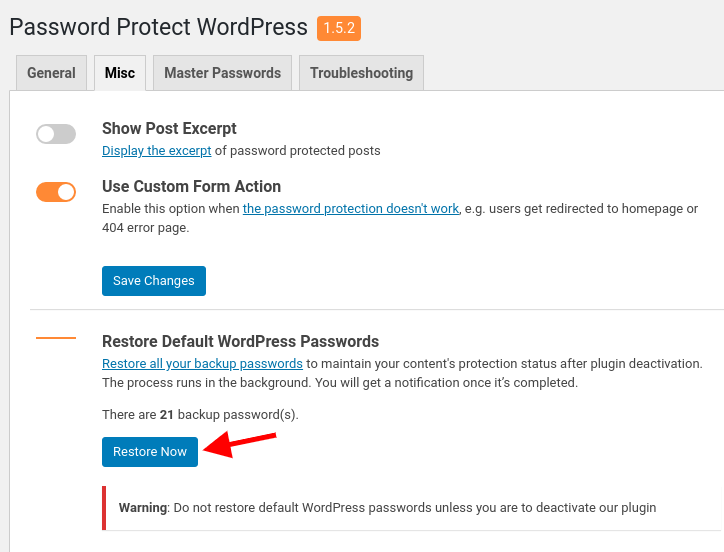
Anyway, since our PPWP Lite version 1.5.2, we’ve allowed you to restore all default WordPress passwords before deactivating our plugin.
Here’s a screenshot of the UI.
https://passwordprotectwp.com/wp-content/uploads/2020/08/ppwp-restore-wordpress-passwords.pngPlease let us know if it makes sense to you now, @bigevent.
Elena
Forum: Plugins
In reply to: [PPWP - Password Protect Pages] Single PageHi @brucegyoung,
Thanks for reaching out to us.
Just to clarify, you can protect a single page without having sitewide protection enabled.
While you can use the same password for the entire site and a single page, unlocking the sitewide password form will not make the single password form disappear. So users will have to enter passwords twice.
If you want to allow users to enter any character and get access to the protected page, you will need some custom codes.
To better assist you, can you please share with us your use case in more detail?
You may want to drop us an email at hello(at)preventdirectaccess.com with some screenshots of what you wanted to achieve so we can help accordingly.We look forward to your reply.
Forum: Plugins
In reply to: [NSFW] [PPWP - Password Protect Pages] passwords not workingHi @jonl711,
The password protection works on our side. We can unlock the page with the provided password.
Can you please double check on yours, i.e. perhaps try in an incognito mode?
If it still doesn’t work, please drop us an email to hello(at)preventdirectaccess.com with what you see on your end so that we can assist you better and faster.
Just an update, it was a conflict with the theme. The solution works and the issue is resolved by email.
If you love our plugin and support, can you leave us a 5-star review, please @jwstimac?