prismtechstudios

Forum Replies Created
-
Forum: Plugins
In reply to: [Modern Footnotes] Print Footnotes at End of PageHi @vitruvian1man! There is not a way to do that right now unfortunately, but I’ve got a task logged to support putting the footnotes at the end of an article at https://github.com/seankwilliams/modern-footnotes/issues/11. I added a note to that with a note about just putting the footnotes at the end with printing.
In the meantime, would the best option for you be to hide footnotes when printing? I can help with some code that would do that if needed.
Thanks for reporting this issue @adamshand ! I’ve just released a new version of the plugin that should fix the issue. Can you try updating to the new version and see if the issue is fixed?
Forum: Plugins
In reply to: [Modern Footnotes] show tooltips on hover?I’ve set up a GitHub issue at https://github.com/seankwilliams/modern-footnotes/issues/25 that will track adding this functionality.
Forum: Plugins
In reply to: [Modern Footnotes] show tooltips on hover?@edoos Making the tooltips show on hover will require some knowledge of jQuery, and it’s got a few steps so I’d need to slate that as a future update. I can do that, since it would be something others would find useful.
The changes would involve changing modern-footnotes.js so that showing the popup occurs on the mouseenter event rather than the click event. Then, you would need to also add mouseenter events for the .modern-footnotes-footnote__connector class and .modern-footnotes-footnote__note class where you set a JavaScript variable that says the user is actively hovering over the tooltip. You’d add a mouseleave event to all three elements (connector, note and link) that uses setTimeout to set an event that will hide the footnote if the JavaScript variable doesn’t indicate the user is hovering over the tooltip.
Let me know if you’re trying the changes on your own, otherwise, I’ll add this into a future release! It’ll be an option that you can toggle: either show the footnotes on hover, or show them on click.
Forum: Plugins
In reply to: [Modern Footnotes] How to style the tooltips with CSSAwesome – good find, and thanks for posting that information @dan-bollinger! It sounds like you’ve got everything working now, but let me know if there are any other issues if that isn’t the case.
Forum: Plugins
In reply to: [Modern Footnotes] How to style the tooltips with CSS@edoos Can you take a screenshot of what your editor looks like when you’re editing posts and send it to me at [email protected]? I’ll see if there’s an option there to edit as HTML.
Forum: Plugins
In reply to: [Modern Footnotes] How to style the tooltips with CSSHi @edoos,
Do you know if you are editing with a classic WordPress editor or the WordPress block editor? (If you are using an updated version of WordPress without having done anything custom, you are on the block editor.)
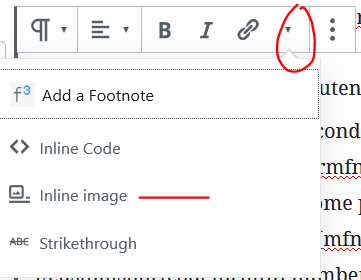
You can add both icons and custom HTML (like line breaks) into the footnotes. For the icons, you’ll want to use the “Inline Image” option underneath the down arrow icon on the editing menu: https://prismtechstudios.com/modern-footnotes/support-screenshots/2019-12-16-gutenberg-editing.PNG For code, adding
<br>should work, but you’ll need to click the three dots in the toolbar and choose “Edit as HTML” first.Can you give those a try and let me know if they work? If not, what are you seeing instead?
Forum: Plugins
In reply to: [Modern Footnotes] List of footnotes@arutha176 thank you for the review, and thank you for the example!
Forum: Plugins
In reply to: [Modern Footnotes] truncated text@arutha176 Good question. Ideally you’d delete the custom CSS once the fix is out, but you can also just wait and delete it if it’s causing other issues (which it probably won’t).
And thank you for those comments! That method makes a lot of sense to me. I think it’s a good way to determine whether the link text should be truncated or not. It’s a little tricky to implement programmatically, but I’ll add the idea to the GitHub issue!
Forum: Plugins
In reply to: [Modern Footnotes] List of footnotes@arutha176 Sure! If you’ve got a good example, it would be great to consider that while determining how a list of footnotes should work. In general most plugins are open source and released under free licenses for the benefit of the WordPress community, so I’m comfortable looking to those for inspiration.
Forum: Plugins
In reply to: [Modern Footnotes] truncated textHi @arutha176! This is related to some recent changes that would cause some links to appear outside of the footnote tooltip. I’ve made a GitHub issue for the permanent fix at https://github.com/seankwilliams/modern-footnotes/issues/24 that will need to be addressed.
In the meantime, you can temporarily fix this by adding this custom CSS:
.modern-footnotes-footnote__note a { display: inline; overflow: auto; white-space: unset; }- This reply was modified 6 years, 6 months ago by prismtechstudios.
Forum: Plugins
In reply to: [Modern Footnotes] Script problem 1.37: footnote not shown@fjvanittersum thanks for pointing this out! I’ve just released a new update to the plugin that should fix this issue. Can you give it a shot and see if it works for you?
Forum: Plugins
In reply to: [Modern Footnotes] Script Error@cuongtalentccc I just released an update where this is fixed now – thanks for bringing it to my attention!
Forum: Plugins
In reply to: [Modern Footnotes] Minor bug on the current version@spaszs I just released an update where this is fixed now – thanks for bringing it to my attention!
Forum: Plugins
In reply to: [Modern Footnotes] Footnote Numbering Doesn’t Start at 1@jdavidstark thanks for the details on this! I’ve just released a new version that I think will fix the problem, but there could be a few things causing this so I’m not positive. When you get a moment, could you upgrade to the latest version of the plugin (1.3.5) and see if it fixes this issue for you?