puregin

Forum Replies Created
-
hi nelson
thanks for coming back on this. i would like to thank you for the plugin, it works smooth and is simple to use.
i’m using wpml to translate the pages.
i’d go for this kind of solution:
– add a dropdown menue to choose the language that should be considered. put as well the options “default page language” and “all languages” inside.
– add a checkbox “page break between languages”, similar to the existing page break for posts/articles.looking forward for this new functionality.
thanks and cheers
- This reply was modified 6 years, 10 months ago by puregin.
Forum: Fixing WordPress
In reply to: change permalink of an attachmentbetter late than never:
@m8hue, thanks for your input, that’s exactly what i’ve been looking for…
Forum: Plugins
In reply to: [Media Library Assistant] empty meta fields result in no mapping at allhi dave
as usual, your reply on my question was quick and provided exactly the solution which i was looking for, thanks again for your support.
just one detail i’d like to add, just in case someone else is looking for the same solution:
instead of putting the comma at the end of a string element ([+xmp:Title+], ), i’d put it in front of the string element (, [+xmp:Title+]), except for the first string element. so there won’t be a comma showing up at the end of the string in case a string element would be empty. using the either/or at the last string element (, [+iptc:original-transmission-reference+].|.) helps to set the final punctuation at the end of the sentence.
template:([+xmp:photoshop.Headline+])(, [+xmp:Title+])(, [+exif:ImageDescription+])(, [+exif:Artist+])(, [+xmp:photoshop.Instructions+])(, [+xmp:photoshop.Source+])(, [+iptc:original-transmission-reference+].|.)
again, thanks for your fabulous support.
silvio
Forum: Fixing WordPress
In reply to: change permalink of an attachmentafter some intensive testing i’m now convinced, that there is no such permalink “edit” button (for media attachments) contained in the actual standard wp installation package (4.5.3) but included in one of the seo/jetpack or similar “enhancment” pluginpacks which were running on one of my colleague’s server.
Forum: Fixing WordPress
In reply to: change permalink of an attachmentthere’s no jscript error displayed, i guess it’s something with the wp installation… i’ll completely re-install the wp now…
Forum: Fixing WordPress
In reply to: change permalink of an attachmentdid you even read what i wrote?
sorry, but that’s now the second time you’re referring to a standard solution (find a plugin, change theme) which i’ve previously mentioned that i don’t want (use a plugin) or already did (change themes).
Forum: Fixing WordPress
In reply to: change permalink of an attachmentthanks for your thoughts.
i’ve already peformed the standard procedure with disabling all plugins and using the standard template, without success.
i’ve also double checked the functionality with a friend who has a similar installation and it’s working on his server.
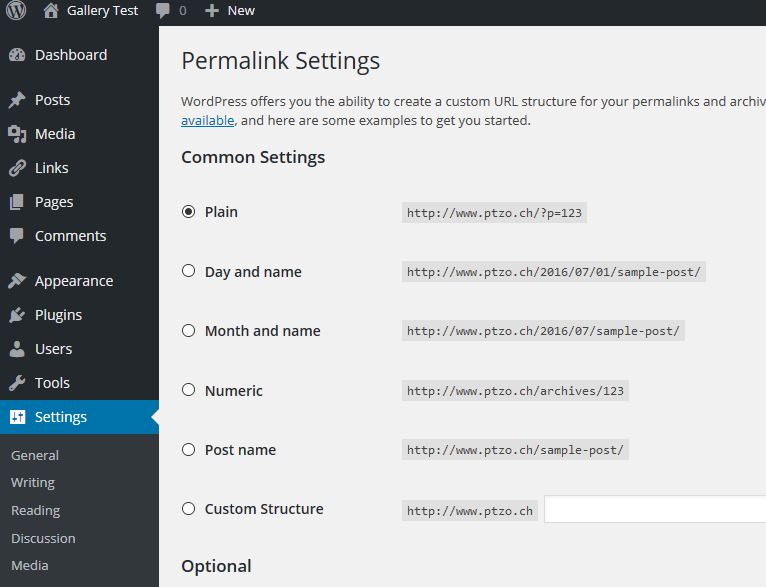
if i have the option on the permalink settings page set on “Post name”…
http://www.biaggi.ch/forumlinks/permalinksettingspostname.jpg
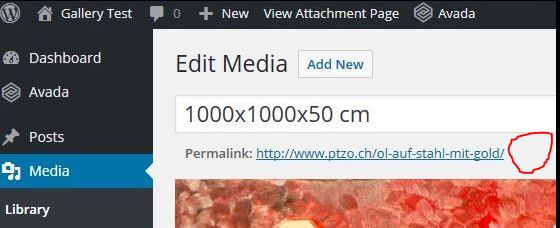
…the permalink button on the attachment page is not showing up at all…
http://www.biaggi.ch/forumlinks/permalinkmedialibrary.jpg
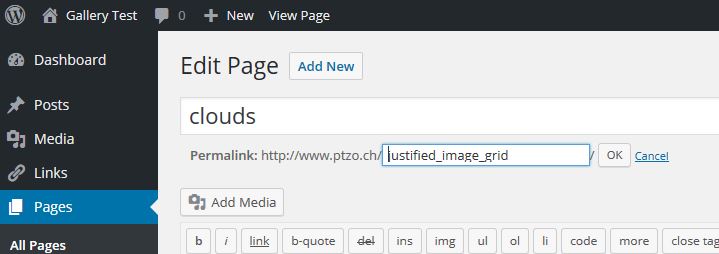
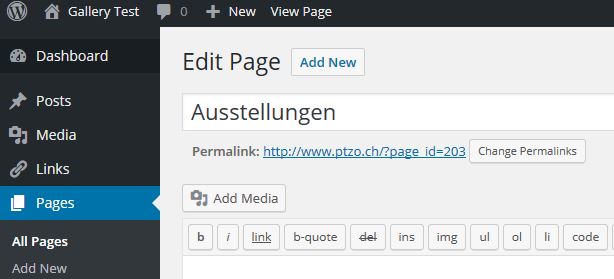
… and on the edit page site the button next to the permalink reads “edit”…
http://www.biaggi.ch/forumlinks/permalinkpage.jpg
… and by klicking on it, a text input field appears and one can change the permalink manually:
http://www.biaggi.ch/forumlinks/permalinkpageedit.jpgif i change the permalink settings from “Post name” to “plain”…
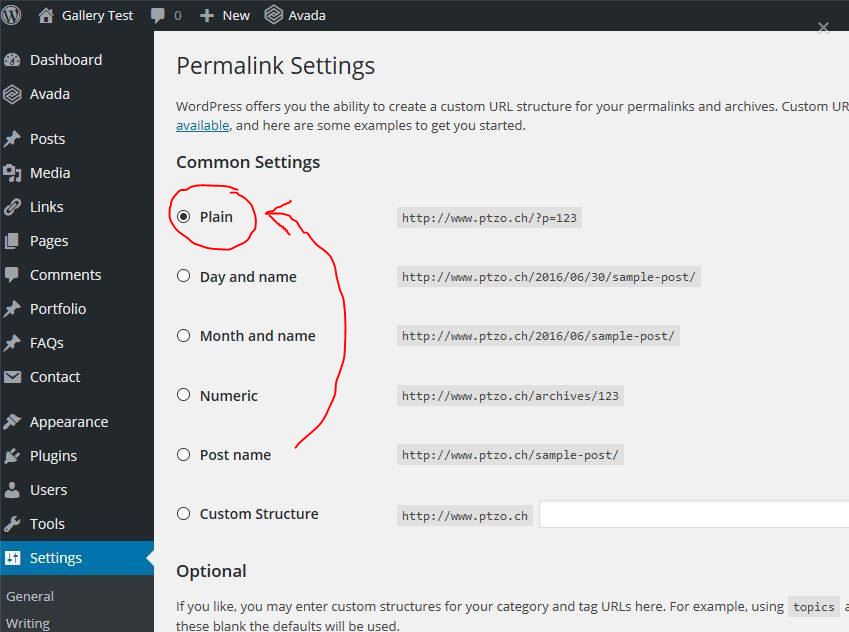
http://www.biaggi.ch/forumlinks/permalinksettingsplain.jpg
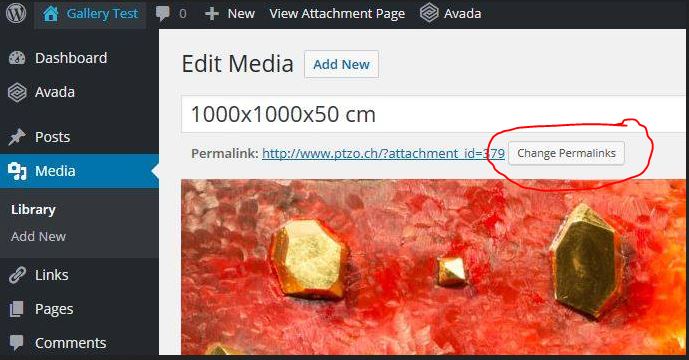
…the permalink button on the attachment page appears (but “change permalink” not “edit”…
http://www.biaggi.ch/forumlinks/permalinkmedialibrarybutton.jpg
… and a click then on the “change permalink” button…
http://www.biaggi.ch/forumlinks/permalinkmedialibrarybutton.jpg
..leads to the permalink settings page…
http://www.biaggi.ch/forumlinks/permalinksettingsplain1.jpgalso on the page edit site, the button next to the permalikn reads now as well “change permalink”…
http://www.biaggi.ch/forumlinks/pageeditchangepermalink.jpg
… and leads as well to the permalink settings page:
http://www.biaggi.ch/forumlinks/permalinksettingsplain1.jpg…summed up this means, that having the permalink settings on “plain”:
– the permalink of a page can not manually be changed (“change permalink” button appears next to page permalink which leads to the permalink settings page)
– the permalink of an attachment can not manually be changed (“change permalink” button appears next to attachment permalink which leads to the permalink settings page)and having the permalink settings on “post name”:
– the permalink of a page can manually be changed (“edit” button appears next to page permalink)
– the permalink of an attachment can not manually be changed (no button appears next to the permalink of an attachment)i am quite confused and don’t really understand why it’s behaving this way…
Forum: Fixing WordPress
In reply to: change permalink of an attachmentas i’ve written above, i’m looking for a non-plugin solution.
Forum: Plugins
In reply to: [Media Library Assistant] display hierarchical taxonomieshi david
sorry for my late reply, time’s been running me over during the last week once again.
thanks for the new release which i have already implemented on my installation. i’m now testing all the different options, no questions so far. but i also have to admit, that i’m not thru with testing all the options so far. i’ll come back to you here in a few days.
silvio
Forum: Plugins
In reply to: [Media Library Assistant] mla mapping/display xmp metadatathanks again david for the follow-follow up of this thread. you’re providing jig information which is very helpful and saves some time to search for… once again, much more than expected has been delievered by you. thanks
silviops: i guess you have a copy/paste typo in:
1. If you use “option 1” (“Yes, but allow overriding on a per-shortcode basis with mla_alt_shortcode attribute.”)shouldn’t it be “option 2” instead of “option 1” in this paragraph?
Forum: Plugins
In reply to: [Media Library Assistant] ASCII��� when mapping exif:UserCommentthanks, works perfectly….
Forum: Plugins
In reply to: [Media Library Assistant] mla mapping/display xmp metadatathanks for your reply.
mla_caption=”{+xmp:photoshop.SupplementalCategories+}” works perfectly, but it’s quite frustrating for me, not to find this information by myself.
there are many “show meta data” websites available, but almost every site displays different results for exactly the same image.
http://www.imgonline.com.ua/
http://www.imageforensic.org/
http://regex.info/exif.cgi (aka jeffrey’s image metadata viewer)to document this, i’ve done some tests and screenshots, maybe someone else would be happy about this information:
*************************
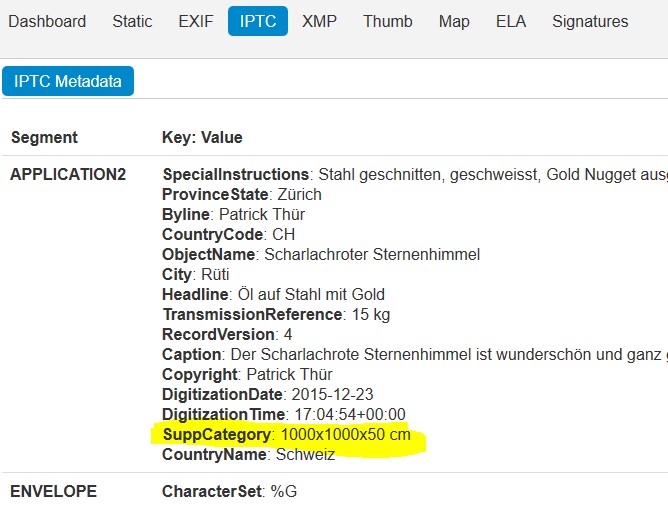
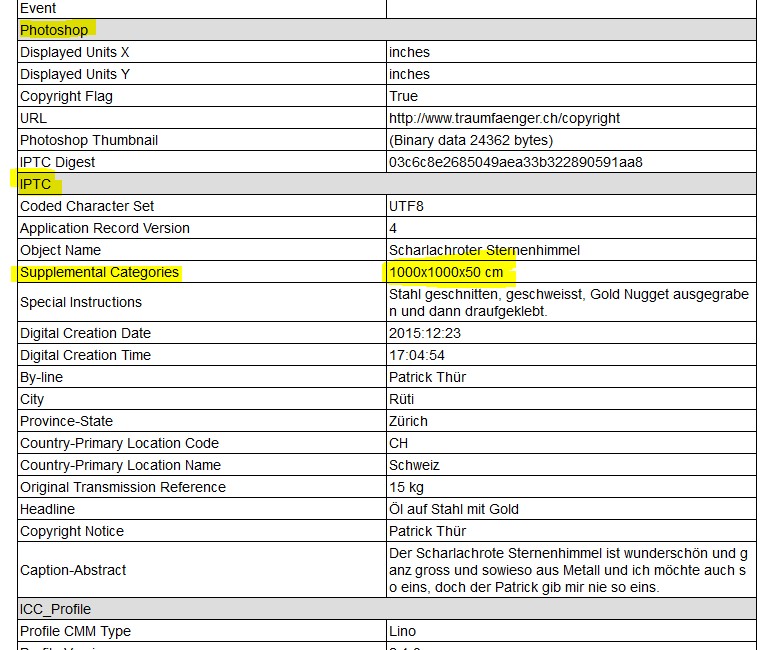
they (with they, i mean the varioust online tools but as well the mls mapping interface or other tools) also use different names for the same fields:e.g. IPTC supplemental categories:
imageforensic.org shows the variable in
iptc metadata
–segment APPLICATION2
—-SuppCategory
https://www.biaggi.ch/forumlinks/imageforensicSCIPTC.jpgbut in the mla mapping rules, the field is called
IPTC ApplicationRecord
Tags 2#020 supplemental-category
https://www.biaggi.ch/forumlinks/mlaSCIPTC.jpgtaking this example, i’m sure they both are referring to the same filed, just with a different name: supplemental-category vs SuppCategory.
****************************************************
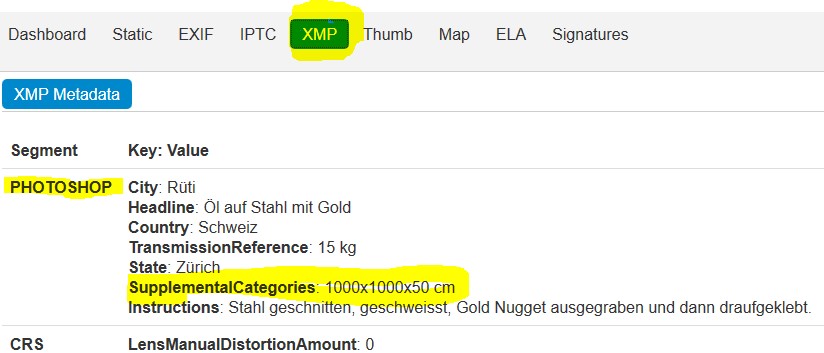
some applications don’t show the field at all:e.g. XMP supplemental categories (xmp/photoshop):
imageforensic.org shows the field in
XMP metadata
–segment PHOTOSHOP
—-SupplementalCategories
https://www.biaggi.ch/forumlinks/imageforensicSCXMP.jpgimgonline.com.ua doesn’t show it the xmp or photoshop section at all:
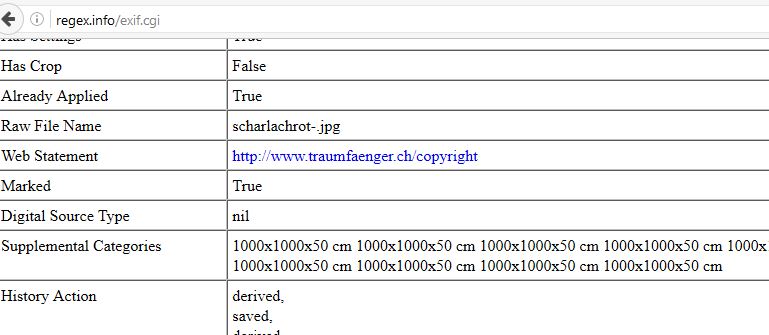
https://www.biaggi.ch/forumlinks/imgonlineSCIPTCPS.jpgregex.info (jeffreys) shows it under section XMP (with no reference to photoshop)
https://www.biaggi.ch/forumlinks/regexSCXMP.jpg
and doesn’t mention it in the photoshop section at all:
https://www.biaggi.ch/forumlinks/regexSCPS.jpg
**************************to keep the topic as complicated as possible, the various fields have different lengths which means e.g. that the iptc SuppCategory is limited to 32 chars while the photoshop/xmp supplementalCategories is much longer (and therefore more relevant to me).
me, working a week on this topic now, i think the best/most accurate online meta information display tool is http://www.imageforensic.org. they display the correct technical names and provide the information in a proper structured manner.
regards
silvio
Forum: Plugins
In reply to: [Media Library Assistant] mla mapping/display xmp metadatahi again
after hours of testing i figured out the following:
the “all_xxx” issue occurs only when the jig justified image grid plugin is activated.additionally i have figured out, that also coding examples like this ones don’t work when the jig plugin is active:
[mla_gallery columns=1 post_parent=all mla_caption=”ObjectName: {+iptc:2#005+}
Headline: {+iptc:2#105+}
ByLine: {+iptc:2#080+}
Keywords: {+iptc:2#025+}”]so i dug into the jig documentation and there is a setting of the jig plugin (Use JIG as MLA display) which controls the handling of the mla_gallery shortcode:
https://www.biaggi.ch/jigsettingsmla.jpgunfortunately, this has been installed/set (i have not worked with jig so far, only installed and checked successfully if/how the mla_alt_shortcode parameter works) to the second option:
“Yes, but allow overriding on a per-shortcode basis with mla_alt_shortcode attribute.”
once i’ve selected the first option:
“No leave the [mla shortcode] alone”
the “all_xxx” and other meta info display issues did not occur any more. so obviously the problems occur while jig is dealing with the mla shortcode, even if the shortcode which is in use is just a normal mla_gallery shortcode without the option mla_alt_shortcode=justified_image_grid. this means, that none of the shortcodes code – like i’ve used in this thread (“all_xxx” or mla_caption=”ObjectName: {+iptc:2#005+}” etc.) – will not work as long as the options 2 or 3 are selected in the jig settings (Use JIG as MLA display). maybe it’s the curly brackets/braces, maybe the +, but jig definitely doesn’t like it.i will now investigate further to figure out, which jig settings option allows me to work in the easiest way with the meta information. i guess that the “mla_alt_shortcode=justified_image_grid” parameter will give me control about the jig on a mla_gallery shortcode to shortcode basis. so i will most likely leave the jig settings (Use JIG as MLA display) on option 1 and use the “mla_alt_shortcode=justified_image_grid” option to still be able to use the “all_xxx” (and similar) functions.
anyway, i need to dig into jig further since i guess by default they use caption and title from wp. maybe i anyway need to string the various meta info into these wp standard fields during the upload of the pictures, we’ll see.. it would have been nice to put the jig gallery caption string in an easy way together like your example (mla_caption=”ObjectName: {+iptc:2#005+}
Headline: {+iptc:2#105+}”()
ByLine: {+iptc:2#080+}
Keywords: {+iptc:2#025+}”).are you aware of this “malfunction” (well, it’s not really malfunctioning, i agree) and is there a workaround somehow? don’t get me wrong, i’m not looking for a workaround which uses wp standard fields or php coding involved. i was just wondering if an easy workaround e.g. like using two “{” instead of one or adding a “\” in front of “}” would help (why and whatsoever ;-)).
regards
silvio
Forum: Plugins
In reply to: [Media Library Assistant] mla mapping/display xmp metadatahi david
additionally to the not yet solved “all_xxx” issue, some other questons came up:
i have maintained the meta information of another test image and uploaded the image to wp.
according to an online meta display website, the xmp SupplementalCategories parameter is filled with text (more than 32 char):
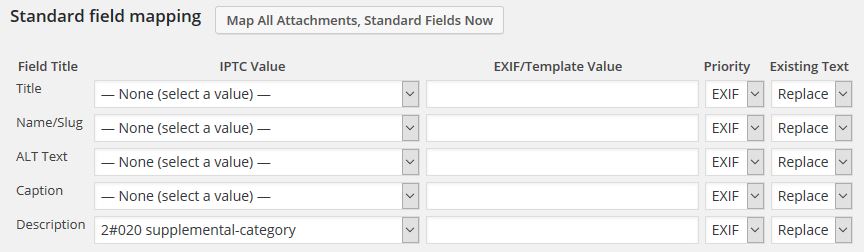
http://metapicz.com/#landing?imgsrc=http%3A%2F%2Fwww.ptzo.ch%2Fwp-content%2Fuploads%2F2016%2F05%2Fscharlachrot-1-4.jpgunfortunately, the iptc parameter “2#020 supplemental-category” which could be used in the mapping screen is defined with a lenght of 32 chars only (beside the limit to 32 characters, this mapping works fine).
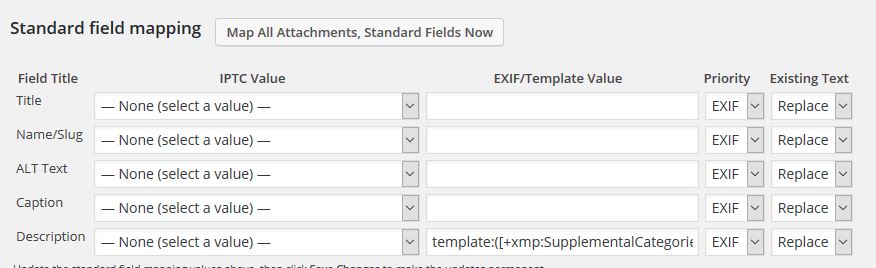
https://www.biaggi.ch/supplementalcategory.jpgtherefore, i have now tried to map the description with the xmp parameter value “template:([+xmp:SupplementalCategories+])” which does not return any value at all.
https://www.biaggi.ch/supplementalcategories.jpgcould you please have a look on this one as well once your back from your travels?
thanks
silvio
Forum: Plugins
In reply to: [Media Library Assistant] mla mapping/display xmp metadatahi david
thanks for the reply.
perfect, the “template:([+xmp:Creator+])” works fine for me.regarding the “all_xxx” isue, please find two of the images which i’m trying to display here:
http://www.ptzo.ch/wp-content/uploads/2016/05/GOPR8697.jpg
http://www.ptzo.ch/wp-content/uploads/2016/05/scharlachrot-1-2.jpgthanks
silvio