QuantumCloud

Forum Replies Created
-
Closing for now.
I am very happy to hear that 🙂
By the way, if you found our efforts useful, kindly leave the plugin a great rating. It can truly help and inspire us. You can do that from here:
https://ww.wp.xz.cn/support/plugin/comment-link-remove/reviews/#new-postMany thanks in advance!
Regards
We have replied to your ticket.
Thank y ou
Please clear any cache plugin you may have.
Share a screenshot of the comment link remove Settings page.
Also, share the link so we can check as well.Thank you
Thank you! Hopefully, the DialogFlow developers will resolve the EU region issue soon too. All other regions seem to work.
Thank you so much!
You are most welcome 🙂
By the way, if you found our effort useful, please consider leaving the plugin a great rating. It will be really helpful and inspiring to us. You can do that from here:
https://ww.wp.xz.cn/support/plugin/chatbot/reviews/#new-postThank you!
I see! At least we were able to track down the problem.
Thanks.
Seem like it is related to DF agent region. People had this issue before with EU region.
Ref: https://stackoverflow.com/questions/63390675/no-designtimeagent-found
https://cloud.google.com/dialogflow/es/docs/how/regionI think simply recreating the project and agent with the US region will solve this issue. Please try that and let us know.
Not that. The DialogFlow Settings page from the ChatBot.
Thanks
Can you share a screenshot of the DialogFlow setting page?
The error message: “No DesignTimeAgent found for project ‘chatbot’ ” indicates that the service account may be wrong.
From the error message, it seems like you may have connected to the wrong API. If you have multiple projects in Google cloud, double check if you copied the correct Project ID and Private key.
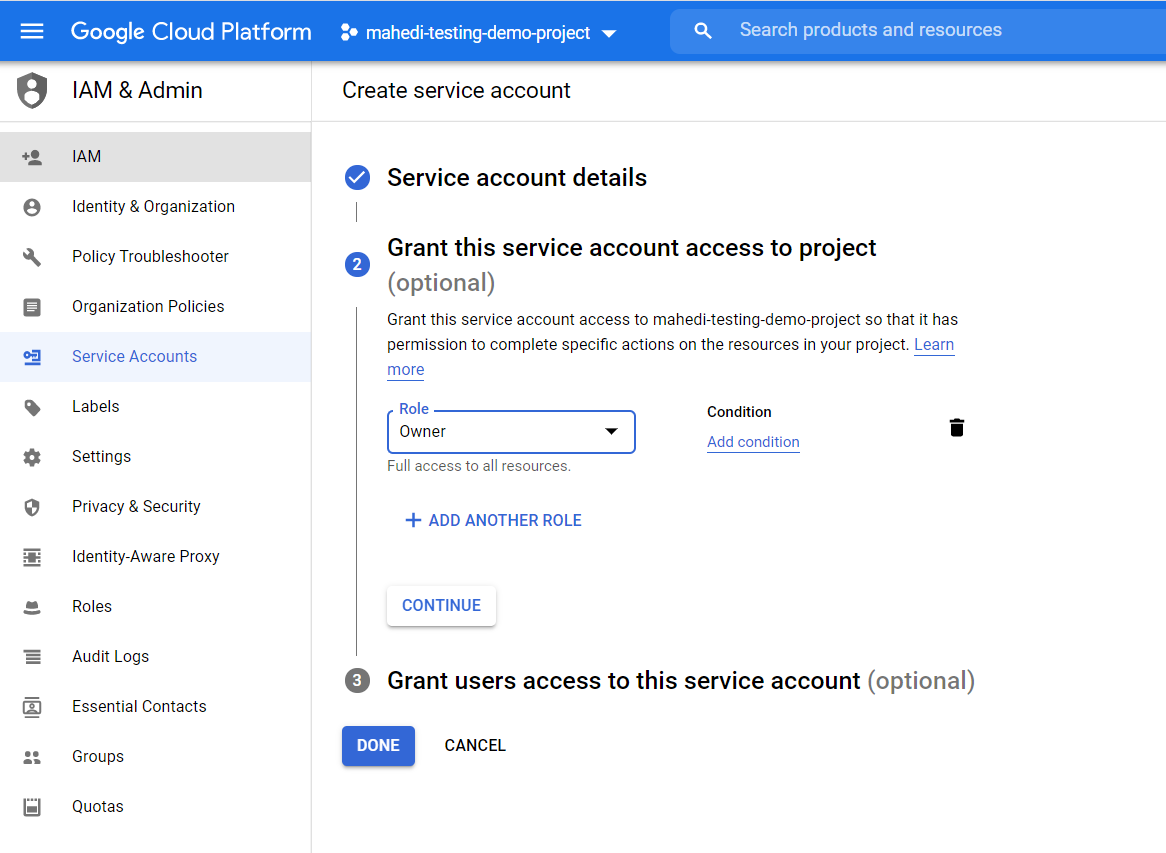
Also, check this image to give owner role to the service account:
https://dev.quantumcloud.com/wpbot-pro/wp-content/uploads/2020/11/download-3.pngThanks
Hi,
I just tested but cannot duplicate the error. Maybe your site is having problem connecting with DialogFlow for a firewall or the Google client library is corrupt. You can try deleting the /wp-content/wpbot-dfv2-client folder and reinstalling the Google client library.
Also, deactivate any security or caching plugin and server side firewall and test again.
Double-check and follow the steps on this article:
https://dev.quantumcloud.com/wpbot-pro/dialogflow-integration/Thank you
Hi,
What is the error message you get when pressed Test connection?
Is the Google client library installed?You are most welcome 🙂
If you found our effort useful, please consider leaving the plugin a great rating.
https://ww.wp.xz.cn/support/plugin/bargain/reviews/#new-postMany thanks in advance!
Regards