RLDD

Forum Replies Created
-
Forum: Plugins
In reply to: [Dynamic Time] Time entries that are billableHi sfx group.
The Dyanamic Time plugin was designed only to handle staff time entries and payroll. Time entries can be noted and categorized. The plugin does not create invoices or integrate with the client billing/invoicing side of business.
Thank you!
- This reply was modified 6 years, 1 month ago by RLDD.
Forum: Plugins
In reply to: [Auto Coupons for WooCommerce] Error after installHello, can you please provide the error you receive after activation? The plugin options will be visible when creating WooCommerce coupons.
Forum: Plugins
In reply to: [Dynamic Time] Dynamic Pro CrashLooks like you got it working. If you need any future assistance with PRO, please reach out to us at richardlerma.com/contact. Thank you.
Forum: Plugins
In reply to: [Dynamic Time] Dynamic Pro CrashHi Pete,
I’ll need to get you version PRO 2.1.2
I cannot post the link here because this forum is for the free open source version and the forum is public. I will email you the link to download the current PRO version at the email address you used to complete the purchase.
Forum: Plugins
In reply to: [Dynamic Time] Dynamic Pro CrashThis issue has been resolved. Thank you!
Forum: Plugins
In reply to: [Dynamic Time] Dynamic Pro CrashHi Pete,
Thank you for reporting this issue. We will resolve this issue today and contact you when it is complete.
Forum: Plugins
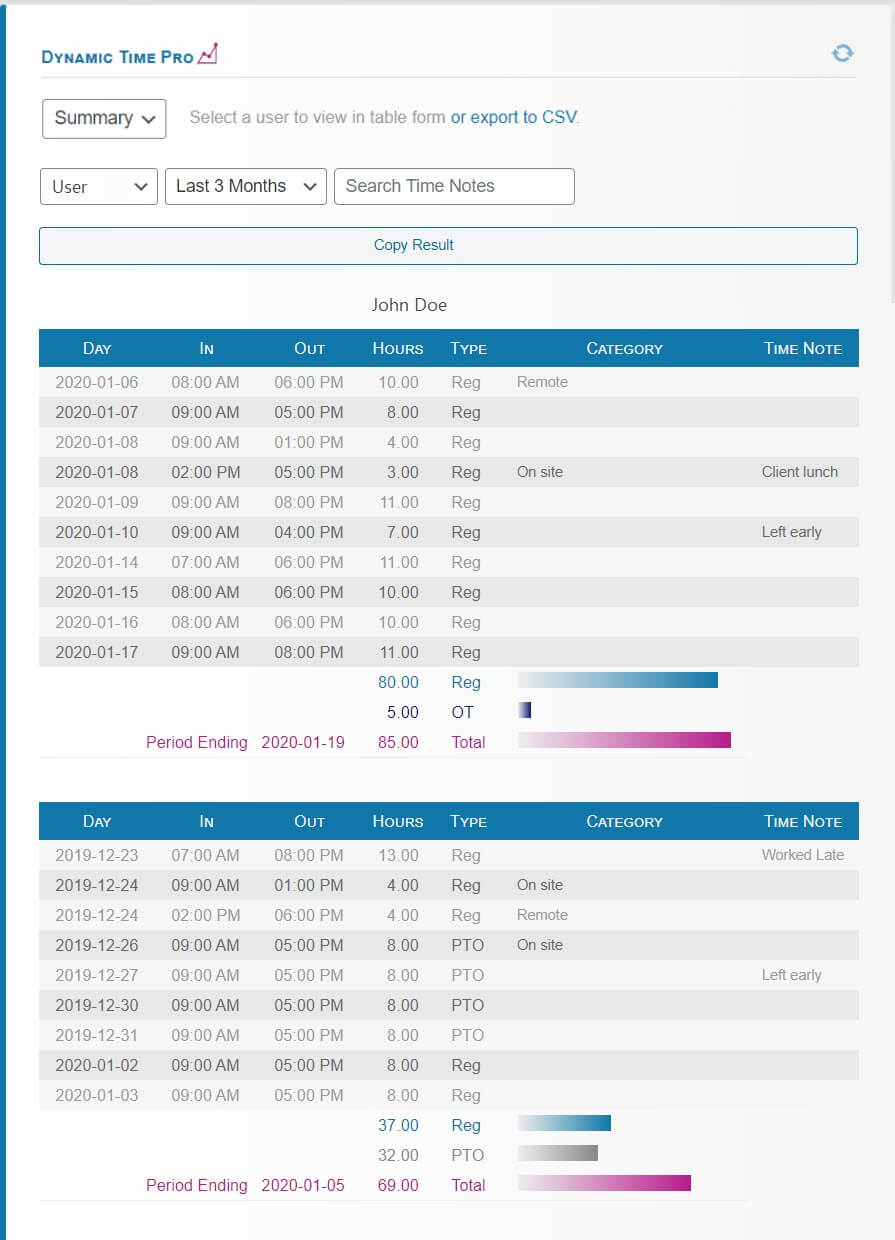
In reply to: [Dynamic Time] Notes on DaysYes, the report will show the contents of the notes field by expanding. You can also copy the report over to any spreadsheet program like Excel or Google Sheets.
Forum: Plugins
In reply to: [Dynamic Time] Notes on DaysHi Peteo,
Yes, all of those features are possible with the PRO add-on. Here’s one example screen capture of what a supervisor would see: https://richardlerma.com/wp-content/uploads/2020/01/Dynamic-Time-PRO.jpg.
Much appreciated Josh. Thank you for this plugin!
Forum: Plugins
In reply to: [Mailchimp for WooCommerce] Persistent Banner asking for reviewThanks Ryan,
I ruled out caching and permissions. If I manually flip mailchimp-woocommerce-sync.initial_sync to zero the problem resolves. Should the action of dismissing the banner be setting the mailchimp-woocommerce-sync.initial_sync to zero?
Forum: Reviews
In reply to: [Mailchimp for WooCommerce] Potentially awesome but poor dev decision-makingHi khungate,
Thanks for your prompt response. It is not evident that the sync can segment customers from a certain time period. If I bring up the sync interface, there is no visible option besides audience. It would be extremely helpful to have an option to limit the sync from the sync interface.
If a store is disconnected for any reason, the sync starts from the beginning. There’s no reason to start from the beginning and resync thousands (potentially hundreds of thousands) of orders because the store was disconnected for one minute. During resync, MailChimp automation campaigns fail to work until the sync success flag is flipped. This means the automations are in limbo, the merchant is losing profit, and MailChimp automations do not trigger until the sync completes, which could take days.
Forum: Plugins
In reply to: [Mailchimp for WooCommerce] Persistent Banner asking for reviewHi khungate,
Yes, that is correct, after a sync is complete, the banner persists and appears on all subsequent page loads under /options-general.php settings. It appears on all pages under WordPress options/settings, whereas plugin guidelines encourage isolating plugin-specific banners to the plugin’s settings page only (not all of the WordPress option/settings pages). Text of the banner follows with account data retracted:
Your store is synced with Mailchimp!
We’ve successfully synced XXX orders to your Audience XXX, that’s awesome!
Could you please do us a favor and leave the plugin a 5-star rating on ww.wp.xz.cn? It helps our community know that we’re working hard to make it better each day.
Leave a Review
Forum: Plugins
In reply to: [Dynamic Time] Changes not reflecting into frontendHi Laura,
Can you provide a bit more detail around the issue you are experiencing? Are the changes you are making to the Dynamic Time settings, or are you entering time that is not reflecting elsewhere? Can you provide an example?
Thank you!
Forum: Reviews
In reply to: [Auto Coupons for WooCommerce] It works perfectly!Hi felipetto, Thanks for the review. The plugin is compatible with the most recent version of Woo. Would you try adding /?troubleshoot to the cart page URL while logged in? This will provide a detailed response as to why a coupon was not applied, whether is is expiration, product, or quantity related.
Forum: Plugins
In reply to: [Dynamic Time] ProjectsHi Rob,
Thank you for your question. No unfortunately this plugin doesn’t use the posts or postmeta tables. You are not the first person to ask for more flexibility in this area. To do this would require a revised design from the ground up which we might consider in the near future.