robertomamoru

Forum Replies Created
-
Hi @nick898989,
Thanks for the tip. I tested disabling “logged in users” as you suggested, but that didn’t work either, even after updating to the latest version (1.34.3) of the plugin.
Hi Paul,
The [turnstile] tag is from Contact Form 7. Turnstile is active in your CF7 plugin and can be configured using the CF7 Integration menu. Inserting the [turnstile] tag and the captcha appearing where you inserted it confirms this. If the tag is not inserted, the captcha is positioned at the top of the form. Remember that the [turnstile] tag is from CF7.
From my perspective, you have two options: 1) Keep only CF7 with the Turnstile integration (without using the SCT plugin) and insert the tag at your discretion; or 2) Disable the CF7 Turnstile integration and re-enable the Simple CAPTCHA Alternative with Cloudflare Turnstile (SCT) plugin and reinsert your [cf7-simple-turnstile] tag into the CF7 form. In my experience, and this was the case in a situation I reported to the SCT plugin author, when SCT is active (and even without checking “Enable on all CF7 Forms” in its configuration), unfortunately, SCT performs the Turnstile captcha check on CF7 forms—and prevents the form from being submitted. In my case, the temporary solution I adopted was to insert both tags into the CF7 form [turnstile] and [cf7-simple-turnstile]. This is redundant, but it works. This way, the form is protected (by the two plugins’ captchas), as are the login, comments, and password resend (through the SCT plugin).
Thank you, and I hope this was helpful.Hi Paul.
The first Turnstile captcha should be from Contact Form 7 (CF7) itself; it’s placed at the top of the form by default. The second Turnstile is from the Simple CAPTCHA Alternative with Cloudflare Turnstile (SCT) plugin. It stopped appearing when you deactivated the plugin. The position matches where you inserted the shortcode [cf7-simple-turnstile].
Try reactivating the SCT plugin and inserting this shortcode [turnstile] right above [cf7-simple-turnstile]. Then, the two Turnstile captchas should appear together. Therefore, the first Turnstile at the top of the form is from CF7.Hi, I use Contact Form 7 (v. 6.11) and Simple Cloudflare Turnstile (v. 1.32.3) and I have a similar issue to William’s.
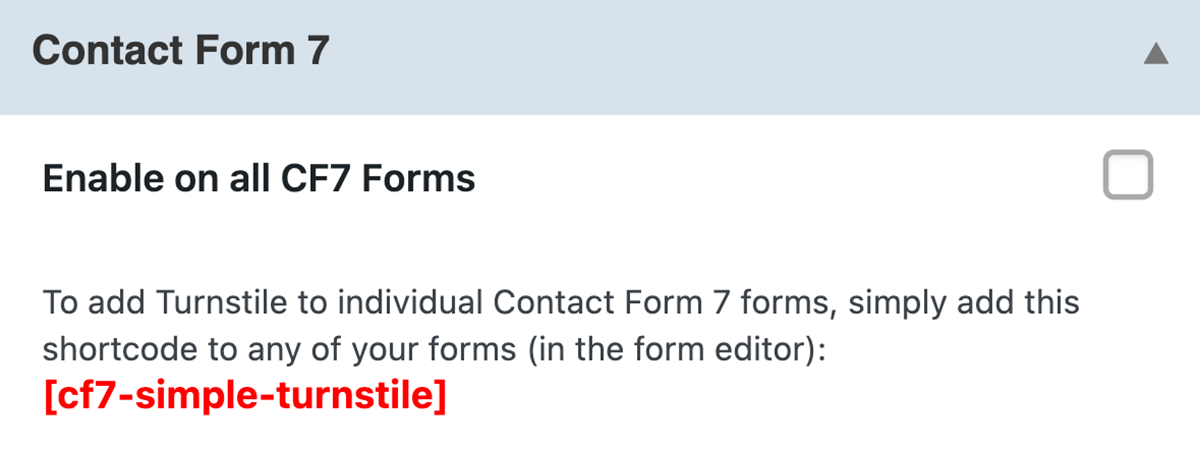
I would like to use Turnstile on forms only using the CF7 integration. I also want to keep Simple Cloudflare Turnstile active to protect logins, passwords, and comments. Therefore, I didn’t enable the SCT option on all CF7 forms (image below), thinking that this would only apply to forms that use the [cf7-simple-turnstile] shortcode. However, configured this way, I see the Turnstile confirmation, but the form fails to submit. My tests:
1) Disabling the SCT plugin and using the CF7 Turnstile integration, the form submits normally.
2) With the SCT plugin active, “Enable on all CF7 Forms” NOT checked, and using the CF7 Turnstile integration, the form does NOT submit.
3) SCT plugin active, “Enable on all CF7 Forms” checked, and using the CF7 Turnstile integration with the [turnstile] shortcode, the form is NOT submitted.
4) SCT plugin active, “Enable on all CF7 Forms” checked, and using the CF7 Turnstile integration with both the [turnstile] and [cf7-simple-turnstile] shortcodes, and the form is SUBMITTED NORMALLY – obviously displaying two CF Turnstiles.Shouldn’t the Simple Cloudflare Turnstile plugin (with the “Enable on all CF7 Forms” option NOT checked) ONLY check CF7 forms when the [cf7-simple-turnstile] shortcode is applied to the form?
For now, to get the desired result, I’ll continue using option 4 above.
Thank you.
Hi @msykes, confirmed, the pagination issue is fixed.
I also checked the “Events Manager Demo Site” https://eventsmanager.site/shortcode/ working perfectly
ThanksThank you, @joneiseman
I tested the proposed change and it worked perfectly. Waiting for the author to make the change.
Forum: Fixing WordPress
In reply to: – is in TITLE instead of a DashExplanation: See the functioning of the function wptexturize() https://developer.ww.wp.xz.cn/reference/functions/wptexturize/ which does the substitution of ” – ” for “–” (en-dash) or – among others.
In a recommendation from 5 years ago by “pixeline” that is at https://developer.ww.wp.xz.cn/reference/hooks/run_wptexturize/ just add the code “add_filter(‘run_wptexturize’, ‘__return_false’);” in functions.php to disable wptexturize conversions.
This article explains where to find and how to add the line in functions.php https://jetpack.com/blog/wordpress-functions-php/
However.
The issue I had was replacing en-dash with – every time I inserted a link. I verified that the problem actually lies in the restoration of – to en-dash, which is not correctly done when inserting the link text (when it contains –). I checked that the original text is correctly encoded with en-dash, but the – is inserted instead of en-dash. I’ll leave this check for another time as the wptexturize function overrides don’t interest me. So I inserted the code in functions.php to eliminate the – problem.
Forum: Plugins
In reply to: [PressForward] Critical error in PressForward options panelUpdate.
When trying to switch to PHP 7.4, the warnings and errors disappeared. Then, going back to PHP 8, the PressFoward panel is working normally. In conclusion, there must be some PressFoward startup process that is not PHP 8 ready (I hope it helps).Forum: Themes and Templates
In reply to: [Customify] Customify 0.3.6 Problem with Featured Image on pagesThank you guys.
The new Customify version 0.3.7 has reinserted the necessary code snippet to display featured image, as I mentioned earlier.- This reply was modified 4 years, 8 months ago by robertomamoru.
Forum: Themes and Templates
In reply to: [Customify] Customify 0.3.6 Problem with Featured Image on pagesAfter almost 4 months with no response, I decided to compare the codes from versions 0.3.5 and 0.3.6.
I realize that the new version 0.3.6 removed the line “<?php the_post_thumbnail (‘large’);?>” from the “content-page-php.php” file located in “/wp-content / themes / customify / template-parts”, disabling the images displayed in posts of type “page”.
This change was not mentioned in the changelog. Hope it can be useful to someone else. Thank you.
Hi @capuderg
Same problem here since upgrade to WordPress 5.5 / WP Mail SMTP 2.1.1
Debug mode show
PHP Deprecated: class-phpmailer.php is deprecated since version 5.5.0! Use wp-includes/PHPMailer/PHPMailer.php instead. The PHPMailer class has been moved to wp-includes/PHPMailer subdirectory and now uses the PHPMailer\PHPMailer namespace. in /var/www/domain/wp-includes/functions.php on line 4963Thanks
Dear Fernando Briano,
With version 0.75.2 pagination is working, BUT only explictly inserting “pagination=yes” or “pagination=true” (even with “pagination” option set to “true” at Options Page).
Ex. [catlist id=3 numberposts=5 pagination=yes instance=1]Another thing, the previous button link show only an “-” without link (when changing pages). As a workaround inserting pagination_prev=”<<” works. Ex. [catlist id=3 numberposts=5 pagination=yes instance=1 pagination_prev=”<<“]
Regards