Thanks Tom – That CSS worked great for configuring my tabs correctly in the mobile view. Much appreciated!
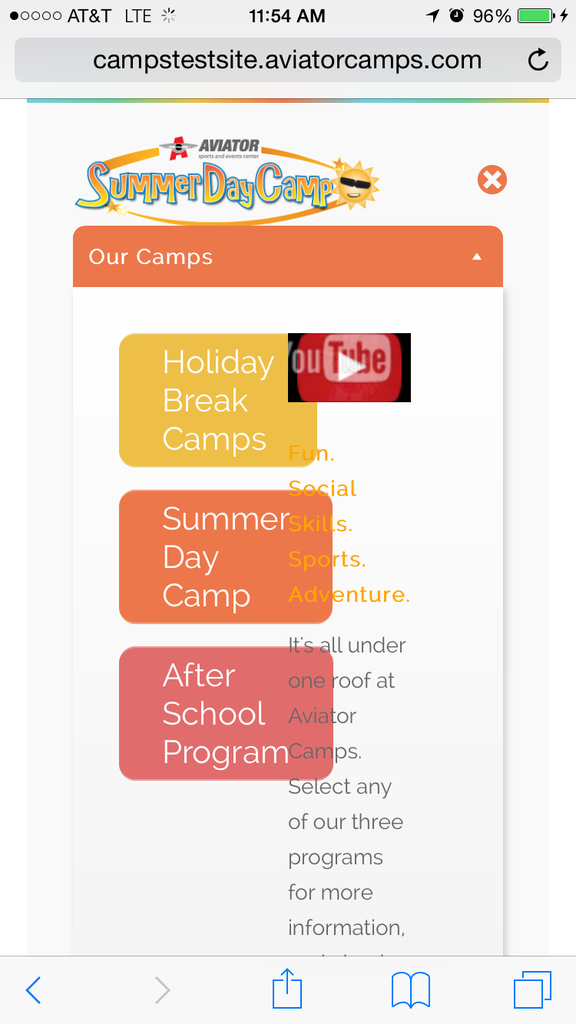
But now the 3 buttons and the Youtube player do not resize correctly within the max mega menu drop down for “Our Camps” ,mobile view (view image link: http://i1261.photobucket.com/albums/ii590/AviatorSports/Mobile%20Mega%20Menu-Comp-Step2_zpssknzygr3.png).
The 3 buttons “Holiday Break Camps”, “Summer Day Camp” & “After School Camp” need to be smaller and the text needs to fit to the right of those 3 buttons and not overlay the buttons like it currently does in the image. How can I achieve this?
Kind Regards,
Rod
Hi xaaa – I figured out a way to hide the slider name on your page. Go to Appearance > Edit CSS and add this to the field:
.jw_easy_slider_name {
display: none !important;
}
After I saved the file, the slider name was removed from my pages. Hope this helps. 🙂
I would love to know the answer to this too… Thanks for your help in advance.