rororo

Forum Replies Created
-
Forum: Themes and Templates
In reply to: [Custom Community] full width header not happeningimcarmel,
I too am having issues with the header image not being full width. I have tried many different sized images like you, and messed around with “full width”, “default”, etc.
Hoping someone can shed some light on this issue!
roForum: Themes and Templates
In reply to: [Custom Community] Header – Make 100% Width, Single ImageKonrad,
Thank you so very much for your response! I really appreciate it! 🙂 This has been driving me mad for a long time, I really want to get to the bottom of it. (And yes: I must have set the post to “resolved” by accident, have fixed that now, thank you.)
So the .png / horizontal colour fade repeat idea is very clever! I will do this. It is certainly better than what I currently have (tiling the whole header image horizontally so that when you zoom out, you see repeats of the title & the owl, which looks terrible).
However, my main problem remains – I can’t seem to get a fixed 100% width header image to take up the entire width of browser. Like if I were to try your .png suggestion, I don’t know how I can make the .png “the width of the website”, like you say. It should be so simple!
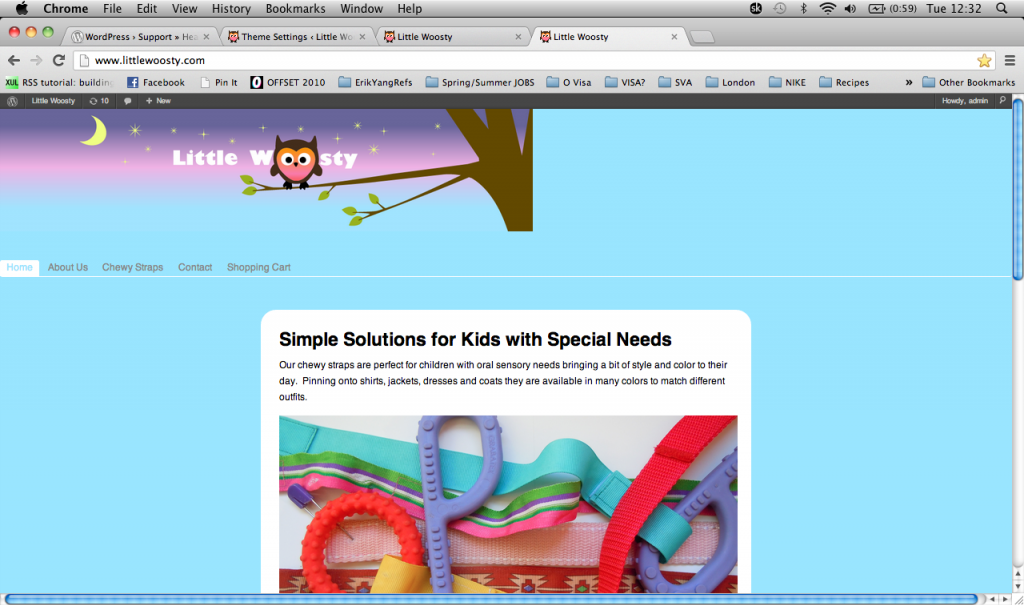
I have obviously tried uploading the header image in the usual way through “”Theme Settings” > “Header”. In the settings, it states Default width is 1000px, the height (and full width option) can be adjusted above. So I uploaded a header that is 1000px wide but it just ends up looking like this.
I set the “Header width” to “default” as you suggested, instead of “full width”. The “Website width” is also set to 1000px. So I really don’t know why the 1000px wide header ends up the left & not the full width of the site? I am wondering if there is anything I should add to the “Header height” settings (currently blank). There, it says Your header height in px (and navigation position (y) at the same time), just enter a number. This is not your header image height, you can specify your header image separately in the fields below. Try 25px or 63px less than your header-image-height to fit perfectly …which I find a bit confusing?
I have also tried leaving the “Header image” setting blank and instead attempted to overwrite the CSS in both:
“Appearance” > “Editor” > “style.css”
“Appearance” > “Theme Settings” > “CSS”
with#header { width:100% !important; background-image: url('http://www.littlewoosty.com/dev/wp-content/uploads/2013/03/woostyTreeBanner4.png'); background-repeat:no-repeat; margin: 0; padding: 0; top: 0px; }but that didn’t work either :c
The reason I care so much about this is because I want to adjust the owl part of the header image to have him sitting on a tree and I want the tree to come to the right edge of the header, no matter how zoomed in or out the browser is.
I wonder if I need to make a change to the header.php file? I don’t know what is telling the header to behave this this. I suppose I just need advice from someone who really understands the intricacies of the Custom Community theme’s code. Or simply a pair of fresh eyes to tell me why I am being dumb!
Thank you so much in advance! And please forgive the length of this.
ro